GoAccess - Easy Page Statistics Dashboard
Example GoAccess Widget
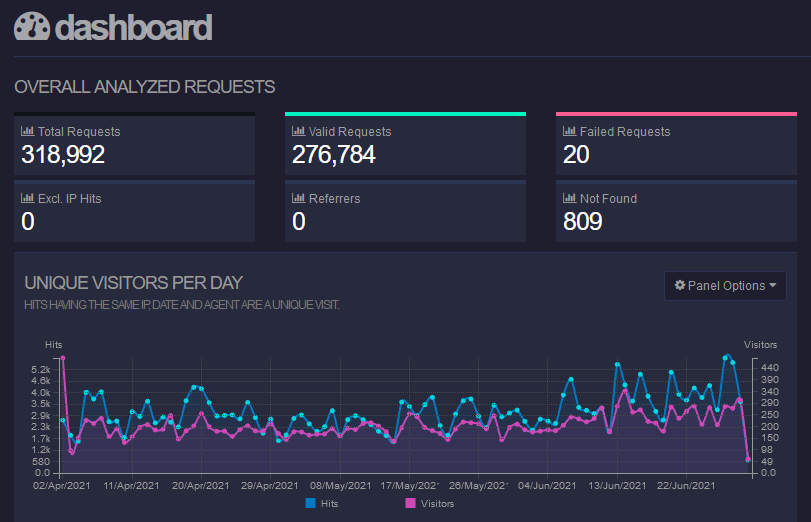
Option 1 - Visitors
Hey there! In this post, I am going to quickly explain how one can find the count of unique visitors on any server running nginx.
The commands below are generic Linux examples. Package names and log paths may differ slightly on your distribution.
To reach this goal, we are going to use the tool Visitors or, for a more modern setup, GoAccess.
A quick reality check first
Visitors still works as a tiny offline report generator, but the old visitors-0.7.tar.gz download that many blog
posts reference no longer exists at the original URL. So today the practical advice is:
- if your distribution still packages
visitors, install it from there and point it at your nginx access log; - otherwise skip straight to GoAccess below, which is actively maintained and much easier to automate.
If you do have a packaged visitors binary available, the actual report generation step is still as simple as:
visitors /var/log/nginx/access.log > report.html
The generated report is plain HTML, so a text browser such as Lynx is still a handy way to inspect it on a headless box:
lynx ./report.html
Feeding Lynx our report.html gives you the opportunity to step through the report using your keyboard.
The page will look similar to this: 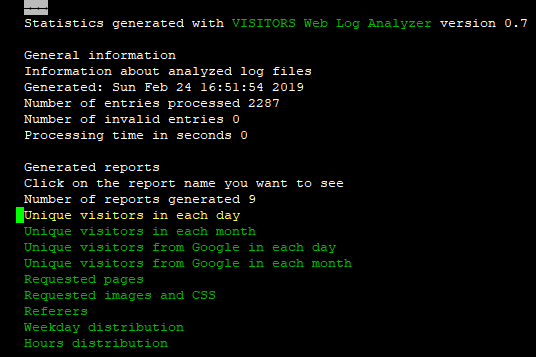
Text written in green represents links.
Using your keyboard, right will follow this link, whereas left will go back.
up and down let you navigate your cursor. Quit with Q.
As you can see in the above screenshot, Lynx will analyse and group its results by day, month and pages as well as other files. Feel free to explore!
Option 2 - GoAccess Dashboard
To run the generation commands successfully, make sure that you have zcat and goaccess installed and available on
your $PATH. The scheduled script below reads its settings from .env when the file is present with Node's
built-in --env-file-if-exists flag (Node 20.19+), so no extra dependency is needed and the defaults still apply
without a .env.
Simple CLI static generation
mkdir -p /var/www/goaccess
zcat -f /var/log/nginx/access.log.*.gz | goaccess /var/log/nginx/access.log - \
    -o /var/www/goaccess/report.html \
    --log-format=COMBINED \
    --html-report-title='my-dashboard' \
    --real-os \
    --ignore-crawlers \
    --anonymize-ip
Automatic, scheduled script generation
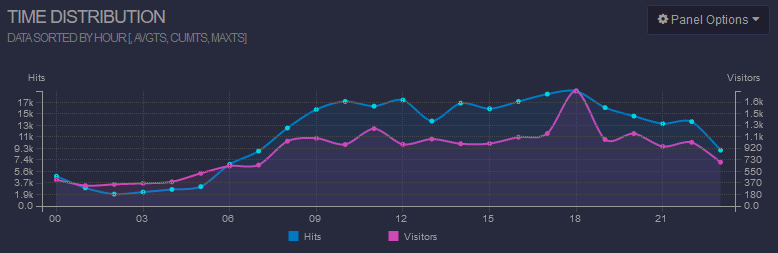
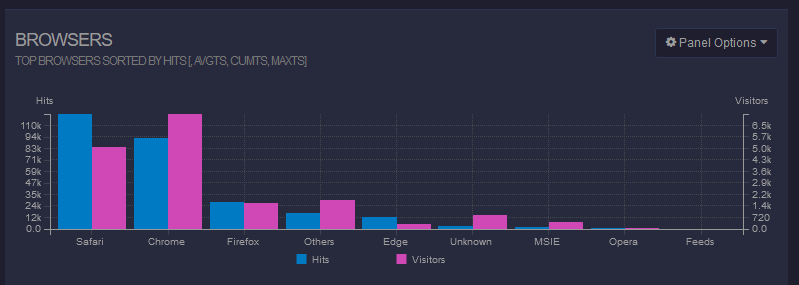
The following script runs on an interval configured via .env. It generates a single .html GoAccess dashboard file
for each "group" of nginx log files. All generated dashboard files are written to
/var/www/goaccess/<your-app-name>/report.html.
Because these reports expose traffic patterns, URLs, referrers, and user-agent data, do not publish them as a world-readable path unless you are comfortable sharing that information. Put them behind HTTP auth, a VPN, or an internal-only vhost.
You can specify the nginx output file name in the nginx config like this:
server {
[...]
    access_log /var/log/nginx/my-app-1/access.log;
    error_log /var/log/nginx/my-app-1/error.log;
[...]
}
// Run with: node --env-file-if-exists=.env scripts/goaccess-report.js
const { spawn } = require('node:child_process');
const fs = require('node:fs');
const path = require('node:path');

const TIMER_MS = Number(process.env.TIMER_MS ?? 15 * 60 * 1000);
if (!Number.isInteger(TIMER_MS) || TIMER_MS < 1000) {
    throw new Error('TIMER_MS must be an integer >= 1000');
}

/**
 * Hardcoded nginx app names to track. Each entry corresponds to
 * /var/log/nginx/<appName>/access.log, except 'unsorted' which points to the root access.log.
 * @type {string[]}
 */
const APPS = [
    'my-app-1',
    'my-app-2',
    'unsorted', // all other non-categorized nginx logs
];

const LOG_ROOT = '/var/log/nginx';
const REPORT_ROOT = '/var/www/goaccess';
const LOG_FORMAT = 'COMBINED';

function getAppPathSegment(appName) {
    if (appName === 'unsorted') {
        return '';
    }

    if (!/^[a-z0-9-]+$/i.test(appName)) {
        throw new Error(`Unsafe app name: ${appName}`);
    }

    return appName;
}

function getAccessLogPath(appName) {
    return path.join(LOG_ROOT, getAppPathSegment(appName), 'access.log');
}

function getCompressedLogs(appName) {
    const accessLogPath = getAccessLogPath(appName);
    const logDir = path.dirname(accessLogPath);
    const logBase = path.basename(accessLogPath);

    return fs.readdirSync(logDir)
        .filter((fileName) => fileName.startsWith(`${logBase}.`) && fileName.endsWith('.gz'))
        .map((fileName) => path.join(logDir, fileName))
        .sort();
}

function getReportPath(appName) {
    return path.join(REPORT_ROOT, appName, 'report.html');
}

function runReport(appName) {
    return new Promise((resolve, reject) => {
        const reportPath = getReportPath(appName);
        const archivedLogs = getCompressedLogs(appName);
        fs.mkdirSync(path.dirname(reportPath), { recursive: true });

        const goaccess = spawn('goaccess', [
            getAccessLogPath(appName),
            '-',
            '-o',
            reportPath,
            `--log-format=${LOG_FORMAT}`,
            `--html-report-title=${appName}_statistics`,
            '--real-os',
            '--ignore-crawlers',
            '--anonymize-ip',
        ]);

        let stderr = '';
        goaccess.stderr.on('data', (chunk) => {
            stderr += chunk.toString();
        });

        if (archivedLogs.length > 0) {
            const zcat = spawn('zcat', ['-f', ...archivedLogs]);
            zcat.stderr.on('data', (chunk) => {
                stderr += chunk.toString();
            });
            zcat.stdout.pipe(goaccess.stdin);
        } else {
            goaccess.stdin.end();
        }

        goaccess.on('close', (code) => {
            if (code === 0) {
                console.log(`Wrote ${reportPath}`);
                resolve();
                return;
            }
            reject(new Error(`goaccess failed for ${appName} (${code}): ${stderr}`));
        });
    });
}

async function generateAllReports() {
    for (const appName of APPS) {
        await runReport(appName);
    }
}

async function main() {
    await generateAllReports();
    setInterval(() => {
        generateAllReports().catch((error) => {
            console.error(error);
        });
    }, TIMER_MS);
}

main().catch((error) => {
    console.error(error);
    process.exit(1);
});
Thanks for reading!
luca