Custom Dialog Widgets
AEM's Granite UI provides a rich set of dialog fields, but multi-site and multi-tenant projects often need context-aware widgets that adapt their behaviour based on the page being edited -- for example, a PathField that automatically roots itself to the current site's DAM folder, or an asset finder that only shows assets belonging to the current brand.
This page covers techniques for building custom, dynamic dialog widgets that go beyond what static dialog XML can achieve.
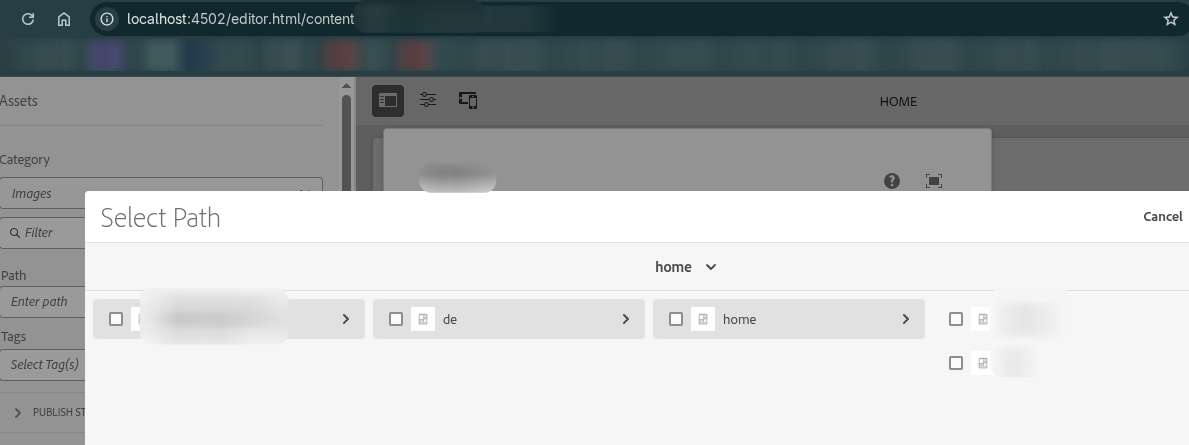
Dynamic PathField Root Path
The problem
The
Granite PathField
has a rootPath property that determines where the path browser opens. In a standard dialog, this
is hardcoded in the XML:
<link jcr:primaryType="nt:unstructured"
      sling:resourceType="granite/ui/components/coral/foundation/form/pathfield"
      fieldLabel="Select page"
      rootPath="/content/my-site"
      name="./linkPath"/>
This works fine for a single site, but in multi-site projects (where /content/brand-a,
/content/brand-b, etc. share the same components), you need the root path to change dynamically
based on which site the author is currently editing.
The rootPath property is read server-side when the dialog renders. It cannot be changed via
client-side JavaScript.
Solution: Custom Granite UI field component
Create a custom resource type that wraps the standard PathField and computes the rootPath
at render time based on the current content path.
1. Reference the custom widget in your dialog
<link jcr:primaryType="nt:unstructured"
      sling:resourceType="myproject/widgets/pathfield-dynamic"
      fieldLabel="Internal Link"
      name="./linkPath"/>
2. Create the widget component
<?xml version="1.0" encoding="UTF-8"?>
<jcr:root xmlns:sling="http://sling.apache.org/jcr/sling/1.0"
          xmlns:nt="http://www.jcp.org/jcr/nt/1.0"
          xmlns:jcr="http://www.jcp.org/jcr/1.0"
    jcr:primaryType="nt:unstructured"
    sling:resourceSuperType="granite/ui/components/coral/foundation/form/pathfield"/>
The sling:resourceSuperType inherits all PathField behaviour. Your custom rendering script
intercepts the request, computes the rootPath, and forwards to the original PathField.
3. Implement the rendering logic
Option A: Sling Servlet (recommended)
A proper OSGi servlet with testable logic:
package com.myproject.core.servlets;

import org.apache.commons.lang3.StringUtils;
import org.apache.sling.api.SlingHttpServletRequest;
import org.apache.sling.api.SlingHttpServletResponse;
import org.apache.sling.api.resource.Resource;
import org.apache.sling.api.resource.ResourceWrapper;
import org.apache.sling.api.resource.ValueMap;
import org.apache.sling.api.servlets.SlingSafeMethodsServlet;
import org.apache.sling.api.wrappers.ValueMapDecorator;
import org.osgi.service.component.annotations.Component;

import javax.servlet.RequestDispatcher;
import javax.servlet.Servlet;
import javax.servlet.ServletException;
import java.io.IOException;
import java.util.HashMap;

@Component(
    service = Servlet.class,
    property = {
        "sling.servlet.resourceTypes=myproject/widgets/pathfield-dynamic",
        "sling.servlet.methods=GET"
    }
)
public class DynamicPathFieldServlet extends SlingSafeMethodsServlet {

    private static final String DEFAULT_ROOT = "/content";

    @Override
    protected void doGet(SlingHttpServletRequest request,
                         SlingHttpServletResponse response)
            throws ServletException, IOException {

        Resource fieldResource = request.getResource();
        String computedRootPath = computeRootPath(request);

        // Create a wrapped resource with the overridden rootPath
        Resource wrappedResource = createWrappedResource(fieldResource, computedRootPath);

        // Forward to the standard pathfield renderer
        RequestDispatcher dispatcher = request.getRequestDispatcher(wrappedResource);
        if (dispatcher != null) {
            request.setAttribute("org.apache.sling.api.include.resource", wrappedResource);
            dispatcher.include(request, response);
        }
    }

    /**
     * Compute the root path based on the content being edited.
     * Extracts the site root (e.g., /content/brand-a) from the editor URL.
     */
    private String computeRootPath(SlingHttpServletRequest request) {
        String contentPath = getContentPath(request);

        if (StringUtils.isNotBlank(contentPath) && contentPath.startsWith("/content/")) {
            String[] parts = contentPath.split("/");
            // /content/{site-root} → extract first two levels
            if (parts.length >= 3) {
                return "/" + parts[1] + "/" + parts[2];
            }
        }

        return DEFAULT_ROOT;
    }

    /**
     * Extract the content path from the editor URL.
     * The page editor sends it via the Referer header or the 'item' parameter.
     */
    private String getContentPath(SlingHttpServletRequest request) {
        // Try the suffix (used by Granite UI for the content path)
        String suffix = request.getRequestPathInfo().getSuffix();
        if (StringUtils.isNotBlank(suffix)) {
            return suffix;
        }

        // Try the Referer header (editor.html/{content-path})
        String referer = request.getHeader("Referer");
        if (StringUtils.isNotBlank(referer) && referer.contains("/editor.html/")) {
            int startIdx = referer.indexOf("/editor.html/") + "/editor.html".length();
            String path = referer.substring(startIdx);
            int queryIdx = path.indexOf('?');
            if (queryIdx > 0) {
                path = path.substring(0, queryIdx);
            }
            return path;
        }

        // Try the 'item' request parameter
        String item = request.getParameter("item");
        if (StringUtils.isNotBlank(item)) {
            return item;
        }

        return null;
    }

    private Resource createWrappedResource(Resource original, String rootPath) {
        ValueMap originalMap = original.getValueMap();
        HashMap<String, Object> modified = new HashMap<>();

        for (String key : originalMap.keySet()) {
            modified.put(key, originalMap.get(key));
        }
        modified.put("rootPath", rootPath);

        ValueMap wrappedMap = new ValueMapDecorator(modified);

        return new ResourceWrapper(original) {
            @Override
            public ValueMap getValueMap() {
                return wrappedMap;
            }

            @Override
            @SuppressWarnings("unchecked")
            public <AdapterType> AdapterType adaptTo(Class<AdapterType> type) {
                if (type == ValueMap.class) {
                    return (AdapterType) wrappedMap;
                }
                return super.adaptTo(type);
            }
        };
    }
}
Option B: JSP (simpler, less testable)
For projects where a servlet feels like overkill, a JSP achieves the same result:
<%@page session="false"
        import="org.apache.commons.lang3.StringUtils,
                org.apache.sling.api.SlingHttpServletRequest,
                org.apache.sling.api.resource.Resource,
                org.apache.sling.api.resource.ResourceWrapper,
                org.apache.sling.api.resource.ValueMap,
                org.apache.sling.api.wrappers.ValueMapDecorator,
                java.util.HashMap" %>
<%@taglib prefix="sling" uri="http://sling.apache.org/taglibs/sling/1.0" %>
<%@taglib prefix="cq" uri="http://www.day.com/taglibs/cq/1.0" %>
<cq:defineObjects/>
<sling:defineObjects/>
<%
    final String computedRootPath = computeRootPath(slingRequest);
    final ValueMap original = resource.getValueMap();
    final HashMap<String, Object> modified = new HashMap<>();

    for (String key : original.keySet()) {
        modified.put(key, original.get(key));
    }
    modified.put("rootPath", computedRootPath);
    final ValueMap wrappedMap = new ValueMapDecorator(modified);

    final Resource wrappedResource = new ResourceWrapper(resource) {
        @Override
        public ValueMap getValueMap() { return wrappedMap; }

        @Override
        public <AdapterType> AdapterType adaptTo(Class<AdapterType> type) {
            if (type == ValueMap.class) return (AdapterType) wrappedMap;
            return super.adaptTo(type);
        }
    };
%><sling:include resource="<%= wrappedResource %>"
    resourceType="granite/ui/components/coral/foundation/form/pathfield"/><%!

    private String computeRootPath(SlingHttpServletRequest request) {
        String contentPath = getContentPath(request);
        if (StringUtils.isNotBlank(contentPath) && contentPath.startsWith("/content/")) {
            String[] parts = contentPath.split("/");
            if (parts.length >= 3) {
                return "/" + parts[1] + "/" + parts[2];
            }
        }
        return "/content";
    }

    private String getContentPath(SlingHttpServletRequest request) {
        String referer = request.getHeader("Referer");
        if (StringUtils.isNotBlank(referer) && referer.contains("/editor.html/")) {
            int start = referer.indexOf("/editor.html/") + "/editor.html".length();
            String path = referer.substring(start);
            int end = path.indexOf('?');
            return end > 0 ? path.substring(0, end) : path;
        }
        String item = request.getParameter("item");
        return StringUtils.isNotBlank(item) ? item : null;
    }
%>
How it works
Customising the root path logic
The computeRootPath method can be adapted to any multi-site structure:
// Two-level site root: /content/{brand}
return "/" + parts[1] + "/" + parts[2];
// → /content/brand-a

// Three-level site root: /content/{brand}/{language}
return "/" + parts[1] + "/" + parts[2] + "/" + parts[3];
// → /content/brand-a/en

// DAM root matching the site: /content/dam/{brand}
return "/content/dam/" + parts[2];
// → /content/dam/brand-a

// Configurable via OSGi: inject a service that maps site paths to root paths
return siteConfigService.getDamRoot(contentPath);
Passing additional configuration
Your custom widget inherits all standard PathField properties. You can add custom properties too:
<link jcr:primaryType="nt:unstructured"
      sling:resourceType="myproject/widgets/pathfield-dynamic"
      fieldLabel="Internal Link"
      name="./linkPath"
      filter="hierarchyNotFile"
      rootPathDepth="{Long}2"
      fallbackRoot="/content/my-site"/>
Read them in the servlet via Config:
Config config = new Config(request.getResource());
int depth = config.get("rootPathDepth", 2);
String fallback = config.get("fallbackRoot", "/content");
Dynamic Assets Side Panel Root
The problem
The AEM page editor's Assets side panel (the left-side drag-and-drop asset finder) defaults to
searching under /content/dam. In multi-site projects, this shows assets from all sites, making it
hard for authors to find the right images.
Solution: Override the search root via clientlib
The asset finder controllers register their searchRoot property on the global
Granite.author.ui.assetFinder.registry object. Override it in a clientlib:
;(function(window, document, ns) {
    'use strict';

    /**
     * Dynamically set the Assets side panel search root based on the current page.
     * Extracts the site name from the editor URL and maps it to a DAM path.
     */
    function getCustomSearchRoot() {
        var pathname = window.location.pathname;

        // Extract site from /editor.html/content/{site}/...
        if (pathname.indexOf('/editor.html/content/') >= 0) {
            var contentPath = pathname.replace('/editor.html', '');
            var parts = contentPath.split('/');
            if (parts.length >= 3) {
                // Map /content/{site}/... → /content/dam/{site}
                return '/content/dam/' + parts[2];
            }
        }

        return '/content/dam';
    }

    // Wait for the asset finder to be available, then override
    var checkInterval = setInterval(function() {
        if (ns && ns.ui && ns.ui.assetFinder && ns.ui.assetFinder.registry) {
            var customRoot = getCustomSearchRoot();

            // Override for all asset types
            var registry = ns.ui.assetFinder.registry;
            if (registry.Images) {
                registry.Images.searchRoot = customRoot;
            }
            if (registry.Documents) {
                registry.Documents.searchRoot = customRoot;
            }
            if (registry.Video) {
                registry.Video.searchRoot = customRoot;
            }
            if (registry.Audio) {
                registry.Audio.searchRoot = customRoot;
            }

            clearInterval(checkInterval);
            console.debug('Asset finder searchRoot set to:', customRoot);
        }
    }, 100);

}(window, document, Granite.author));
Simple static override
If you just need a fixed custom path (not dynamic), the override is even simpler:
;(function(window, document, ns) {
    'use strict';

    var customSearchRoot = '/content/dam/myproject';
    ns.ui.assetFinder.registry.Images.searchRoot = customSearchRoot;
    console.debug('Asset finder searchRoot set to:', customSearchRoot);

}(window, document, Granite.author));
Clientlib setup
<?xml version="1.0" encoding="UTF-8"?>
<jcr:root xmlns:jcr="http://www.jcp.org/jcr/1.0" xmlns:cq="http://www.day.com/jcr/cq/1.0"
    jcr:primaryType="cq:ClientLibraryFolder"
    allowProxy="{Boolean}true"
    categories="[cq.authoring.dialog,cq.authoring.editor]"/>
#base=js
assetSearchRoot.js
The cq.authoring.editor category ensures the script loads when the page editor opens.
Dynamic DataSource for Select Fields
Another common need is a dropdown whose options change based on context. Use a DataSource servlet to generate options dynamically:
@Component(
    service = Servlet.class,
    property = {
        "sling.servlet.resourceTypes=myproject/datasource/site-tags",
        "sling.servlet.methods=GET"
    }
)
public class SiteTagsDataSourceServlet extends SlingSafeMethodsServlet {

    @Override
    protected void doGet(SlingHttpServletRequest request,
                         SlingHttpServletResponse response) {

        ResourceResolver resolver = request.getResourceResolver();
        String suffix = request.getRequestPathInfo().getSuffix();

        // Determine the site from the content path
        String siteName = extractSiteName(suffix);
        String tagRoot = "/content/cq:tags/" + siteName;

        List<Map.Entry<String, String>> options = new ArrayList<>();
        Resource tagResource = resolver.getResource(tagRoot);
        if (tagResource != null) {
            for (Resource tag : tagResource.getChildren()) {
                options.add(Map.entry(
                    tag.getName(),
                    tag.getValueMap().get("jcr:title", tag.getName())
                ));
            }
        }

        // Convert to DataSource (see Servlets page for the full pattern)
        DataSource ds = new SimpleDataSource(
            new TransformIterator<>(options.iterator(), entry -> {
                ValueMap vm = new ValueMapDecorator(new HashMap<>());
                vm.put("value", entry.getKey());
                vm.put("text", entry.getValue());
                return new ValueMapResource(resolver, new ResourceMetadata(),
                    JcrConstants.NT_UNSTRUCTURED, vm);
            })
        );
        request.setAttribute(DataSource.class.getName(), ds);
    }

    private String extractSiteName(String suffix) {
        if (suffix != null && suffix.startsWith("/content/")) {
            String[] parts = suffix.split("/");
            if (parts.length >= 3) return parts[2];
        }
        return "global";
    }
}
<category
    jcr:primaryType="nt:unstructured"
    sling:resourceType="granite/ui/components/coral/foundation/form/select"
    fieldLabel="Category"
    name="./category">
    <datasource
        jcr:primaryType="nt:unstructured"
        sling:resourceType="myproject/datasource/site-tags"/>
</category>
The Custom Widget Pattern
All the techniques above follow the same pattern:
When to use which approach
| Technique | Server / Client | Use case |
|---|---|---|
| Custom PathField widget (servlet/JSP) | Server-side | Dynamic rootPath for PathField or PathBrowser |
| Asset finder searchRoot override | Client-side (JS) | Dynamic root for the asset side panel |
| DataSource servlet | Server-side | Dynamic options for Select, Autocomplete, TagField |
| Render Condition | Server-side | Show/hide entire fields based on context |
| Dialog clientlib show/hide | Client-side (JS) | Toggle field visibility based on other field values |
Best Practices
Prefer server-side for security-sensitive logic
The PathField rootPath and DataSource options should be computed server-side. Client-side overrides
can be bypassed by a knowledgeable user.
Make root path logic configurable
Hardcoding path patterns (e.g., "first two segments") is fragile. Consider an OSGi service that maps content paths to root paths, configurable per run mode:
@ObjectClassDefinition(name = "Site Path Configuration")
@interface SitePathConfig {
    @AttributeDefinition(name = "Content root depth",
        description = "Number of path segments for the content root")
    int contentRootDepth() default 2;

    @AttributeDefinition(name = "DAM root pattern",
        description = "Pattern for DAM root. Use {site} as placeholder.")
    String damRootPattern() default "/content/dam/{site}";
}
Test with multiple sites
Custom widgets should be tested in the context of different sites to verify the path computation works correctly for all tenants.
Use sling:resourceSuperType for custom fields
Always extend the original Granite UI component via sling:resourceSuperType rather than
reimplementing it. This ensures your widget inherits all future improvements and bug fixes from
Adobe.
Provide a fallback
Always return a sensible default if the context path can't be determined:
// Good: fallback to a safe default
return StringUtils.isNotBlank(rootPath) ? rootPath : "/content";

// Bad: return null (will break the PathField)
return rootPath;
Common Pitfalls
| Pitfall | Solution |
|---|---|
Custom PathField shows /content for all sites | Check that the Referer header or suffix contains the content path; verify computeRootPath logic |
| Widget works in CRXDE but not after deploy | Ensure the widget component and servlet are included in the content package and filter.xml |
| Asset finder override doesn't work | Verify the clientlib category is cq.authoring.editor; check that Granite.author.ui.assetFinder.registry exists before overriding |
| PathField still uses the hardcoded rootPath | Make sure the dialog references your custom sling:resourceType, not the standard granite/.../pathfield |
| DataSource returns empty options | Check that the suffix path is correctly extracted; log the computed tag root |
| Custom widget breaks on AEM upgrade | Because you use sling:resourceSuperType, upgrades to the parent component are inherited automatically |
See also
- Component Dialogs -- all dialog field types including PathField
- Servlets -- DataSource servlet patterns
- Overlays -- customising product UI
- Render Conditions -- conditionally showing fields
- Coral UI -- client-side dialog scripting
- Touch UI
- Client Libraries -- loading authoring clientlibs
- Tags and Taxonomies -- tag-based DataSources
- Multi-Tenancy UI Frontend -- multi-tenant frontend patterns