Sending E-Mails in AEM
AEM provides a built-in e-mail infrastructure based on the Day CQ Mail Service
(com.day.cq.mailer.DefaultMailService). It wraps Apache Commons Email and exposes a
MessageGatewayService that OSGi components can inject to send plain-text, HTML, and
multi-part messages.
This page covers configuration, coding patterns, templated e-mails, testing with MailHog, and AEMaaCS-specific networking requirements.
OSGi Configuration
The mail service is configured via the Day CQ Mail Service factory PID.
Local development (with MailHog)
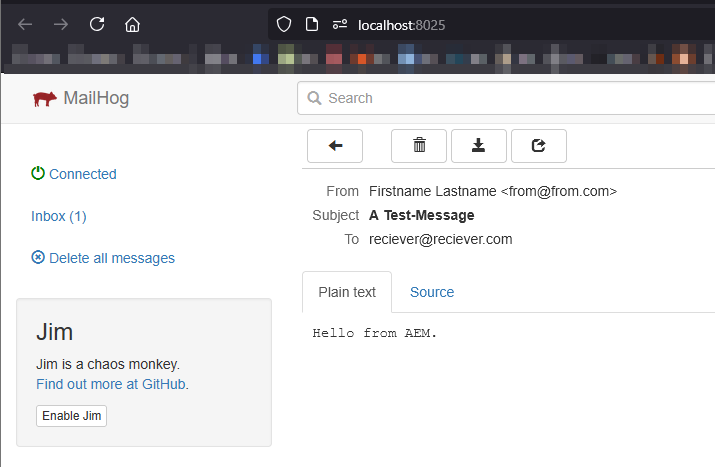
MailHog is a lightweight SMTP test server that captures all outgoing mail in a web UI - no real mail provider needed.
Start MailHog with Docker:
docker run -d --name mailhog -p 1025:1025 -p 8025:8025 mailhog/mailhog
- Port 1025 - SMTP (for AEM to send to)
- Port 8025 - Web UI (open in browser to see captured mails)
{
    "smtp.host": "localhost",
    "smtp.port": 1025,
    "smtp.user": "",
    "smtp.password": "",
    "from.address": "noreply@local.dev",
    "smtp.ssl": false,
    "smtp.starttls": false,
    "smtp.requiretls": false,
    "debug.email": false,
    "oauth.flow": false
}
Stage / Production (AEM 6.5 / AMS)
For AEM 6.5 or AMS environments with direct network access, point at your SMTP relay (e.g. SendGrid, Amazon SES, corporate mail server):
{
    "smtp.host": "$[secret:smtp_host]",
    "smtp.port": 587,
    "smtp.user": "$[secret:smtp_user]",
    "smtp.password": "$[secret:smtp_password]",
    "from.address": "noreply@example.com",
    "smtp.ssl": false,
    "smtp.starttls": true,
    "smtp.requiretls": true,
    "debug.email": false,
    "oauth.flow": false
}
Use secret environment variables (
$[secret:...]) in AEMaaCS to keep credentials out of the code repository. See the OSGi configuration page for details.
On AEMaaCS, do not point
smtp.hostdirectly at the external SMTP host. Use the Advanced Networking proxy pattern shown below.
Configuration reference
| Property | Type | Description |
|---|---|---|
smtp.host | String | SMTP server hostname |
smtp.port | int | SMTP port (25, 465, 587) |
smtp.user | String | SMTP authentication user |
smtp.password | String | SMTP authentication password |
from.address | String | Default "From" address |
smtp.ssl | boolean | Use implicit SSL (port 465) |
smtp.starttls | boolean | Upgrade to TLS after connecting (port 587) |
smtp.requiretls | boolean | Fail if STARTTLS is not available |
debug.email | boolean | Log full SMTP conversation (never enable in production) |
oauth.flow | boolean | Use OAuth 2.0 for authentication (Microsoft 365, Google Workspace) |
Sending a Simple Plain-Text E-Mail
The simplest case - inject MessageGatewayService, build a SimpleEmail, and send it:
import com.day.cq.mailer.MessageGateway;
import com.day.cq.mailer.MessageGatewayService;
import org.apache.commons.mail.Email;
import org.apache.commons.mail.SimpleEmail;
import org.osgi.service.component.annotations.Component;
import org.osgi.service.component.annotations.Reference;

import javax.mail.internet.InternetAddress;
import java.util.Collections;

@Component(service = SimpleMailSender.class)
public class SimpleMailSender {

    @Reference
    private MessageGatewayService messageGatewayService;

    public void sendTestMail(String to, String subject, String body) throws Exception {
        SimpleEmail email = new SimpleEmail();
        email.setFrom("noreply@example.com", "My AEM Site");
        email.addHeader("X-Mailer", "Adobe Experience Manager");
        email.setCharset("utf-8");
        email.setSubject(subject);
        email.setMsg(body);
        email.setTo(Collections.singletonList(new InternetAddress(to)));

        MessageGateway<Email> gateway = messageGatewayService.getGateway(Email.class);
        if (gateway != null) {
            gateway.send(email);
        } else {
            throw new IllegalStateException(
                "Mail gateway not available - check DefaultMailService config");
        }
    }
}
Always null-check the gateway. If the OSGi config is missing or invalid,
getGateway()returnsnullrather than throwing.
Sending HTML E-Mails
Use HtmlEmail to send rich HTML content with an automatic plain-text fallback:
import org.apache.commons.mail.HtmlEmail;

public void sendHtmlMail(String to, String subject,
                         String htmlBody, String textFallback) throws Exception {

    HtmlEmail email = new HtmlEmail();
    email.setFrom("noreply@example.com", "My AEM Site");
    email.setCharset("utf-8");
    email.setSubject(subject);
    email.setHtmlMsg(htmlBody);
    email.setTextMsg(textFallback); // shown by plain-text clients

    email.addTo(to);

    MessageGateway<HtmlEmail> gateway =
        messageGatewayService.getGateway(HtmlEmail.class);
    if (gateway != null) {
        gateway.send(email);
    }
}
Sending E-Mails with Attachments
Use MultiPartEmail or HtmlEmail with embedded attachments:
import org.apache.commons.mail.EmailAttachment;
import org.apache.commons.mail.MultiPartEmail;

public void sendWithAttachment(String to, String subject, String body,
                               String attachmentPath) throws Exception {

    MultiPartEmail email = new MultiPartEmail();
    email.setFrom("noreply@example.com");
    email.setCharset("utf-8");
    email.setSubject(subject);
    email.setMsg(body);
    email.addTo(to);

    // Attach a file from the local filesystem or a URL
    EmailAttachment attachment = new EmailAttachment();
    attachment.setPath(attachmentPath);
    attachment.setDisposition(EmailAttachment.ATTACHMENT);
    attachment.setName("report.pdf");
    email.attach(attachment);

    MessageGateway<MultiPartEmail> gateway =
        messageGatewayService.getGateway(MultiPartEmail.class);
    if (gateway != null) {
        gateway.send(email);
    }
}
Attaching DAM assets
To attach an asset from the JCR repository, stream it from the rendition:
import com.day.cq.dam.api.Asset;
import com.day.cq.dam.api.Rendition;
import org.apache.commons.mail.ByteArrayDataSource;

Resource assetResource = resolver.getResource("/content/dam/myproject/report.pdf");
Asset asset = assetResource.adaptTo(Asset.class);
Rendition original = asset.getOriginal();

ByteArrayDataSource dataSource = new ByteArrayDataSource(
    original.getStream(),
    original.getMimeType()
);

email.attach(dataSource, "report.pdf", "Monthly report");
Templated E-Mails
Hardcoding HTML in Java is fragile. AEM supports two common patterns for templated mails.
Pattern 1: HTML file + MailTemplate
Store the e-mail as an HTML file with ${placeholder} tokens, then load it and replace the
tokens with real values at send time using MailTemplate:
import com.day.cq.commons.mail.MailTemplate;
import com.day.cq.mailer.MessageGateway;
import com.day.cq.mailer.MessageGatewayService;
import org.apache.commons.mail.HtmlEmail;
import org.apache.sling.api.resource.ResourceResolver;

import javax.jcr.Session;
import javax.mail.internet.InternetAddress;
import java.util.Collections;
import java.util.Map;

public void sendTemplatedMail(ResourceResolver resolver,
                              String templatePath,
                              Map<String, String> tokens,
                              String recipientEmail) throws Exception {

    Session session = resolver.adaptTo(Session.class);

    // Load the template from the JCR
    MailTemplate template = MailTemplate.create(templatePath, session);

    if (template == null) {
        throw new IllegalArgumentException("Template not found: " + templatePath);
    }

    // Replace ${placeholders} in the template (both headers and body) with the
    // token values. Use the Map overload - getEmail(StrLookup, Class) is deprecated.
    HtmlEmail email = template.getEmail(tokens, HtmlEmail.class);

    email.setTo(Collections.singletonList(new InternetAddress(recipientEmail)));

    MessageGateway<HtmlEmail> gateway =
        messageGatewayService.getGateway(HtmlEmail.class);
    if (gateway != null) {
        gateway.send(email);
    }
}
The template file is a plain HTML file stored in the JCR with ${variable}
placeholders. It can start with an optional header block (Subject, From,
To, CC, BCC, Reply-To, Bounce-To) separated from the body by a blank line --
MailTemplate parses those headers and applies them to the Email, and placeholders
work in the headers too:
Subject: Welcome to ${siteName}
From: ${siteName} <noreply@example.com>

<!DOCTYPE html>
<html>
<head><meta charset="utf-8"/></head>
<body>
  <h1>Welcome, ${firstName}!</h1>
  <p>Your account on <strong>${siteName}</strong> has been created.</p>
  <p><a href="${loginUrl}">Log in now</a></p>
</body>
</html>
Where should this file live, and how does it get into the JCR? See Managing HTML Templates with Placeholders below for the full step-by-step.
Usage:
Map<String, String> tokens = Map.of(
    "firstName", "Jane",
    "siteName", "Acme Corp",
    "loginUrl", "https://acme.com/login"
);
sendTemplatedMail(resolver,
    "/apps/myproject/templates/email/welcome.html",
    tokens,
    "jane@acme.com");
Pattern 2: HTL-rendered page
For richer templates, create an AEM component/page that renders the e-mail via HTL, then
fetch the rendered HTML with Sling's SlingRequestProcessor:
import org.apache.sling.api.SlingHttpServletRequest;
import org.apache.sling.api.request.builder.Builders;
import org.apache.sling.api.request.builder.SlingHttpServletResponseResult;
import org.apache.sling.api.resource.Resource;
import org.apache.sling.api.resource.ResourceResolver;
import org.apache.sling.engine.SlingRequestProcessor;

@Reference
private SlingRequestProcessor requestProcessor;

public String renderPageToHtml(ResourceResolver resolver, String pagePath)
        throws Exception {

    Resource page = resolver.getResource(pagePath);
    if (page == null) {
        throw new IllegalArgumentException("Page not found: " + pagePath);
    }

    // Build a synthetic internal request/response with the Sling request Builders API,
    // run it through the engine, and read the captured output
    SlingHttpServletRequest request = Builders.newRequestBuilder(page)
        .withRequestMethod("GET")
        .withExtension("html")
        .build();
    SlingHttpServletResponseResult response = Builders.newResponseBuilder().build();

    requestProcessor.processRequest(request, response, resolver);

    return response.getOutputAsString();
}
This approach lets authors edit e-mail templates visually in AEM, using components and the Style System.
Pattern 3: Properties-file template + StringSubstitutor
MailTemplate is convenient but rigid: one header block, one body, and its own parsing
rules. A more flexible approach - and a common one in real projects - is to store the
template as a Java .properties file with named sections and do the token replacement
yourself with Apache Commons StringSubstitutor. This keeps the subject, header, message,
and footer as separate, independently reusable fields.
subject=A task is waiting for you: ${taskName}

header=-----------------------------------------------------------\n\
Project: ${projectTitle}\n\
Assigned: ${eventTimestamp}\n\
-----------------------------------------------------------\n

message=\n\
Hi ${firstName},\n\
a new task has been assigned to you. Open it here:\n${host.prefix}${link.open}\n

footer=\n\
-----------------------------------------------------------\n\
This is an automatically generated message. Please do not reply.
Each value is a ${placeholder} host; \ continues a line within a property. Load the file
from its JCR nt:file node and substitute the tokens at send time:
import com.day.cq.mailer.MessageGateway;
import com.day.cq.mailer.MessageGatewayService;
import org.apache.commons.mail.Email;
import org.apache.commons.mail.HtmlEmail;
import org.apache.commons.mail.SimpleEmail;
import org.apache.commons.text.StringSubstitutor; // from org.apache.commons.text (provided by AEM)
import org.apache.sling.api.resource.ResourceResolver;

import javax.jcr.Node;
import javax.jcr.Session;
import java.io.InputStream;
import java.nio.charset.StandardCharsets;
import java.util.Enumeration;
import java.util.Map;
import java.util.Properties;

/** Reads the template properties from a JCR nt:file. */
private Properties loadTemplate(String path, ResourceResolver resolver) throws Exception {
    Session session = resolver.adaptTo(Session.class);
    if (session == null || !session.itemExists(path)) {
        throw new IllegalArgumentException("Template not found: " + path);
    }
    Node node = (Node) session.getItem(path);
    Properties props = new Properties();
    try (InputStream is = node.getProperty("jcr:content/jcr:data").getBinary().getStream()) {
        Properties raw = new Properties();
        raw.load(is); // Properties.load ALWAYS decodes ISO-8859-1
        Enumeration<?> keys = raw.propertyNames();
        while (keys.hasMoreElements()) {
            String key = (String) keys.nextElement();
            // Re-encode ISO-8859-1 bytes as UTF-8 so umlauts/accents survive
            String value = new String(
                raw.getProperty(key).getBytes(StandardCharsets.ISO_8859_1),
                StandardCharsets.UTF_8);
            props.put(key, value);
        }
    }
    return props;
}

/** Builds an Email from the template, substituting ${tokens} from params. */
public Email buildEmail(String templatePath, Map<String, String> params,
                        ResourceResolver resolver) throws Exception {

    Properties template = loadTemplate(templatePath, resolver);
    StringSubstitutor sub = new StringSubstitutor(params);

    // .html templates render as HTML, everything else as plain text
    boolean html = templatePath.endsWith(".html");
    Email email = html ? new HtmlEmail() : new SimpleEmail();
    email.setCharset("utf-8");
    email.setSubject(sub.replace(template.getProperty("subject")));

    String body = sub.replace(template.getProperty("header", ""))
                + sub.replace(template.getProperty("message", ""))
                + sub.replace(template.getProperty("footer", ""));

    if (email instanceof HtmlEmail) {
        ((HtmlEmail) email).setHtmlMsg(body);
    } else {
        email.setMsg(body);
    }
    return email;
}
The encoding gotcha.
java.util.Properties.load(InputStream)always decodes the bytes as ISO-8859-1, never UTF-8. Without the re-encoding step above, any umlaut or accented character in the template comes out garbled. This is the single most common bug with properties-based mail templates.
When to prefer this over MailTemplate: you want named, independently reusable sections
(subject/header/message/footer), the subject to live inside the template, or full control over
parsing and encoding. The cost is that you own the loader and the encoding handling - which is
exactly what the snippet above provides.
Combining with a separate .html body in the JCR
Rich HTML is awkward to keep inside a single .properties value - the escaping and \ line
continuations get unwieldy fast. A clean hybrid keeps the small metadata (subject, and a
pointer to the body) in the properties file, while the HTML body lives in its own .html
file in the JCR, carrying the same ${placeholder} tokens. The body file is authorable and
lintable on its own, and you can inline CSS the way e-mail clients expect.
subject=A task is waiting for you: ${taskName}
body=/apps/myproject/templates/email/task-assigned.html
<!DOCTYPE html>
<html>
<head><meta charset="utf-8"/></head>
<body style="font-family: Arial, sans-serif;">
  <h1>Hi ${firstName},</h1>
  <p>A new task is waiting in <strong>${projectTitle}</strong>.</p>
  <p><a href="${host.prefix}${link.open}">Open the task</a></p>
</body>
</html>
Load the metadata with the Pattern 3 loader, load the HTML body as a UTF-8 string, and run the
same StringSubstitutor over both:
public Email buildHtmlEmail(String metaPath, Map<String, String> params,
                            ResourceResolver resolver) throws Exception {

    Properties meta = loadTemplate(metaPath, resolver);     // reuse the Pattern 3 loader
    String htmlBody = loadText(meta.getProperty("body"), resolver);
    StringSubstitutor sub = new StringSubstitutor(params);

    HtmlEmail email = new HtmlEmail();
    email.setCharset("utf-8");
    email.setSubject(sub.replace(meta.getProperty("subject")));
    email.setHtmlMsg(sub.replace(htmlBody));                // ${tokens} in the HTML are replaced
    email.setTextMsg("Open the task: "                      // plain-text fallback
        + params.get("host.prefix") + params.get("link.open"));
    return email;
}

/** Reads a JCR nt:file as a UTF-8 string. */
private String loadText(String path, ResourceResolver resolver) throws Exception {
    Session session = resolver.adaptTo(Session.class);
    Node node = (Node) session.getItem(path);
    try (InputStream is = node.getProperty("jcr:content/jcr:data").getBinary().getStream()) {
        return new String(is.readAllBytes(), StandardCharsets.UTF_8);
    }
}
Reading the
.htmlfile directly as UTF-8 sidesteps theProperties.loadISO-8859-1 gotcha entirely - it only applies to.propertiesparsing, not to a raw HTML stream. The placeholder mechanism is identical (${...}viaStringSubstitutor), so the sameparamsmap drives the subject, the metadata, and the HTML body. Authors then edit the HTML file in the JCR without ever touching Java.
Managing HTML Templates with Placeholders
The MailTemplate pattern above hinges on two decisions: where the HTML template files
live and how they get to a place MailTemplate can read them. MailTemplate reads a
template from one of two sources:
- a JCR
nt:filenode, viaMailTemplate.create(path, session) - any
InputStream, vianew MailTemplate(stream, charset)(e.g. a bundle resource)
This section walks through both, end to end.
Step 1 - Choose where the templates live
| Storage | Edit by | Load with | Best for |
|---|---|---|---|
ui.apps (/apps/...) | Developers | MailTemplate.create(path, ...) | Code-owned templates, deployed and versioned with the app |
ui.content (/content/...) | Authors | MailTemplate.create(path, ...) | Templates business users should tweak without a deployment |
Bundle resource (src/main/resources) | Developers | new MailTemplate(stream, charset) | Simplest, unit-testable, no JCR lookup at all |
Avoid
/etc/notification/email/...on AEM as a Cloud Service./etcis deprecated and read-only there. Put developer-owned templates under/apps/<project>/templates/email/(immutable but readable at runtime) or ship them as bundle resources.
Step 2 - Write the template (header block + body + placeholders)
A template is a plain text/HTML file. An optional header block at the very top sets mail
headers; a blank line separates it from the body. ${placeholder} tokens are allowed
anywhere - including in the headers.
Subject: Welcome to ${siteName}, ${firstName}!
From: ${siteName} <noreply@example.com>
Reply-To: support@example.com

<!DOCTYPE html>
<html>
<head><meta charset="utf-8"/></head>
<body>
  <h1>Welcome, ${firstName}!</h1>
  <p>Your account on <strong>${siteName}</strong> is ready.</p>
  <p><a href="${loginUrl}">Log in now</a></p>
</body>
</html>
Things worth knowing about the format:
- Recognized headers:
Subject,From,To,CC,BCC,Reply-To,Bounce-To. Anything you set in the template you do not need to set again in code (and vice versa). Setting recipients in both theTo:header andemail.setTo(...)adds them twice, so pick one place per header. - HTML detection: if the body contains an
<html>tag,MailTemplatesends it as the HTML part; otherwise it is treated as plain text. - Missing tokens stay literal: an unresolved
${foo}is left in the output verbatim, so always pass every token the template uses. - Charset:
create()honors the node'sjcr:encoding(defaultutf-8); theInputStreamconstructor takes the charset as its second argument.
Step 3, Option A - Store the template in the JCR (ui.apps)
Drop the file into your content package's jcr_root tree. FileVault imports any plain file
as an nt:file node automatically - no .content.xml needed for the file itself.
ui.apps/src/main/content/jcr_root/apps/myproject/templates/email/
├── welcome.html
├── password-reset.html
└── order-confirmation.html
Make sure your filter covers the path so the file is actually deployed:
<filter root="/apps/myproject/templates/email"/>
After deployment the template is readable at
/apps/myproject/templates/email/welcome.html. Load it with a Session:
Session session = resolver.adaptTo(Session.class);
MailTemplate template = MailTemplate.create(
    "/apps/myproject/templates/email/welcome.html", session);

if (template == null) {
    // create() returns null if the path is missing or not an nt:file
    throw new EmailException("Template not found or not an nt:file");
}
MailTemplate.create()returnsnullwhen the path does not resolve to annt:filenode. Always null-check it - a misspelled path fails silently otherwise.
Step 3, Option B - Ship the template as a bundle resource
If authors never touch the templates, the simplest option is to keep them inside the bundle
and load them from the classpath. No JCR lookup, no Session, and they are trivial to unit
test.
core/src/main/resources/email-templates/
└── welcome.html
public MailTemplate loadFromBundle(String resourceName) throws IOException {
    try (InputStream in = getClass().getClassLoader()
            .getResourceAsStream("email-templates/" + resourceName)) {
        if (in == null) {
            throw new IOException("Bundle template not found: " + resourceName);
        }
        return new MailTemplate(in, "utf-8");
    }
}
Step 4 - Render the placeholders and send
Build the token map, render the template into a typed Email, fill in any per-recipient
details, and hand it to the gateway:
public void sendWelcome(ResourceResolver resolver, String recipient,
                        String firstName, String siteName) throws Exception {

    Session session = resolver.adaptTo(Session.class);
    MailTemplate template = MailTemplate.create(
        "/apps/myproject/templates/email/welcome.html", session);
    if (template == null) {
        throw new EmailException("Template not found");
    }

    Map<String, String> tokens = Map.of(
        "firstName", firstName,
        "siteName", siteName,
        "loginUrl", "https://example.com/login"
    );

    // Subject and From come from the template's header block; tokens fill the gaps
    HtmlEmail email = template.getEmail(tokens, HtmlEmail.class);
    email.setTo(Collections.singletonList(new InternetAddress(recipient)));

    MessageGateway<HtmlEmail> gateway =
        messageGatewayService.getGateway(HtmlEmail.class);
    if (gateway != null) {
        gateway.send(email);
    }
}
Step 5 - Wire it into the reusable service
In a real project, route everything through the EmailService.sendTemplated(...) method
shown below so template loading, token replacement, and error
handling live in one place.
Step 6 - Verify the rendered output
- Locally: send against MailHog / Mailpit and inspect the rendered HTML and headers in the web UI.
- In a unit test: load a bundle template with the
InputStreamconstructor, callgetEmail(tokens, HtmlEmail.class), and assert onemail.getSubject()/getHtmlMsg(). No running AEM required.
Escape user input. Tokens are substituted verbatim into the HTML, so any value that originates from a user (names, free-text fields) must be HTML-escaped before it goes into the token map - otherwise the template is open to HTML/markup injection.
Localization: keep one template file per language (
welcome_de.html,welcome_en.html, ...) and resolve the path from the recipient's locale at send time, rather than branching inside a single template.
Reusable E-Mail Service
In real projects, wrap the gateway logic into a dedicated OSGi service. If you want a ready-made, ACS Commons-compatible templated sender without installing the full ACS Commons library, see acs.email in standalone-acs-commons.
Otherwise, a minimal in-project service looks like this:
package com.myproject.core.services;

import org.apache.commons.mail.EmailException;

import java.util.List;
import java.util.Map;

public interface EmailService {

    /**
     * Send a plain-text e-mail.
     */
    void sendPlainText(String from, List<String> to, String subject, String body)
        throws EmailException;

    /**
     * Send an HTML e-mail with an optional plain-text fallback.
     */
    void sendHtml(String from, List<String> to, String subject,
                  String html, String textFallback)
        throws EmailException;

    /**
     * Send a templated e-mail using an AEM mail template with token replacement.
     */
    void sendTemplated(String templatePath, Map<String, String> tokens,
                       List<String> to)
        throws EmailException;
}
package com.myproject.core.services.impl;

import com.day.cq.commons.mail.MailTemplate;
import com.day.cq.mailer.MessageGateway;
import com.day.cq.mailer.MessageGatewayService;
import com.myproject.core.services.EmailService;
import org.apache.commons.mail.Email;
import org.apache.commons.mail.EmailException;
import org.apache.commons.mail.HtmlEmail;
import org.apache.commons.mail.SimpleEmail;
import org.apache.sling.api.resource.ResourceResolver;
import org.apache.sling.api.resource.ResourceResolverFactory;
import org.osgi.service.component.annotations.Component;
import org.osgi.service.component.annotations.Reference;
import org.slf4j.Logger;
import org.slf4j.LoggerFactory;

import javax.jcr.Session;
import javax.mail.internet.InternetAddress;
import java.util.Collections;
import java.util.List;
import java.util.Map;
import java.util.stream.Collectors;

@Component(service = EmailService.class)
public class EmailServiceImpl implements EmailService {

    private static final Logger LOG = LoggerFactory.getLogger(EmailServiceImpl.class);
    private static final String CHARSET = "utf-8";
    private static final String MAIL_SERVICE_USER = "myproject-mail-service";

    @Reference
    private MessageGatewayService gatewayService;

    @Reference
    private ResourceResolverFactory resolverFactory;

    @Override
    public void sendPlainText(String from, List<String> to,
                              String subject, String body) throws EmailException {

        SimpleEmail email = new SimpleEmail();
        email.setCharset(CHARSET);
        email.setFrom(from);
        email.setSubject(subject);
        email.setMsg(body);
        email.setTo(toAddresses(to));

        send(email, Email.class);
    }

    @Override
    public void sendHtml(String from, List<String> to, String subject,
                         String html, String textFallback) throws EmailException {

        HtmlEmail email = new HtmlEmail();
        email.setCharset(CHARSET);
        email.setFrom(from);
        email.setSubject(subject);
        email.setHtmlMsg(html);
        if (textFallback != null) {
            email.setTextMsg(textFallback);
        }
        email.setTo(toAddresses(to));

        send(email, HtmlEmail.class);
    }

    @Override
    public void sendTemplated(String templatePath, Map<String, String> tokens,
                              List<String> to) throws EmailException {

        Map<String, Object> auth =
            Collections.singletonMap(ResourceResolverFactory.SUBSERVICE, MAIL_SERVICE_USER);

        HtmlEmail email;
        // Build the e-mail inside the try-with-resources, then send after the resolver
        // is closed - the template is fully read by then.
        try (ResourceResolver resolver = resolverFactory.getServiceResourceResolver(auth)) {
            Session session = resolver.adaptTo(Session.class);

            MailTemplate template = MailTemplate.create(templatePath, session);
            if (template == null) {
                throw new EmailException(
                    "Template not found or not an nt:file: " + templatePath);
            }

            // Replaces ${placeholders}; Subject/From can come from the template headers
            email = template.getEmail(tokens, HtmlEmail.class);
            email.setTo(toAddresses(to));
        } catch (EmailException e) {
            throw e;
        } catch (Exception e) {
            throw new EmailException("Failed to build templated e-mail: " + templatePath, e);
        }

        send(email, HtmlEmail.class);
    }

    private <T extends Email> void send(T email, Class<T> type) throws EmailException {
        MessageGateway<T> gateway = gatewayService.getGateway(type);
        if (gateway == null) {
            throw new EmailException(
                "Mail gateway unavailable. Check DefaultMailService OSGi config.");
        }
        try {
            gateway.send(email);
            LOG.info("E-mail sent: subject='{}', to={}",
                email.getSubject(), email.getToAddresses());
        } catch (Exception e) {
            LOG.error("Failed to send e-mail: {}", e.getMessage(), e);
            throw new EmailException("Failed to send e-mail", e);
        }
    }

    private List<InternetAddress> toAddresses(List<String> emails) throws EmailException {
        try {
            return emails.stream()
                .map(addr -> {
                    try { return new InternetAddress(addr); }
                    catch (Exception e) { throw new RuntimeException(e); }
                })
                .collect(Collectors.toList());
        } catch (RuntimeException e) {
            throw new EmailException("Invalid e-mail address", e.getCause());
        }
    }
}
sendTemplatedreads the template from the JCR, so it needs aResourceResolver. It uses a service user rather than an administrative session. Map a subservice namedmyproject-mail-service(with read access to your template path) via aorg.apache.sling.serviceusermapping.impl.ServiceUserMapperImpl.amendedconfig. See the OSGi configuration page. Templates shipped as bundle resources skip this entirely - they need no resolver at all.
Sending to AEM Users and Groups
So far recipients have been raw address strings. In practice you usually know the recipients
as AEM users and groups (Authorizables) - a workflow participant, a project group, the
members of a role. It is cleaner to let the service resolve addresses from the user profile
and expand groups itself, so callers pass principals rather than e-mail strings.
import org.apache.jackrabbit.api.security.user.Authorizable;
import org.apache.jackrabbit.api.security.user.Group;
import org.apache.commons.lang3.StringUtils;

import javax.jcr.Value;
import java.util.ArrayList;
import java.util.Iterator;
import java.util.List;

/** Reads the e-mail address from the user's profile/email property. */
private String emailOf(Authorizable user) throws Exception {
    if (user == null || user.isGroup()) {
        return null;
    }
    Value[] values = user.getProperty("profile/email");
    return (values != null && values.length > 0) ? values[0].getString() : null;
}

/** Expands a group to its member users; a user resolves to itself. */
private List<Authorizable> resolveUsers(Authorizable principal) throws Exception {
    List<Authorizable> users = new ArrayList<>();
    if (principal == null) {
        return users;
    }
    if (principal.isGroup()) {
        Iterator<Authorizable> members = ((Group) principal).getMembers(); // transitive members
        while (members.hasNext()) {
            Authorizable member = members.next();
            if (!member.isGroup()) {
                users.add(member);
            }
        }
    } else {
        users.add(principal);
    }
    return users;
}
With those helpers, send one mail per recipient rather than putting everyone on a single
To. A per-recipient loop keeps addresses private, lets each message carry per-recipient
tokens (e.g. ${participantId}), and - importantly - means one bad address or send failure
is logged and skipped instead of aborting the whole batch:
public void sendToAuthorizables(String templatePath, Map<String, String> params,
                                List<Authorizable> recipients, ResourceResolver resolver) {
    MessageGateway<Email> gateway = gatewayService.getGateway(
        templatePath.endsWith(".html") ? HtmlEmail.class : SimpleEmail.class);
    if (gateway == null) {
        LOG.error("Mail gateway not configured");
        return;
    }
    for (Authorizable user : recipients) {
        try {
            String address = emailOf(user);
            if (StringUtils.isBlank(address)) {
                LOG.warn("No address for {}, skipping", user.getID());
                continue;
            }
            // per-recipient token, then build a fresh Email for this address
            params.put("participantId", user.getID());
            Email email = buildEmail(templatePath, params, resolver);
            email.setTo(Collections.singleton(new InternetAddress(address)));
            gateway.send(email);
        } catch (Exception e) {
            LOG.error("Failed to send to {}", user, e); // skip, do not abort the batch
        }
    }
}
Obtain the
ResourceResolver(and aUserManagerto look principals up by id) through themyproject-mail-serviceservice user described above, not an administrative session.
E-Mails in Workflow Steps
Workflows are a common trigger for sending e-mails (e.g., approval notifications, publish
confirmations). Use your EmailService inside a WorkflowProcess:
@Component(
    service = WorkflowProcess.class,
    property = "process.label=Send Notification E-Mail"
)
public class NotificationEmailStep implements WorkflowProcess {

    @Reference
    private EmailService emailService;

    @Reference
    private ResourceResolverFactory resolverFactory;

    @Override
    public void execute(WorkItem workItem, WorkflowSession workflowSession,
                        MetaDataMap metaDataMap) throws WorkflowException {

        String payloadPath = workItem.getWorkflowData().getPayload().toString();
        String initiator = workItem.getWorkflow().getInitiator();

        try {
            emailService.sendPlainText(
                "noreply@example.com",
                List.of("admin@example.com"),
                "Content published: " + payloadPath,
                "Page " + payloadPath + " was published by " + initiator + "."
            );
        } catch (Exception e) {
            throw new WorkflowException("Failed to send notification", e);
        }
    }
}
See the Workflows page for more on custom workflow steps.
Config-driven, reusable step
Hardcoding the template and recipients in Java means a new step (and a deployment) for every
notification. A better pattern is one generic step whose template path and recipients come
from the workflow model's PROCESS_ARGS. The same compiled step is then reused across many
models, and authors change behaviour by editing the model.
@Component(
    service = WorkflowProcess.class,
    property = "process.label=Send Templated E-Mail"
)
public class TemplatedEmailStep implements WorkflowProcess {

    @Reference private EmailService emailService;
    @Reference private ResourceResolverFactory resolverFactory;
    @Reference private Externalizer externalizer;

    @Override
    public void execute(WorkItem workItem, WorkflowSession session,
                        MetaDataMap metaData) throws WorkflowException {

        // PROCESS_ARGS = "sendTo:project.group.editor,emailTemplate:/apps/.../published.txt"
        String args = metaData.get("PROCESS_ARGS", String.class);
        Map<String, String> argMap = parseArgs(args);          // -> sendTo, emailTemplate
        String templatePath = argMap.get("emailTemplate");
        String payloadPath = workItem.getWorkflowData().getPayload().toString();

        Map<String, Object> auth =
            Collections.singletonMap(ResourceResolverFactory.SUBSERVICE, "myproject-mail-service");
        try (ResourceResolver resolver = resolverFactory.getServiceResourceResolver(auth)) {

            Map<String, String> params = new HashMap<>();
            params.put("link.open", "/editor.html" + payloadPath + ".html");
            params.put("modelTitle", workItem.getWorkflow().getWorkflowModel().getTitle());
            params.put("eventTimestamp", workItem.getTimeStarted().toString());
            // absolute publish host prefix so links work outside AEM
            params.put("host.prefix", externalizer.externalLink(resolver, Externalizer.PUBLISH, ""));

            List<Authorizable> recipients = resolveRecipients(argMap.get("sendTo"), resolver);
            emailService.sendToAuthorizables(templatePath, params, recipients, resolver);
        } catch (Exception e) {
            throw new WorkflowException("Failed to send workflow e-mail", e);
        }
    }
}
The matching step in the workflow model carries the configuration:
<node
    jcr:primaryType="cq:WorkflowNode"
    jcr:title="Notify editors"
    sling:resourceType="cq/workflow/components/model/process">
    <metaData
        jcr:primaryType="nt:unstructured"
        PROCESS="com.myproject.core.workflows.TemplatedEmailStep"
        PROCESS_ARGS="sendTo:project.group.editor,emailTemplate:/apps/myproject/templates/email/published.txt"
        PROCESS_AUTO_ADVANCE="true"/>
</node>
Workflows are not the only trigger. To e-mail someone when they are added to a group, register an Oak
AuthorizableActionProviderand react inAbstractGroupAction.onMemberAdded(...)-- the sameEmailServicecall, driven by a repository event instead of a workflow.
AEMaaCS: Advanced Networking
On AEM as a Cloud Service, outbound SMTP traffic is blocked by default. You must configure Advanced Networking to allow AEM to reach an external SMTP server.
Setup steps
- Enable dedicated egress IP in Cloud Manager (or flexible port egress)
- Add a port forwarding rule for your SMTP server:
| Name | Value |
|---|---|
| Port forward name | smtp_sendgrid |
| Protocol | TCP |
portDest | 587 |
portOrig | 30587 |
| Destination host | smtp.sendgrid.net |
- Reference the forwarded port in your OSGi config:
{
    "smtp.host": "$[env:AEM_PROXY_HOST;default=proxy.tunnel]",
    "smtp.port": 30587,
    "smtp.user": "$[secret:smtp_user]",
    "smtp.password": "$[secret:smtp_password]",
    "from.address": "noreply@example.com",
    "smtp.ssl": false,
    "smtp.starttls": true,
    "smtp.requiretls": true
}
On AEMaaCS,
smtp.hostmust use the reserved proxy host$[env:AEM_PROXY_HOST;default=proxy.tunnel]; do not setAEM_PROXY_HOSTyourself in Cloud Manager.smtp.portis theportOrigvalue from the Cloud ManagerportForwardsrule (for example30587), not the SMTP server's destination port.
OAuth 2.0 (Microsoft 365 / Google Workspace)
AEMaaCS supports OAuth 2.0 authentication for SMTP. This is required when connecting to Microsoft 365 or Google Workspace, which have deprecated basic password authentication:
{
    "smtp.host": "$[env:AEM_PROXY_HOST;default=proxy.tunnel]",
    "smtp.port": 30587,
    "oauth.flow": true,
    "oauth.client.id": "$[secret:oauth_client_id]",
    "oauth.client.secret": "$[secret:oauth_client_secret]",
    "oauth.token.url": "https://login.microsoftonline.com/{tenant}/oauth2/v2.0/token",
    "oauth.scope": "https://outlook.office365.com/.default",
    "from.address": "noreply@example.com"
}
Local Testing with MailHog
MailHog captures all outgoing SMTP traffic and displays it in a web UI. No real mails are ever sent.
Docker setup
# Run MailHog
docker run -d --name mailhog -p 1025:1025 -p 8025:8025 mailhog/mailhog

# Or with Docker Compose (add to your local AEM docker-compose.yml)
services:
  mailhog:
    image: mailhog/mailhog
    ports:
      - "1025:1025"  # SMTP
      - "8025:8025"  # Web UI
MailHog features
| Feature | URL / Details |
|---|---|
| Web UI | http://localhost:8025 |
| SMTP | localhost:1025 |
| REST API | http://localhost:8025/api/v2/messages |
| Search | Filter by sender, recipient, or subject in the UI |
Alternative: Mailpit
Mailpit is a modern, actively maintained alternative to MailHog (which is no longer maintained):
docker run -d --name mailpit -p 1025:1025 -p 8025:8025 axllent/mailpit
Same ports, same OSGi config - just a different Docker image. Mailpit offers a more modern UI, mobile-responsive views, and better performance.
Groovy Console: Quick E-Mail Test
Use the Groovy Console to quickly verify your mail configuration without deploying Java code:
import com.day.cq.mailer.MessageGatewayService
import org.apache.commons.mail.SimpleEmail
import javax.mail.internet.InternetAddress

def gatewayService = getService(MessageGatewayService.class)
def gateway = gatewayService.getGateway(org.apache.commons.mail.Email.class)
assert gateway != null : "Mail gateway not configured - check DefaultMailService"

def email = new SimpleEmail()
email.setFrom("test@local.dev")
email.setCharset("utf-8")
email.setSubject("Groovy Console Test")
email.setMsg("If you see this in MailHog, your config works!")
email.setTo([new InternetAddress("admin@test.com")])

gateway.send(email)

println "Mail sent successfully!"
Common Mail Types at a Glance
| Class | Use case | Gateway type |
|---|---|---|
SimpleEmail | Plain-text messages | Email.class |
HtmlEmail | HTML with plain-text fallback | HtmlEmail.class |
MultiPartEmail | Attachments | MultiPartEmail.class |
ImageHtmlEmail | HTML with inline images | HtmlEmail.class |
All classes are from the org.apache.commons.mail package, bundled with AEM.
Best Practices
Use a dedicated EmailService
Don't scatter MessageGatewayService calls throughout the codebase. Centralize them in one
service with proper error handling, logging, and a consistent "from" address.
Always check the gateway for null
// Good
MessageGateway<Email> gw = gatewayService.getGateway(Email.class);
if (gw == null) {
    LOG.error("Mail gateway not configured");
    return;
}

// Bad - NullPointerException if config is missing
gatewayService.getGateway(Email.class).send(email);
Use secret variables for credentials
Never hardcode SMTP passwords in OSGi configs. Use $[secret:...] on AEMaaCS or
encrypted values on AEM 6.5.
Test with MailHog / Mailpit first
Before pointing at a real SMTP server, always verify your code works with a local test server. This avoids accidentally sending test mails to real recipients.
Set debug.email carefully
Enabling debug.email logs the entire SMTP conversation, including potentially sensitive
headers and content. Never enable it in production.
Provide a plain-text fallback
When sending HtmlEmail, always call setTextMsg() with a meaningful plain-text version.
Some mail clients and spam filters penalize HTML-only mails.
Handle bounces and failures gracefully
The send() method is synchronous. If the SMTP server is slow or unreachable, it will
block the calling thread. Consider:
- Running mail sends asynchronously via Sling Jobs
- Setting a reasonable SMTP connection timeout
- Implementing retry logic for transient failures
Common Pitfalls
| Pitfall | Solution |
|---|---|
MessageGateway is null | OSGi config missing or invalid; verify in Felix console under Day CQ Mail Service |
| Mails sent locally but not on AEMaaCS | Configure Advanced Networking with port forwarding; smtp.host must be $[env:AEM_PROXY_HOST;default=proxy.tunnel] and smtp.port must be the portOrig value |
| Authentication failure on Microsoft 365 | Microsoft deprecated basic auth; use oauth.flow: true with a registered app |
| Mails land in spam | Set proper SPF, DKIM, and DMARC DNS records for the sending domain |
javax.mail.AuthenticationFailedException | Wrong credentials or wrong auth mechanism; check smtp.user and smtp.password |
| Mails not arriving on publish | Ensure the OSGi config exists for the publish run mode (config.publish/) |
| Attachment too large | Check your SMTP provider's size limits; consider linking to a download URL instead |
| Encoding issues in subject/body | Always call email.setCharset("utf-8") before setting content |
Garbled umlauts from .properties templates | Properties.load decodes ISO-8859-1; re-encode each value to UTF-8 (see Pattern 3) |
External Resources
See also
- OSGi configuration - run-mode configs and secrets
- Workflows - triggering e-mails from workflow steps
- Groovy Console - quick mail testing
- Deployment - deploying OSGi configs
- AEM as a Cloud Service - advanced networking
- Security basics
- Sling Models and Services - OSGi service patterns