Sending E-Mails in AEM
AEM provides a built-in e-mail infrastructure based on the Day CQ Mail Service
(com.day.cq.mailer.DefaultMailService). It wraps Apache Commons Email and exposes a
MessageGatewayService that OSGi components can inject to send plain-text, HTML, and
multi-part messages.
This page covers configuration, coding patterns, templated e-mails, testing with MailHog, and AEMaaCS-specific networking requirements.
OSGi Configuration
The mail service is configured via the Day CQ Mail Service factory PID.
Local development (with MailHog)
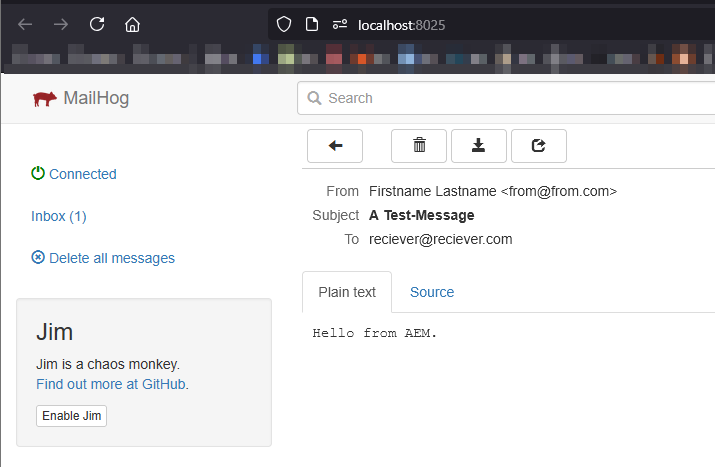
MailHog is a lightweight SMTP test server that captures all outgoing mail in a web UI -- no real mail provider needed.
Start MailHog with Docker:
docker run -d --name mailhog -p 1025:1025 -p 8025:8025 mailhog/mailhog
- Port 1025 -- SMTP (for AEM to send to)
- Port 8025 -- Web UI (open in browser to see captured mails)
{
    "smtp.host": "localhost",
    "smtp.port": 1025,
    "smtp.user": "",
    "smtp.password": "",
    "from.address": "noreply@local.dev",
    "smtp.ssl": false,
    "smtp.starttls": false,
    "smtp.requiretls": false,
    "debug.email": false,
    "oauth.flow": false
}
Stage / Production
For real environments, point at your SMTP relay (e.g. SendGrid, Amazon SES, corporate mail server):
{
    "smtp.host": "$[secret:smtp_host]",
    "smtp.port": 587,
    "smtp.user": "$[secret:smtp_user]",
    "smtp.password": "$[secret:smtp_password]",
    "from.address": "noreply@example.com",
    "smtp.ssl": false,
    "smtp.starttls": true,
    "smtp.requiretls": true,
    "debug.email": false,
    "oauth.flow": false
}
Use secret environment variables (
$[secret:...]) in AEMaaCS to keep credentials out of the code repository. See the OSGi configuration page for details.
Configuration reference
| Property | Type | Description |
|---|---|---|
smtp.host | String | SMTP server hostname |
smtp.port | int | SMTP port (25, 465, 587) |
smtp.user | String | SMTP authentication user |
smtp.password | String | SMTP authentication password |
from.address | String | Default "From" address |
smtp.ssl | boolean | Use implicit SSL (port 465) |
smtp.starttls | boolean | Upgrade to TLS after connecting (port 587) |
smtp.requiretls | boolean | Fail if STARTTLS is not available |
debug.email | boolean | Log full SMTP conversation (never enable in production) |
oauth.flow | boolean | Use OAuth 2.0 for authentication (Microsoft 365, Google Workspace) |
Sending a Simple Plain-Text E-Mail
The simplest case -- inject MessageGatewayService, build a SimpleEmail, and send it:
import com.day.cq.mailer.MessageGateway;
import com.day.cq.mailer.MessageGatewayService;
import org.apache.commons.mail.Email;
import org.apache.commons.mail.SimpleEmail;
import org.osgi.service.component.annotations.Component;
import org.osgi.service.component.annotations.Reference;

import javax.mail.internet.InternetAddress;
import java.util.Collections;

@Component(service = SimpleMailSender.class)
public class SimpleMailSender {

    @Reference
    private MessageGatewayService messageGatewayService;

    public void sendTestMail(String to, String subject, String body) throws Exception {
        SimpleEmail email = new SimpleEmail();
        email.setFrom("noreply@example.com", "My AEM Site");
        email.addHeader("X-Mailer", "Adobe Experience Manager");
        email.setCharset("utf-8");
        email.setSubject(subject);
        email.setMsg(body);
        email.setTo(Collections.singletonList(new InternetAddress(to)));

        MessageGateway<Email> gateway = messageGatewayService.getGateway(Email.class);
        if (gateway != null) {
            gateway.send(email);
        } else {
            throw new IllegalStateException(
                "Mail gateway not available -- check DefaultMailService config");
        }
    }
}
Always null-check the gateway. If the OSGi config is missing or invalid,
getGateway()returnsnullrather than throwing.
Sending HTML E-Mails
Use HtmlEmail to send rich HTML content with an automatic plain-text fallback:
import org.apache.commons.mail.HtmlEmail;

public void sendHtmlMail(String to, String subject,
                         String htmlBody, String textFallback) throws Exception {

    HtmlEmail email = new HtmlEmail();
    email.setFrom("noreply@example.com", "My AEM Site");
    email.setCharset("utf-8");
    email.setSubject(subject);
    email.setHtmlMsg(htmlBody);
    email.setTextMsg(textFallback); // shown by plain-text clients

    email.addTo(to);

    MessageGateway<HtmlEmail> gateway =
        messageGatewayService.getGateway(HtmlEmail.class);
    if (gateway != null) {
        gateway.send(email);
    }
}
Sending E-Mails with Attachments
Use MultiPartEmail or HtmlEmail with embedded attachments:
import org.apache.commons.mail.EmailAttachment;
import org.apache.commons.mail.MultiPartEmail;

public void sendWithAttachment(String to, String subject, String body,
                               String attachmentPath) throws Exception {

    MultiPartEmail email = new MultiPartEmail();
    email.setFrom("noreply@example.com");
    email.setCharset("utf-8");
    email.setSubject(subject);
    email.setMsg(body);
    email.addTo(to);

    // Attach a file from the local filesystem or a URL
    EmailAttachment attachment = new EmailAttachment();
    attachment.setPath(attachmentPath);
    attachment.setDisposition(EmailAttachment.ATTACHMENT);
    attachment.setName("report.pdf");
    email.attach(attachment);

    MessageGateway<MultiPartEmail> gateway =
        messageGatewayService.getGateway(MultiPartEmail.class);
    if (gateway != null) {
        gateway.send(email);
    }
}
Attaching DAM assets
To attach an asset from the JCR repository, stream it from the rendition:
import com.day.cq.dam.api.Asset;
import com.day.cq.dam.api.Rendition;
import org.apache.commons.mail.ByteArrayDataSource;

Resource assetResource = resolver.getResource("/content/dam/myproject/report.pdf");
Asset asset = assetResource.adaptTo(Asset.class);
Rendition original = asset.getOriginal();

ByteArrayDataSource dataSource = new ByteArrayDataSource(
    original.getStream(),
    original.getMimeType()
);

email.attach(dataSource, "report.pdf", "Monthly report");
Templated E-Mails
Hardcoding HTML in Java is fragile. AEM supports two common patterns for templated mails.
Pattern 1: AEM page as e-mail template
Author the e-mail as a regular AEM page, then render it to HTML at send time:
import com.day.cq.commons.mail.MailTemplate;
import org.apache.sling.api.resource.ResourceResolver;

import javax.jcr.Session;
import java.util.Map;

public void sendTemplatedMail(ResourceResolver resolver,
                              String templatePath,
                              Map<String, String> tokens,
                              String recipientEmail) throws Exception {

    Session session = resolver.adaptTo(Session.class);

    // Load the template from the JCR
    MailTemplate template = MailTemplate.create(templatePath, session);

    if (template == null) {
        throw new IllegalArgumentException("Template not found: " + templatePath);
    }

    // Replace ${placeholders} in the template with actual values
    HtmlEmail email = template.getEmail(
        MailTemplate.CHARSET_UTF8,
        HtmlEmail.class,
        tokens
    );

    email.setTo(Collections.singletonList(new InternetAddress(recipientEmail)));

    MessageGateway<HtmlEmail> gateway =
        messageGatewayService.getGateway(HtmlEmail.class);
    if (gateway != null) {
        gateway.send(email);
    }
}
The template file is a plain HTML file stored in the JCR (e.g., under
/etc/notification/email/myproject/), with ${variable} placeholders:
<!DOCTYPE html>
<html>
<head><meta charset="utf-8"/></head>
<body>
  <h1>Welcome, ${firstName}!</h1>
  <p>Your account on <strong>${siteName}</strong> has been created.</p>
  <p><a href="${loginUrl}">Log in now</a></p>
</body>
</html>
Usage:
Map<String, String> tokens = Map.of(
    "firstName", "Jane",
    "siteName", "Acme Corp",
    "loginUrl", "https://acme.com/login"
);
sendTemplatedMail(resolver,
    "/etc/notification/email/myproject/welcome.html",
    tokens,
    "jane@acme.com");
Pattern 2: HTL-rendered page
For richer templates, create an AEM component/page that renders the e-mail via HTL, then
fetch the rendered HTML with Sling's SlingRequestProcessor:
import org.apache.sling.engine.SlingRequestProcessor;
import org.apache.sling.api.resource.ResourceResolver;

@Reference
private SlingRequestProcessor requestProcessor;

public String renderPageToHtml(ResourceResolver resolver, String pagePath)
        throws Exception {

    // Build an internal request to the page
    ContainerRequestWrapper request = new ContainerRequestWrapper(pagePath);
    ByteArrayOutputStream output = new ByteArrayOutputStream();
    ContainerResponseWrapper response = new ContainerResponseWrapper(output);

    requestProcessor.processRequest(request, response, resolver);

    return output.toString("utf-8");
}
This approach lets authors edit e-mail templates visually in AEM, using components and the Style System.
Reusable E-Mail Service
In real projects, wrap the gateway logic into a dedicated OSGi service:
package com.myproject.core.services;

import java.util.List;

public interface EmailService {

    /**
     * Send a plain-text e-mail.
     */
    void sendPlainText(String from, List<String> to, String subject, String body)
        throws EmailException;

    /**
     * Send an HTML e-mail with an optional plain-text fallback.
     */
    void sendHtml(String from, List<String> to, String subject,
                  String html, String textFallback)
        throws EmailException;

    /**
     * Send a templated e-mail using an AEM mail template with token replacement.
     */
    void sendTemplated(String templatePath, java.util.Map<String, String> tokens,
                       List<String> to)
        throws EmailException;
}
package com.myproject.core.services.impl;

import com.day.cq.mailer.MessageGateway;
import com.day.cq.mailer.MessageGatewayService;
import com.myproject.core.services.EmailService;
import org.apache.commons.mail.Email;
import org.apache.commons.mail.HtmlEmail;
import org.apache.commons.mail.SimpleEmail;
import org.osgi.service.component.annotations.Component;
import org.osgi.service.component.annotations.Reference;
import org.slf4j.Logger;
import org.slf4j.LoggerFactory;

import javax.mail.internet.InternetAddress;
import java.util.List;
import java.util.stream.Collectors;

@Component(service = EmailService.class)
public class EmailServiceImpl implements EmailService {

    private static final Logger LOG = LoggerFactory.getLogger(EmailServiceImpl.class);
    private static final String CHARSET = "utf-8";

    @Reference
    private MessageGatewayService gatewayService;

    @Override
    public void sendPlainText(String from, List<String> to,
                              String subject, String body) throws EmailException {

        SimpleEmail email = new SimpleEmail();
        email.setCharset(CHARSET);
        email.setFrom(from);
        email.setSubject(subject);
        email.setMsg(body);
        email.setTo(toAddresses(to));

        send(email, Email.class);
    }

    @Override
    public void sendHtml(String from, List<String> to, String subject,
                         String html, String textFallback) throws EmailException {

        HtmlEmail email = new HtmlEmail();
        email.setCharset(CHARSET);
        email.setFrom(from);
        email.setSubject(subject);
        email.setHtmlMsg(html);
        if (textFallback != null) {
            email.setTextMsg(textFallback);
        }
        email.setTo(toAddresses(to));

        send(email, HtmlEmail.class);
    }

    @Override
    public void sendTemplated(String templatePath,
                              java.util.Map<String, String> tokens,
                              List<String> to) throws EmailException {
        // See the MailTemplate pattern above
        // ...
    }

    private <T extends Email> void send(T email, Class<T> type) throws EmailException {
        MessageGateway<T> gateway = gatewayService.getGateway(type);
        if (gateway == null) {
            throw new EmailException(
                "Mail gateway unavailable. Check DefaultMailService OSGi config.");
        }
        try {
            gateway.send(email);
            LOG.info("E-mail sent: subject='{}', to={}",
                email.getSubject(), email.getToAddresses());
        } catch (Exception e) {
            LOG.error("Failed to send e-mail: {}", e.getMessage(), e);
            throw new EmailException("Failed to send e-mail", e);
        }
    }

    private List<InternetAddress> toAddresses(List<String> emails) throws EmailException {
        try {
            return emails.stream()
                .map(addr -> {
                    try { return new InternetAddress(addr); }
                    catch (Exception e) { throw new RuntimeException(e); }
                })
                .collect(Collectors.toList());
        } catch (RuntimeException e) {
            throw new EmailException("Invalid e-mail address", e.getCause());
        }
    }
}
E-Mails in Workflow Steps
Workflows are a common trigger for sending e-mails (e.g., approval notifications, publish
confirmations). Use your EmailService inside a WorkflowProcess:
@Component(
    service = WorkflowProcess.class,
    property = "process.label=Send Notification E-Mail"
)
public class NotificationEmailStep implements WorkflowProcess {

    @Reference
    private EmailService emailService;

    @Reference
    private ResourceResolverFactory resolverFactory;

    @Override
    public void execute(WorkItem workItem, WorkflowSession workflowSession,
                        MetaDataMap metaDataMap) throws WorkflowException {

        String payloadPath = workItem.getWorkflowData().getPayload().toString();
        String initiator = workItem.getWorkflow().getInitiator();

        try {
            emailService.sendPlainText(
                "noreply@example.com",
                List.of("admin@example.com"),
                "Content published: " + payloadPath,
                "Page " + payloadPath + " was published by " + initiator + "."
            );
        } catch (Exception e) {
            throw new WorkflowException("Failed to send notification", e);
        }
    }
}
See the Workflows page for more on custom workflow steps.
AEMaaCS: Advanced Networking
On AEM as a Cloud Service, outbound SMTP traffic is blocked by default. You must configure Advanced Networking to allow AEM to reach an external SMTP server.
Setup steps
-
Enable dedicated egress IP in Cloud Manager (or flexible port egress)
-
Add a port forwarding rule for your SMTP server:
Name Value Port forward name smtp_sendgridProtocol TCP Port 587 Destination host smtp.sendgrid.net -
Reference the forwarded port in your OSGi config:
{
    "smtp.host": "localhost",
    "smtp.port": 30587,
    "smtp.user": "$[secret:smtp_user]",
    "smtp.password": "$[secret:smtp_password]",
    "from.address": "noreply@example.com",
    "smtp.ssl": false,
    "smtp.starttls": true,
    "smtp.requiretls": true
}
On AEMaaCS,
smtp.hostis alwayslocalhostandsmtp.portis the forwarded port (typically 30000 + original port, e.g., 30587 for port 587). The Cloud Manager infrastructure proxies the traffic to the actual SMTP host.
OAuth 2.0 (Microsoft 365 / Google Workspace)
AEMaaCS supports OAuth 2.0 authentication for SMTP. This is required when connecting to Microsoft 365 or Google Workspace, which have deprecated basic password authentication:
{
    "smtp.host": "localhost",
    "smtp.port": 30587,
    "oauth.flow": true,
    "oauth.client.id": "$[secret:oauth_client_id]",
    "oauth.client.secret": "$[secret:oauth_client_secret]",
    "oauth.token.url": "https://login.microsoftonline.com/{tenant}/oauth2/v2.0/token",
    "oauth.scope": "https://outlook.office365.com/.default",
    "from.address": "noreply@example.com"
}
Local Testing with MailHog
MailHog captures all outgoing SMTP traffic and displays it in a web UI. No real mails are ever sent.
Docker setup
# Run MailHog
docker run -d --name mailhog -p 1025:1025 -p 8025:8025 mailhog/mailhog

# Or with Docker Compose (add to your local AEM docker-compose.yml)
services:
  mailhog:
    image: mailhog/mailhog
    ports:
      - "1025:1025"  # SMTP
      - "8025:8025"  # Web UI
MailHog features
| Feature | URL / Details |
|---|---|
| Web UI | http://localhost:8025 |
| SMTP | localhost:1025 |
| REST API | http://localhost:8025/api/v2/messages |
| Search | Filter by sender, recipient, or subject in the UI |
Alternative: Mailpit
Mailpit is a modern, actively maintained alternative to MailHog (which is no longer maintained):
docker run -d --name mailpit -p 1025:1025 -p 8025:8025 axllent/mailpit
Same ports, same OSGi config -- just a different Docker image. Mailpit offers a more modern UI, mobile-responsive views, and better performance.
Groovy Console: Quick E-Mail Test
Use the Groovy Console to quickly verify your mail configuration without deploying Java code:
import com.day.cq.mailer.MessageGatewayService
import org.apache.commons.mail.SimpleEmail
import javax.mail.internet.InternetAddress

def gatewayService = getService(MessageGatewayService.class)
def gateway = gatewayService.getGateway(org.apache.commons.mail.Email.class)

def email = new SimpleEmail()
email.setFrom("test@local.dev")
email.setCharset("utf-8")
email.setSubject("Groovy Console Test")
email.setMsg("If you see this in MailHog, your config works!")
email.setTo([new InternetAddress("admin@test.com")])

gateway.send(email)

println "Mail sent successfully!"
Common Mail Types at a Glance
| Class | Use case | Gateway type |
|---|---|---|
SimpleEmail | Plain-text messages | Email.class |
HtmlEmail | HTML with plain-text fallback | HtmlEmail.class |
MultiPartEmail | Attachments | MultiPartEmail.class |
ImageHtmlEmail | HTML with inline images | HtmlEmail.class |
All classes are from the org.apache.commons.mail package, bundled with AEM.
Best Practices
Use a dedicated EmailService
Don't scatter MessageGatewayService calls throughout the codebase. Centralise them in one
service with proper error handling, logging, and a consistent "from" address.
Always check the gateway for null
// Good
MessageGateway<Email> gw = gatewayService.getGateway(Email.class);
if (gw == null) {
    LOG.error("Mail gateway not configured");
    return;
}

// Bad -- NullPointerException if config is missing
gatewayService.getGateway(Email.class).send(email);
Use secret variables for credentials
Never hardcode SMTP passwords in OSGi configs. Use $[secret:...] on AEMaaCS or
encrypted values on AEM 6.5.
Test with MailHog / Mailpit first
Before pointing at a real SMTP server, always verify your code works with a local test server. This avoids accidentally sending test mails to real recipients.
Set debug.email carefully
Enabling debug.email logs the entire SMTP conversation, including potentially sensitive
headers and content. Never enable it in production.
Provide a plain-text fallback
When sending HtmlEmail, always call setTextMsg() with a meaningful plain-text version.
Some mail clients and spam filters penalise HTML-only mails.
Handle bounces and failures gracefully
The send() method is synchronous. If the SMTP server is slow or unreachable, it will
block the calling thread. Consider:
- Running mail sends asynchronously via Sling Jobs
- Setting a reasonable SMTP connection timeout
- Implementing retry logic for transient failures
Common Pitfalls
| Pitfall | Solution |
|---|---|
MessageGateway is null | OSGi config missing or invalid; verify in Felix console under Day CQ Mail Service |
| Mails sent locally but not on AEMaaCS | Configure Advanced Networking with port forwarding; smtp.host must be localhost |
| Authentication failure on Microsoft 365 | Microsoft deprecated basic auth; use oauth.flow: true with a registered app |
| Mails land in spam | Set proper SPF, DKIM, and DMARC DNS records for the sending domain |
javax.mail.AuthenticationFailedException | Wrong credentials or wrong auth mechanism; check smtp.user and smtp.password |
| Mails not arriving on publish | Ensure the OSGi config exists for the publish run mode (config.publish/) |
| Attachment too large | Check your SMTP provider's size limits; consider linking to a download URL instead |
| Encoding issues in subject/body | Always call email.setCharset("utf-8") before setting content |
External Resources
See also
- OSGi configuration -- run-mode configs and secrets
- Workflows -- triggering e-mails from workflow steps
- Groovy Console -- quick mail testing
- Deployment -- deploying OSGi configs
- AEM as a Cloud Service -- advanced networking
- Security basics
- Sling Models and Services -- OSGi service patterns