Core Components
1. Merging Dialogs
This post explains, how you can extend the functionality of AEM Core Components. Part 1 focuses on the extension and reusability of the core components dialog.
TL:DR
There are two options which allow you to properly reuse Core Components dialogs, or snippets from it.
- Use sling:resourceSuperType to directly inherit
- Use Parameterized Namespace Granite Include to include a configurable path into your dialog.
Option 2 is the preferred way, if you want to, more or less, reused the original Core Component in addition to your own properties. Using namespace include, you've got the option inject the sling model from the component you have inherited from. More on this in Part 2.
Introduction
The 'AEM Core Components' Component Library consists of a wide range of basic author-able components. These can be used, to create and layout content pages without having to program 'the same things all over again'.
The latest Core Component Release can be downloaded from their GitHub Release page.
Each GitHub Release produces the following artefacts:

In general, downloading the core.wcm.components.all-<version>.zip and installing it via
the JCR Package Manager is enough.
If you are running an AEM Cloud SDK, the Core Components are bundled with the SDK and available under /libs/core/wcm/components/ - you do not need to install them separately on AEMaaCS.
Core Components - Manual Installation
If you want to add the Core Components to your development environment and install them via Maven / pom.xml, a few
additions are required. First, add a version variable, then add the required POM dependencies. These
need to be added to the root POM, the all POM, the core POM, and the ui.apps POM.
If you bootstrap your development environment via the Maven AEM Project Archetype, this will have already been done for you.
Always verify the current release at the Core Components GitHub Releases page before pinning a version - the examples below use a recent release but a newer one may be available.
Root POM
<core.wcm.components.version>2.32.8</core.wcm.components.version>

<!-- [...] -->

<dependencies>
    <dependency>
        <groupId>com.adobe.cq</groupId>
        <artifactId>core.wcm.components.core</artifactId>
        <version>${core.wcm.components.version}</version>
    </dependency>
    <dependency>
        <groupId>com.adobe.cq</groupId>
        <artifactId>core.wcm.components.content</artifactId>
        <type>zip</type>
        <version>${core.wcm.components.version}</version>
    </dependency>
    <dependency>
        <groupId>com.adobe.cq</groupId>
        <artifactId>core.wcm.components.config</artifactId>
        <type>zip</type>
        <version>${core.wcm.components.version}</version>
    </dependency>
    <dependency>
        <groupId>com.adobe.cq</groupId>
        <artifactId>core.wcm.components.extensions.amp</artifactId>
        <version>${core.wcm.components.version}</version>
    </dependency>
    <dependency>
        <groupId>com.adobe.cq</groupId>
        <artifactId>core.wcm.components.extensions.amp.content</artifactId>
        <type>zip</type>
        <version>${core.wcm.components.version}</version>
    </dependency>
    <dependency>
        <groupId>com.adobe.cq</groupId>
        <artifactId>core.wcm.components.examples.ui.apps</artifactId>
        <type>zip</type>
        <version>${core.wcm.components.version}</version>
    </dependency>
    <dependency>
        <groupId>com.adobe.cq</groupId>
        <artifactId>core.wcm.components.examples.ui.content</artifactId>
        <type>zip</type>
        <version>${core.wcm.components.version}</version>
    </dependency>
</dependencies>
All POM
<embeddeds>
    <embedded>
        <groupId>com.adobe.cq</groupId>
        <artifactId>core.wcm.components.content</artifactId>
        <type>zip</type>
        <target>/apps/mysite-vendor-packages/application/install</target>
    </embedded>
    <embedded>
        <groupId>com.adobe.cq</groupId>
        <artifactId>core.wcm.components.core</artifactId>
        <target>/apps/mysite-vendor-packages/application/install</target>
    </embedded>
    <embedded>
        <groupId>com.adobe.cq</groupId>
        <artifactId>core.wcm.components.config</artifactId>
        <type>zip</type>
        <target>/apps/mysite-vendor-packages/application/install</target>
    </embedded>
    <embedded>
        <groupId>com.adobe.cq</groupId>
        <artifactId>core.wcm.components.extensions.amp.content</artifactId>
        <type>zip</type>
        <target>/apps/mysite-vendor-packages/application/install</target>
    </embedded>
    <embedded>
        <groupId>com.adobe.cq</groupId>
        <artifactId>core.wcm.components.extensions.amp</artifactId>
        <target>/apps/mysite-vendor-packages/application/install</target>
    </embedded>
    <embedded>
        <groupId>com.adobe.cq</groupId>
        <artifactId>core.wcm.components.examples.ui.apps</artifactId>
        <type>zip</type>
        <target>/apps/mysite-vendor-packages/application/install</target>
    </embedded>
    <embedded>
        <groupId>com.adobe.cq</groupId>
        <artifactId>core.wcm.components.examples.ui.content</artifactId>
        <type>zip</type>
        <target>/apps/mysite-vendor-packages/content/install</target>
    </embedded>
</embeddeds>
core POM
<!-- [...] -->
<dependency>
    <groupId>com.adobe.cq</groupId>
    <artifactId>core.wcm.components.core</artifactId>
</dependency>
<!-- [...] -->
ui.apps POM
<build>
    <plugins>
        <!-- [...] -->
    <plugin>
        <groupId>org.apache.jackrabbit</groupId>
        <artifactId>filevault-package-maven-plugin</artifactId>
        <configuration>
            <group>com.fi</group>
            <name>mysite.ui.apps</name>
            <packageType>application</packageType>
            <accessControlHandling>merge</accessControlHandling>
            <repositoryStructurePackages>
                <repositoryStructurePackage>
                    <groupId>com.fi</groupId>
                    <artifactId>mysite.ui.apps.structure</artifactId>
                </repositoryStructurePackage>
            </repositoryStructurePackages>
            <dependencies>
                <dependency>
                    <groupId>com.adobe.cq</groupId>
                    <artifactId>core.wcm.components.content</artifactId>
                </dependency>
                <dependency>
                    <groupId>com.adobe.cq</groupId>
                    <artifactId>core.wcm.components.config</artifactId>
                </dependency>
            </dependencies>
        </configuration>
    </plugin>
    </plugins>
</build>

<dependencies>
    <!-- [...] -->
    <dependency>
        <groupId>com.adobe.cq</groupId>
        <artifactId>core.wcm.components.core</artifactId>
    </dependency>
    <dependency>
        <groupId>com.adobe.cq</groupId>
        <artifactId>core.wcm.components.content</artifactId>
        <type>zip</type>
    </dependency>
    <dependency>
        <groupId>com.adobe.cq</groupId>
        <artifactId>core.wcm.components.config</artifactId>
        <type>zip</type>
    </dependency>
    <!-- [...] -->
</dependencies>
Extending Image Core Component
Based on current Core Components releases where the Image component resource type is
image/v3/image.
Extending an AEM Dialog is (currently) possible using one of two methods. The first option extends the desired dialog / component directly, whereas the ACS-Commons variant "pulls" the properties into a configurable namespace, which allows sensible usage and delegation in the corresponding backend model. Both backend options will be described in Part 2 of this mini series.
Option 1 - slingResourceSuperType
Extending via sling:resourceSuperType is as simple as referencing the parent in the component's .content.xml definition.
<jcr:root xmlns:sling="http://sling.apache.org/jcr/sling/1.0"
          xmlns:cq="http://www.day.com/jcr/cq/1.0"
          xmlns:jcr="http://www.jcp.org/jcr/1.0"

          jcr:primaryType="cq:Component"
          jcr:title="Extended Image Component"
          sling:resourceSuperType="core/wcm/components/image/v3/image"
          componentGroup="MySite - Content"/>
You then need to look at the original dialog structure, which can be found
at /libs/core/wcm/components/image/v3/image/cq:dialog. Copy/paste this and remove the 'asset' and 'metadata' tabs, since
these will be served from the inherited parent. You can now add your own dialog tab instead. The resulting dialog will
merge all tabs together. Individual tabs can be hidden via sling:hideChildren on the tabs 'items' node.
<tabs jcr:primaryType="nt:unstructured"
      sling:resourceType="granite/ui/components/coral/foundation/tabs"
      maximized="{Boolean}true">
    <items jcr:primaryType="nt:unstructured"
           sling:hideChildren="[asset]">
        <!-- [...] -->
    </items>
</tabs>
Using this method, all properties will be written directly to the component's jcr:content node. For a simple proxy
or extension of a Core Component, prefer the standard Sling Model delegation pattern with
@Self @Via(type = ResourceSuperType.class) so the Core Component model keeps handling its own logic
(see Extending Core Components with Delegation).
Option 2 - Parameterized Namespace Granite Include
Option 2 utilizes the ACS Commons Feature Parameterized Namespace Granite Include . This allows us, to include premade dialog sections in our components dialog, as well as nesting them under a given namespace / jcr node name. Due to this, we are able to include the same widget multiple times, as well as bundle all properties in a single child resource and use this to automatically inject based on the inherited sling model. For us, the latter is the important part. But more on this in Part 2.
Prefer a standalone module instead of full ACS Commons? Use
acs.include from
standalone-acs-commons. Migration from ACS Commons
requires replacing acs-commons/granite/ui/components/include with
acs-include/granite/ui/components/include. After that, placeholder/parameter authoring,
hide and typed casting work as in ACS Commons.
<?xml version="1.0" encoding="UTF-8"?>
<jcr:root xmlns:sling="http://sling.apache.org/jcr/sling/1.0"
          xmlns:cq="http://www.day.com/jcr/cq/1.0"
          xmlns:jcr="http://www.jcp.org/jcr/1.0"
          xmlns:nt="http://www.jcp.org/jcr/nt/1.0"
          jcr:primaryType="nt:unstructured"
          jcr:title="Extended Image"
          sling:resourceType="cq/gui/components/authoring/dialog">
    <content
        jcr:primaryType="nt:unstructured"
        sling:resourceType="granite/ui/components/coral/foundation/container">
        <items jcr:primaryType="nt:unstructured">
            <tabs
                jcr:primaryType="nt:unstructured"
                sling:resourceType="granite/ui/components/coral/foundation/tabs"
                maximized="{Boolean}true">
                <items jcr:primaryType="nt:unstructured">
                    <image
                        jcr:primaryType="nt:unstructured"
                        jcr:title="Asset"
                        sling:resourceType="acs-commons/granite/ui/components/include"
                        path="/libs/core/wcm/components/image/v3/image/cq:dialog/content/items/tabs/items/asset"
                        namespace="image"
                        margin="{Boolean}true"/>
                    <imageMetaData
                        jcr:primaryType="nt:unstructured"
                        jcr:title="MetaData"
                        sling:resourceType="acs-commons/granite/ui/components/include"
                        path="/libs/core/wcm/components/image/v3/image/cq:dialog/content/items/tabs/items/metadata"
                        namespace="image"
                        margin="{Boolean}true"/>
                    <ctaLinksContainer
                        jcr:primaryType="nt:unstructured"
                        jcr:title="CTAs"
                        sling:orderBefore="properties"
                        sling:resourceType="granite/ui/components/coral/foundation/container"
                        margin="{Boolean}true">
                        <items jcr:primaryType="nt:unstructured">
                            <columns
                                jcr:primaryType="nt:unstructured"
                                sling:resourceType="granite/ui/components/coral/foundation/fixedcolumns"
                                margin="{Boolean}true">
                                <items jcr:primaryType="nt:unstructured">
                                    <column
                                        jcr:primaryType="nt:unstructured"
                                        sling:resourceType="granite/ui/components/coral/foundation/container">
                                        <items jcr:primaryType="nt:unstructured">
                                            <ctaLinks jcr:primaryType="nt:unstructured"
                                                      sling:resourceType="granite/ui/components/coral/foundation/form/multifield"
                                                      composite="{Boolean}true"
                                                      fieldLabel="CTA Links">
                                                <field jcr:primaryType="nt:unstructured"
                                                       sling:resourceType="granite/ui/components/coral/foundation/container"
                                                       name="./ctaLinks">
                                                    <items jcr:primaryType="nt:unstructured">
                                                        <column jcr:primaryType="nt:unstructured"
                                                                sling:resourceType="granite/ui/components/coral/foundation/container">
                                                            <items jcr:primaryType="nt:unstructured">
                                                                <title jcr:primaryType="nt:unstructured"
                                                                       fieldLabel="Title"
                                                                       sling:resourceType="granite/ui/components/coral/foundation/form/textfield"
                                                                       name="./title"/>
                                                                <path jcr:primaryType="nt:unstructured"
                                                                      sling:resourceType="granite/ui/components/coral/foundation/form/pathfield"
                                                                      fieldDescription="Target Path"
                                                                      fieldLabel="Target Path"
                                                                      rootPath="/content/mysite"
                                                                      name="./path"/>
                                                            </items>
                                                        </column>
                                                    </items>
                                                </field>
                                            </ctaLinks>
                                        </items>
                                    </column>
                                </items>
                            </columns>
                        </items>
                    </ctaLinksContainer>
                </items>
            </tabs>
        </items>
    </content>
</jcr:root>
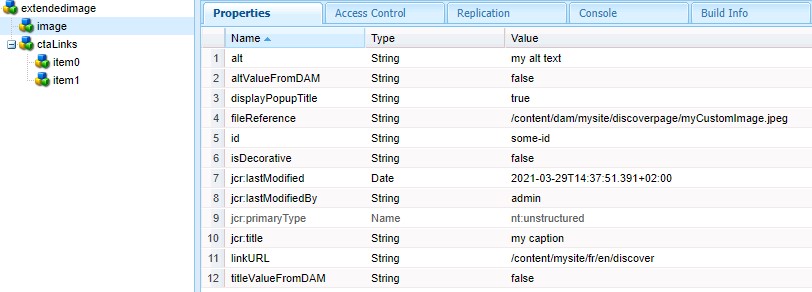
If added to a page and filled with data, the jcr node will be created like and look like this
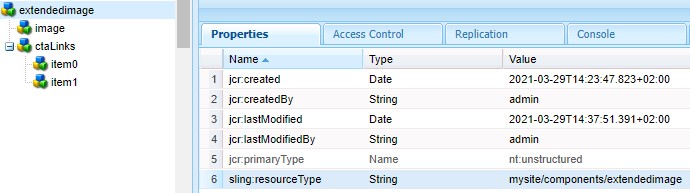
Due to the parameterized namespace include, all included/referenced image v2 dialog nodes will be included in
the namespace="image"
All custom added properties, in our case the ctaLinks Multifield, will be in their defined jcr properties, as expected and usual for any AEM component

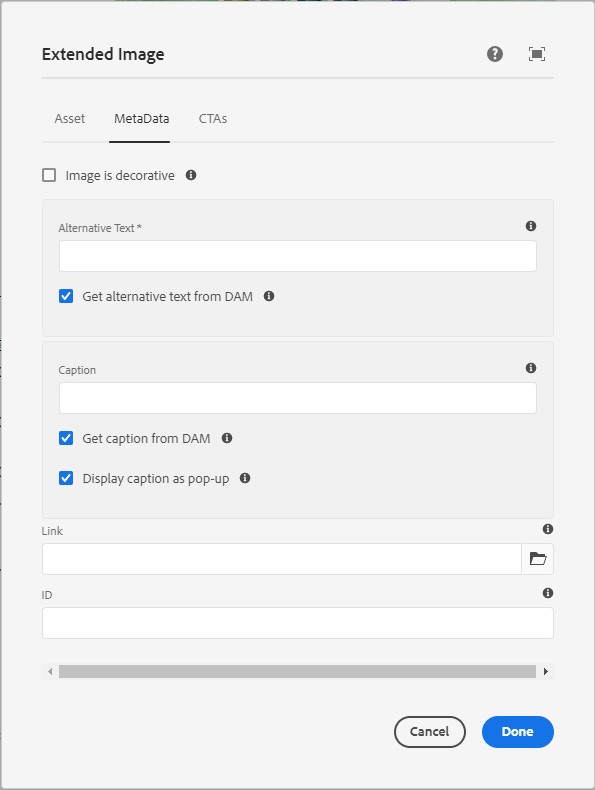
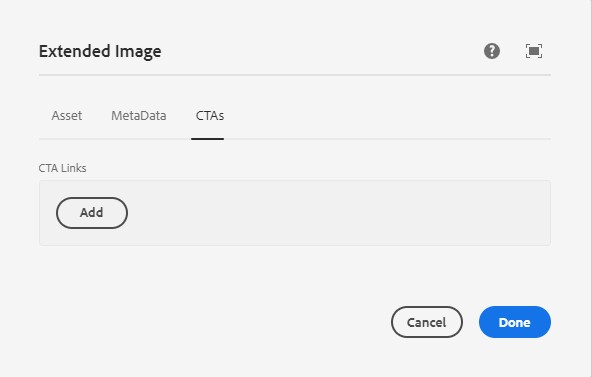
By implementing above solution, the result will look like the following image. We are reusing the inherited asset and metadata tabs, as well as our custom added tab for cta links
2. Extending the Java Backend
This post explains, how you can extend the functionality of AEM Core Components. Part 2 focuses on the backend extension and reusability of the core components already implemented logic.
TL:DR
By using two features from ACS Commons, we can easily reuse already implemented dialogs and logic from a core component, add additional properties and export it to the .model.json
We include snippets from the original dialog via Parameterized Namespace Granite Include and we inject the original sling model into our custom sling model via Child Resource From Request Injector.
Reuse Core Component Sling Model
We use the Child Resource From Request Injector to enable the injected object to access a Sling request. This lets the Image Core Component correctly populate all its fields.
The ACS Commons website describes the injector as follows
This injector is similar to the standard @ChildResource injector provided by sling, but with a key difference in that it uses a mock request object pointed to the resource path as the adaptable, allowing the sling model to reference the request and other sling bindings not otherwise accessible when adapting a resource directly. This is particularly useful when injecting instances of WCM Core components, which are generally not adaptable from Resource and thus fail to inject via the standard @ChildResource injector.
This lets us build custom components while reusing existing Core Components. Projects often need complex components that combine images, text, checkboxes, and other fields - this pattern makes that possible while minimizing code repetition.
@ChildResourceFromRequest
private com.adobe.cq.wcm.core.components.models.Image image;
Complete Class Example
This example uses Lombok annotations to avoid getter/setter boilerplate in simple Java POJOs.
By injecting our image object with the aforementioned ACS injector, we leverage the full Core Components
Image Sling Model and any logic it applies. We can inject ctaLinks (see Part 1 for the dialog XML) via a
regular @ChildResource, since we are passing the untouched JSON data from the JCR to the .model.json output.
// core/src/main/java/com/mysite/core/models/image/ExtendedImage.java
package com.mysite.core.models.image;

import com.adobe.acs.commons.models.injectors.annotation.ChildResourceFromRequest;
import com.adobe.cq.export.json.ComponentExporter;
import com.adobe.cq.export.json.ExporterConstants;
import lombok.Getter;
import lombok.Setter;
import org.apache.sling.api.SlingHttpServletRequest;
import org.apache.sling.api.resource.Resource;
import org.apache.sling.models.annotations.DefaultInjectionStrategy;
import org.apache.sling.models.annotations.Exporter;
import org.apache.sling.models.annotations.Model;
import org.apache.sling.models.annotations.injectorspecific.ChildResource;

@Model(
        adaptables = SlingHttpServletRequest.class,
        adapters = {ExtendedImage.class, ComponentExporter.class},
        resourceType = ExtendedImage.RESOURCE_TYPE,
        defaultInjectionStrategy = DefaultInjectionStrategy.OPTIONAL)
@Exporter(name = ExporterConstants.SLING_MODEL_EXPORTER_NAME, extensions = ExporterConstants.SLING_MODEL_EXTENSION)
@Getter
@Setter
public class ExtendedImage implements ComponentExporter {

    public static final String RESOURCE_TYPE = "mysite/components/extendedimage";

    @ChildResourceFromRequest
    private com.adobe.cq.wcm.core.components.models.Image image;

    @ChildResource
    private Resource ctaLinks;

    @Override
    public String getExportedType() {
        return RESOURCE_TYPE;
    }
}
Example JSON Export
Implementing the Sling Model above together with the component from Part 1 gives us a custom extendedImage
component that exports all Core Components Image properties under the image namespace, along with our own
additional properties.
{
    "extendedimage": {
        "image": {
            "id": "some-id",
            "alt": "my alt text",
            "title": "my caption",
            "src": "/content/mysite/fr/en/home/_jcr_content/root/responsivegrid/extendedimage/image.img.jpeg/1617021471391/myCustomImage.jpeg",
            "link": "/content/mysite/fr/en/discover.html",
            "type": "nt:unstructured",
            "dataLayer": {
                "some-id": {
                    "@type": "nt:unstructured",
                    "repo:modifyDate": "2021-03-29T12:37:51Z",
                    "dc:title": "my caption",
                    "xdm:linkURL": "/content/mysite/fr/en/discover.html",
                    "image": {
                        "repo:id": "3227649d-917f-461f-afc6-7d545d51cb33",
                        "repo:modifyDate": "2021-03-22T15:21:43Z",
                        "@type": "image/jpeg",
                        "repo:path": "/content/dam/mysite/discoverpage/myCustomImage.jpeg",
                        "xdm:tags": [],
                        "xdm:smartTags": {}
                    }
                }
            }
        },
        "ctaLinks": {
            "jcr:primaryType": "nt:unstructured",
            "item0": {
                "jcr:primaryType": "nt:unstructured",
                "path": "/content/mysite/fr/en/home",
                "title": "CTA 1"
            },
            "item1": {
                "jcr:primaryType": "nt:unstructured",
                "path": "/content/mysite/fr/en/discover",
                "title": "CTA 2"
            }
        },
        "type": "mysite/components/extendedimage"
    }
}
Links & Downloads
- Core Components Releases
- Core Components Library
- Image Core Component
- Parameterized Namespace Granite Include
- Child Resource From Request Injector
- JCR Package Manager
Credits
Thanks to Niek Raaijmakers for figuring some of this out :)