Touch UI Component Dialog Examples
The following chapters each present a Coral XML snippet which can be copied into any component's _cq_dialog/.content.xml.
A dialog is the form an author gets when they configure a component. Each widget is a Granite UI resource, and the name on that widget is the JCR property written on the component content node.
ui.apps/.../components/teaser/
  .content.xml                    # cq:Component
  teaser.html
  _cq_dialog/.content.xml         # node name: cq:dialog
  _cq_design_dialog/.content.xml  # template policy
  _cq_editConfig.xml              # inline editing, drop targets
_cq_dialog keeps the colon out of the filename. FileVault turns the underscore into cq:dialog. Build new dialogs with Coral 3 resource types (granite/ui/components/coral/foundation/...). Coral 2 widgets live under granite/ui/components/foundation and still show up in older projects; the pathbrowser section below is the one you will recognise.
A value is stored only when name is relative to the component:
name="./title"
Without the ./ the POST lands on the wrong resource and the dialog looks like it does not save. The XML element name (<title>, <heading>, <alert>) only has to be unique among siblings. It is not the property name.
/content/mysite/en/jcr:content/root/teaser
  title = "Spring collection"
  fileReference = "/content/dam/spring.jpg"
  links/            # composite multifield, name="./links"
    item0/  label, url
    item1/  label, url
For a first component, the beginners guide dialog chapter walks through one dialog end to end. This page is the catalog you copy from after that. Widget contracts live in the Granite UI server-side API.
TL;DR
- Start from the empty dialog template and evolve it.
- Use
fieldLabel+fieldDescriptionconsistently for author guidance. - Prefer
compositemultifields and@ChildResourcewhen you need structured data. - Reach for
cq-dialog-dropdown-showhidebefore writing a dialog clientlib. - Set
uncheckedValueon checkboxes, andselectedon the default select option. - Keep validation minimal and handle missing values in your Sling Model.
Quick navigation
- Best Practices
- Common pitfalls
- Empty Dialog / Starting Point
- Simple Data Fields
- Complex Data Fields
- Validation (see also the deep dive: Dialog Validation)
- Dialog Inheritance
- cq editConfig - inline editing, listeners, drop targets
- Design Dialog (Template Policies)
- Rich Text Editor (RTE)
- MSM / Live Copy considerations
- Dialog cookbook
- Full XML Example
- AEM Component Help Pages
- Accessibility
Best Practices
- If possible, extend an existing core component.
- Version your components
<component>/<version>/<component>. - Structure your fields into tabs where it makes sense
- Do not overuse multifields
- Use as few fields as possible, but as many as necessary
- Use Granite Alerts for important hints or notes
- Use granite wells where fields could be visually grouped.
- Add a component README.md file to help authors
- Add clientLib files directly into the component folder if necessary
- Don't overdo validation, handle missing fields gracefully in the model as well
Common pitfalls
- Missing
name, or anamewithout the./prefix. The field renders and the POST goes nowhere useful. - A checkbox with no
uncheckedValue. Clearing it deletes the property, so the model seesnullinstead offalse. - A select or radio with no
selecteditem. The closed dialog shows the first option, and nothing is stored until the author changes it. - Treating the multifield's own node name as the JCR name. For a composite multifield the stored node is the
nameon the innerfieldcontainer. min-items/max-itemswith no validator. Those data attributes are inert until the multifield validator is registered.requiredon a field that show/hide can hide. Thehideclass does not turn validation off, so save stays blocked.- A numberfield with no
@TypeHint. The value is stored as a String. - Renaming
nameafter content exists, with no fallback in the Sling Model. - Pasting
sling:hideChildren="[*]"into a proxy dialog. That drops every inherited tab. See Dialog Inheritance. - Forgetting
fieldLabel, which makes the dialog harder to scan and leaves the input unlabelled for assistive tech. - A composite multifield where a fixed group of fields would do. A fieldset is the smaller tool.
- A dialog clientlib on
cq.authoring.dialog, so the script loads in every dialog. PreferextraClientlibs.
Empty Dialog / Starting Point
This is an empty dialog structure and components can be placed in tabs (you can add n tabs.)

<?xml version="1.0" encoding="UTF-8"?>
<jcr:root xmlns:sling="http://sling.apache.org/jcr/sling/1.0" xmlns:granite="http://www.adobe.com/jcr/granite/1.0" xmlns:cq="http://www.day.com/jcr/cq/1.0" xmlns:jcr="http://www.jcp.org/jcr/1.0" xmlns:nt="http://www.jcp.org/jcr/nt/1.0"
          jcr:primaryType="nt:unstructured"
          jcr:title="MyTestComponent"
          sling:resourceType="cq/gui/components/authoring/dialog"
          helpPath="https://url-to-your-documentation.com">
    <content
            granite:class="cmp-mytestcmp__editor"
            jcr:primaryType="nt:unstructured"
            sling:resourceType="granite/ui/components/coral/foundation/container">
        <items jcr:primaryType="nt:unstructured">
            <tabs
                    jcr:primaryType="nt:unstructured"
                    sling:resourceType="granite/ui/components/coral/foundation/tabs"
                    maximized="{Boolean}true">
                <items jcr:primaryType="nt:unstructured">
                    <properties
                            jcr:primaryType="nt:unstructured"
                            jcr:title="Properties"
                            sling:resourceType="granite/ui/components/coral/foundation/container"
                            margin="{Boolean}true">
                        <items jcr:primaryType="nt:unstructured">
                            <columns
                                    jcr:primaryType="nt:unstructured"
                                    sling:resourceType="granite/ui/components/coral/foundation/fixedcolumns"
                                    margin="{Boolean}true">
                                <items jcr:primaryType="nt:unstructured">
                                    <column
                                            jcr:primaryType="nt:unstructured"
                                            sling:resourceType="granite/ui/components/coral/foundation/container">
                                        <items jcr:primaryType="nt:unstructured">
                                        <!--  Place your components / dialog fields here  -->
                                        </items>
                                    </column>
                                </items>
                            </columns>
                        </items>
                    </properties>
                    <layout
                            jcr:primaryType="nt:unstructured"
                            jcr:title="Layout"
                            sling:resourceType="granite/ui/components/coral/foundation/container"
                            margin="{Boolean}true">
                        <items jcr:primaryType="nt:unstructured">
                            <columns
                                    jcr:primaryType="nt:unstructured"
                                    sling:resourceType="granite/ui/components/coral/foundation/fixedcolumns"
                                    margin="{Boolean}true">
                                <items jcr:primaryType="nt:unstructured">
                                    <column
                                            jcr:primaryType="nt:unstructured"
                                            sling:resourceType="granite/ui/components/coral/foundation/container">
                                        <items jcr:primaryType="nt:unstructured">
                                        <!--  Place your components / dialog fields here  -->
                                        </items>
                                    </column>
                                </items>
                            </columns>
                        </items>
                    </layout>
                </items>
            </tabs>
        </items>
    </content>
</jcr:root>

Authors see one tab per child of tabs/items. Put fields in that tab's column items. jcr:title is the tab label. margin="{Boolean}true" is the padding; without it the fields sit on the dialog chrome. maximized="{Boolean}true" lets the tab body fill the dialog.
granite:class and granite:id land on the widget root, which is how dialog CSS and show/hide scripts find a field. required="{Boolean}true" on a form field marks it required.
The XML element name can be anything, as long as it is unique among its siblings.
The Alert snippet does not have to be named alert. The name attribute is what gets stored.
Simple Data Fields
Textfield
<textfield
   jcr:primaryType="nt:unstructured"
   sling:resourceType="granite/ui/components/coral/foundation/form/textfield"
   fieldDescription="The button label"
   fieldLabel="Button Label"
   name="./label"
   emptyText="Learn more"/>
emptyText is the placeholder and is not saved. value is submitted with the dialog, so it becomes real content on the first save even when the author never touches the field. Put fallbacks in the Sling Model when they should stay out of the JCR. See Persisted values and defaults.

Textarea
<textarea
   jcr:primaryType="nt:unstructured"
   sling:resourceType="granite/ui/components/coral/foundation/form/textarea"
   fieldLabel="This is a text area"
   emptyText="Please add your descriptive text"
   name="./textareacontent"/>

Hidden
<hidden
    jcr:primaryType="nt:unstructured"
    sling:resourceType="granite/ui/components/coral/foundation/form/hidden"
    name="./source"
    value="author-ui"/>
Numberfield
You can define the min, max value and the increments, in which the input can be set.
<numberfield
    jcr:primaryType="nt:unstructured"
    sling:resourceType="granite/ui/components/coral/foundation/form/numberfield"
    fieldLabel="Choose a number value"
    name="./numbervalue"
    min="{Long}1"
    max="{Long}10"
    step="{Double}1"/>
The widget posts a string, so the JCR property is "1" unless the submit also carries a Sling type hint. Add a hidden sibling when the property should be a Long (or Double for decimals):
<numberTypeHint
    jcr:primaryType="nt:unstructured"
    sling:resourceType="granite/ui/components/coral/foundation/form/hidden"
    name="./numbervalue@TypeHint"
    value="Long"/>
A Sling Model long converts the string and hides the mismatch until a query or a script compares types.

Pathfield (Pathbrowser)
<pathfield
   jcr:primaryType="nt:unstructured"
   sling:resourceType="granite/ui/components/coral/foundation/form/pathfield"
   fieldLabel="Select path"
   rootPath="/content"
   name="./path"/>
rootPath is case-sensitive. rootpath is ignored and the picker opens at /.
filter limits the picker:
filter | Picker shows |
|---|---|
hierarchyNotFile | Pages and folders, not assets |
nosystem | Hides /apps, /libs, and other system paths |
| omitted | Pages and assets |
An asset picker uses rootPath="/content/dam" and no filter. hierarchyNotFile on a DAM root hides the assets you wanted the author to pick.

Pathfield picker options
<pathfield
   jcr:primaryType="nt:unstructured"
   sling:resourceType="granite/ui/components/coral/foundation/form/pathfield"
   fieldLabel="Select asset"
   forceSelection="{Boolean}true"
   rootPath="/content/dam"
   pickerSrc="/mnt/overlay/granite/ui/content/coral/foundation/form/pathfield/picker.html"
   name="./assetPath"/>
For an implementation of a dynamic rootPath, see Custom Dialog Widgets - Dynamic PathField.
Pathbrowser
In legacy AEM 6.5 codebases you might still encounter the older Coral 2 pathbrowser component. Prefer the Coral 3 pathfield above for new dialogs, especially for AEM as a Cloud Service projects.
You can recognize the Coral 3 components by the path /components/coral/foundation. The older Coral 2 variants live
in /components/foundation.
<pathbrowser
   jcr:primaryType="nt:unstructured"
   sling:resourceType="granite/ui/components/foundation/form/pathbrowser"
   fieldLabel="Select asset"
   rootPath="/content/dam"
   name="./assetpath"/>

Asset Upload
<file
    jcr:primaryType="nt:unstructured"
    sling:resourceType="cq/gui/components/authoring/dialog/fileupload"
    class="cq-droptarget"
    fileNameParameter="./fileName"
    fileReferenceParameter="./fileReference"
    mimeTypes="[image/gif,image/jpeg,image/png,image/tiff,image/svg+xml]"
    fieldLabel="Image"
    name="./file"/>
fileReferenceParameter is the DAM path written when the author picks an existing asset (./fileReference). name="./file" is the binary child used when they upload from disk. Drag-and-drop from the asset finder also needs a matching drop target on cq:editConfig. Set allowUpload="{Boolean}false" when the asset must already live in the DAM.

Checkbox
<checkbox
    jcr:primaryType="nt:unstructured"
    sling:resourceType="granite/ui/components/coral/foundation/form/checkbox"
    checked="{Boolean}true"
    name="./altValueFromPageImage"
    text="Inherit alternative text from page"
    uncheckedValue="{Boolean}false"
    value="{Boolean}true"/>
text is the checkbox caption. A fieldLabel on the same widget draws a second caption above it.
value is written when the box is checked. uncheckedValue is written when it is cleared. Omit uncheckedValue and clearing the box deletes the property: a primitive boolean in the Sling Model reads false, a Boolean reads null. checked applies only while the property is missing; once the author has saved, the stored value wins.

Checkbox group
<checkboxGroup
    jcr:primaryType="nt:unstructured"
    sling:resourceType="granite/ui/components/coral/foundation/form/checkboxgroup"
    fieldLabel="Options"
    name="./options">
    <items jcr:primaryType="nt:unstructured">
        <optA text="Option A" value="a" jcr:primaryType="nt:unstructured"/>
        <optB text="Option B" value="b" jcr:primaryType="nt:unstructured"/>
    </items>
</checkboxGroup>
Checked options are stored as a String[] on ./options. Read it with @ValueMapValue private String[] options. There is no uncheckedValue here: clearing every box removes the property.
Switch
<switch
   jcr:primaryType="nt:unstructured"
   sling:resourceType="granite/ui/components/coral/foundation/form/switch"
   checked="{Boolean}true"
   name="./switchValue"
   fieldLabel="Toggle Me"
   uncheckedValue="{Boolean}false"
   value="{Boolean}true"/>
A switch persists the same way as a checkbox: value when on, uncheckedValue when off, property deleted when uncheckedValue is missing. onText and offText replace the default labels.

Switch with labels
<switch
   jcr:primaryType="nt:unstructured"
   sling:resourceType="granite/ui/components/coral/foundation/form/switch"
   fieldLabel="Enable feature"
   onText="On"
   offText="Off"
   name="./featureEnabled"
   uncheckedValue="{Boolean}false"
   value="{Boolean}true"/>
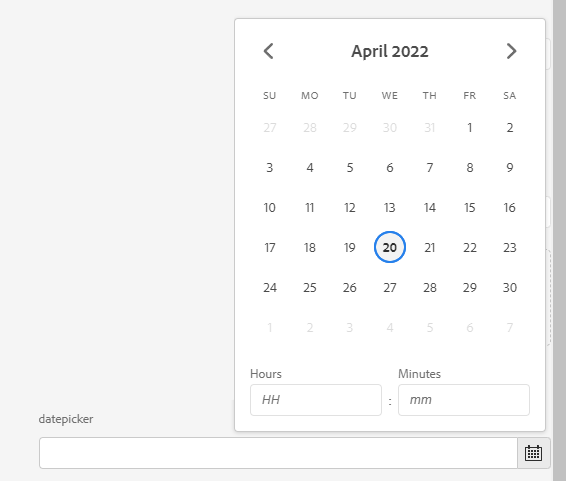
Datepicker
<datepicker
   jcr:primaryType="nt:unstructured"
   sling:resourceType="granite/ui/components/coral/foundation/form/datepicker"
   displayedFormat="MM-DD-YYYY HH:mm"
   fieldLabel="datepicker"
   name="./datepicker"
   type="datetime"
   typeHint="Date"/>
displayedFormat uses Moment tokens, not SimpleDateFormat. DD is the day of the month and dd is the day of the week, so a Java-style dd-MM-yyyy renders the weekday. YYYY-MM-DD is the usual date-only format.
type is date, time, or datetime. typeHint="Date" stores a JCR Date, which a Calendar injection can read. Without the hint the value is an ISO string and the Calendar comes back null.
Datepicker constraints
<datepicker
   jcr:primaryType="nt:unstructured"
   sling:resourceType="granite/ui/components/coral/foundation/form/datepicker"
   fieldLabel="Publish date"
   minDate="2024-01-01"
   maxDate="2030-12-31"
   displayedFormat="YYYY-MM-DD"
   name="./publishDate"/>
Colorfield
<colorpicker
    jcr:primaryType="nt:unstructured"
    sling:resourceType="granite/ui/components/coral/foundation/form/colorfield"
    fieldLabel="Brand Color"
    name="./brandColor"
    showDefaultColors="{Boolean}true"
    showProperties="{Boolean}true"
    showSwatches="{Boolean}true"/>
You can also restrict to a predefined palette by providing custom swatches:
<colorpicker
    jcr:primaryType="nt:unstructured"
    sling:resourceType="granite/ui/components/coral/foundation/form/colorfield"
    fieldLabel="Theme Color"
    name="./themeColor"
    showProperties="{Boolean}false"
    showSwatches="{Boolean}true"
    showDefaultColors="{Boolean}false">
    <items jcr:primaryType="nt:unstructured">
        <primary jcr:primaryType="nt:unstructured" value="#0055FF"/>
        <secondary jcr:primaryType="nt:unstructured" value="#FF6600"/>
        <dark jcr:primaryType="nt:unstructured" value="#333333"/>
    </items>
</colorpicker>
Password
<password
    jcr:primaryType="nt:unstructured"
    sling:resourceType="granite/ui/components/coral/foundation/form/password"
    fieldLabel="API Key"
    fieldDescription="Stored as plain text in the JCR - consider using OSGi configs for secrets"
    name="./apiKey"/>
Dialog passwords are stored as plain text in the JCR. For actual secrets, use OSGi secret configurations or context-aware configurations instead.
Button Group
A visual toggle group, useful for alignment or variant selection. Set selectionMode to single, multiple, or none.
<alignment
    jcr:primaryType="nt:unstructured"
    sling:resourceType="granite/ui/components/coral/foundation/form/buttongroup"
    fieldLabel="Text Alignment"
    selectionMode="single"
    name="./alignment">
    <items jcr:primaryType="nt:unstructured">
        <left  jcr:primaryType="nt:unstructured" text="Left"   value="left"   icon="textLeft"/>
        <center jcr:primaryType="nt:unstructured" text="Center" value="center" icon="textCenter" checked="{Boolean}true"/>
        <right jcr:primaryType="nt:unstructured" text="Right"  value="right"  icon="textRight"/>
    </items>
</alignment>
Userpicker
<userpicker
    jcr:primaryType="nt:unstructured"
    sling:resourceType="granite/ui/components/coral/foundation/form/userpicker"
    fieldLabel="User Picker"
    hideServiceUsers="{Boolean}true"
    impersonatesOnly="{Boolean}false"
    name="./user"/>

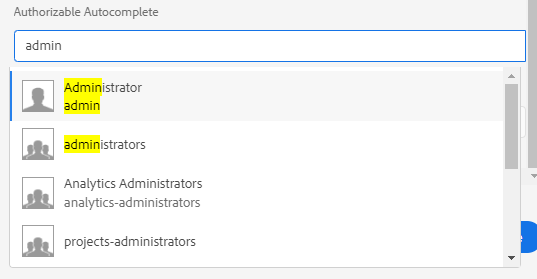
Authorizable Autocomplete
<authautocomplete
    jcr:primaryType="nt:unstructured"
    sling:resourceType="granite/ui/components/coral/foundation/authorizable/autocomplete"
    fieldLabel="User Picker"
    name="./user"/>
Complex Data Fields
Conditional fields (show/hide)
Use a render condition when you need server-side control (for example, permissions or site-level logic).
A render condition decides whether a field is even rendered into the dialog HTML - the author
cannot reveal it from the client. See the dedicated Render Conditions
page for the full pattern (custom rendercondition resource type + server-side logic), and Adobe's
Granite UI render condition reference.
<advancedSettings
    jcr:primaryType="nt:unstructured"
    sling:resourceType="granite/ui/components/coral/foundation/container">
    <granite:rendercondition
        jcr:primaryType="nt:unstructured"
        sling:resourceType="com.myproject/renderconditions/isAdmin"/>
    <items jcr:primaryType="nt:unstructured">
        <!-- advanced fields -->
    </items>
</advancedSettings>
For client-side toggles (show/hide based on a checkbox or select), prefer dialog JS in a small clientlib scoped to dialog usage.
Native showhide with cq-dialog-dropdown-showhide
The dialog editor already loads cq.authoring.dialog, and that clientlib contains Adobe's show/hide script. You do not register anything. A select (or checkbox) with the class below toggles every element that carries the matching target class and showhidetargetvalue.
Dropdown-controlled target
<linkType
    jcr:primaryType="nt:unstructured"
    sling:resourceType="granite/ui/components/coral/foundation/form/select"
    fieldLabel="Link Type"
    name="./linkType"
    granite:class="cq-dialog-dropdown-showhide">
    <granite:data
        jcr:primaryType="nt:unstructured"
        cq-dialog-dropdown-showhide-target=".cmp-link-type-target"/>
    <items jcr:primaryType="nt:unstructured">
        <internal jcr:primaryType="nt:unstructured" text="Internal" value="internal"/>
        <external jcr:primaryType="nt:unstructured" text="External" value="external"/>
        <email    jcr:primaryType="nt:unstructured" text="Email"    value="email"/>
    </items>
</linkType>

<internalPath
    jcr:primaryType="nt:unstructured"
    sling:resourceType="granite/ui/components/coral/foundation/form/pathfield"
    fieldLabel="Internal Path"
    name="./internalPath"
    rootPath="/content"
    granite:class="cmp-link-type-target hide">
    <granite:data
        jcr:primaryType="nt:unstructured"
        showhidetargetvalue="internal"/>
</internalPath>

<externalUrl
    jcr:primaryType="nt:unstructured"
    sling:resourceType="granite/ui/components/coral/foundation/form/textfield"
    fieldLabel="External URL"
    name="./externalUrl"
    granite:class="cmp-link-type-target hide">
    <granite:data
        jcr:primaryType="nt:unstructured"
        showhidetargetvalue="external"/>
</externalUrl>

<emailAddress
    jcr:primaryType="nt:unstructured"
    sling:resourceType="granite/ui/components/coral/foundation/form/textfield"
    fieldLabel="Email Address"
    name="./emailAddress"
    granite:class="cmp-link-type-target hide">
    <granite:data
        jcr:primaryType="nt:unstructured"
        showhidetargetvalue="email"/>
</emailAddress>
How Adobe's script resolves it:
- The select fires a
changeevent; the script readscq-dialog-dropdown-showhide-target. - It queries the document for every element matching that selector (e.g.
.cmp-link-type-target). - For each target, it reads the target's
showhidetargetvalueand compares to the current select value. - Matching targets lose the
hideclass; the others gain it. Ondialog-readythe script runs against the saved value, so a field can start withhideand still be visible when the stored value matches.
The script toggles hide. It does not disable Foundation validation. A target with required="{Boolean}true" fails the dialog while it is hidden. Leave required off fields that can be hidden, or register a validator that skips .hide ancestors. See Dialog Validation.
Checkbox-controlled target (same idea, different class)
<enableAnalytics
    jcr:primaryType="nt:unstructured"
    sling:resourceType="granite/ui/components/coral/foundation/form/checkbox"
    text="Enable analytics tracking"
    name="./enableAnalytics"
    value="{Boolean}true"
    uncheckedValue="{Boolean}false"
    granite:class="cq-dialog-checkbox-showhide">
    <granite:data
        jcr:primaryType="nt:unstructured"
        cq-dialog-checkbox-showhide-target=".cmp-analytics-settings"/>
</enableAnalytics>

<trackingId
    jcr:primaryType="nt:unstructured"
    sling:resourceType="granite/ui/components/coral/foundation/form/textfield"
    fieldLabel="Tracking ID"
    name="./trackingId"
    granite:class="cmp-analytics-settings hide"/>
With the checkbox variant, the target is simply shown when checked and hidden when unchecked -
there's no showhidetargetvalue needed.
Adobe's script queries the whole document by default. Inside a composite multifield every item
has its own controller and target, so a global .cmp-link-type-target selector matches rows other
than the one the author is editing and toggles them all together. For per-row behaviour, use the
custom JS pattern shown below -- it scopes lookups to closest("coral-multifield-item").
Dynamic show/hide based on a selection
Use this when the built-in script is not enough. The usual case is a controller inside a composite multifield: Adobe's script queries the whole document, so every row toggles together. A radiogroup can drive the same script if you listen for change and read the group value. The example uses a select.
1) Controller and target share a multifield row
granite:class="linkType-showhide-source" is the controller. linkType-showhide-target is the field that should appear only for email.
<linkType
    jcr:primaryType="nt:unstructured"
    sling:resourceType="granite/ui/components/coral/foundation/form/select"
    granite:class="linkType-showhide-source"
    fieldLabel="Link type"
    name="./linkType">
    <items jcr:primaryType="nt:unstructured">
        <internal jcr:primaryType="nt:unstructured" text="Internal" value="internal"/>
        <email jcr:primaryType="nt:unstructured" text="Email" value="email"/>
    </items>
</linkType>
<emailSubject
    jcr:primaryType="nt:unstructured"
    sling:resourceType="granite/ui/components/coral/foundation/form/textfield"
    granite:class="linkType-showhide-target"
    fieldLabel="Email subject"
    name="./emailSubject"/>
Both fields sit in the composite multifield's field/items, next to each other, so they share one coral-multifield-item.
2) Load the script in this dialog only
Give the clientlib its own category and name it from the dialog with extraClientlibs. A category of cq.authoring.dialog loads the same file in every dialog in the project.
<jcr:root xmlns:jcr="http://www.jcp.org/jcr/1.0" xmlns:nt="http://www.jcp.org/jcr/nt/1.0"
          xmlns:sling="http://sling.apache.org/jcr/sling/1.0"
          jcr:primaryType="nt:unstructured"
          jcr:title="My Component"
          extraClientlibs="[cq.authoring.mycomponent]"
          sling:resourceType="cq/gui/components/authoring/dialog">
    <!-- [...] -->
</jcr:root>
<?xml version="1.0" encoding="UTF-8"?>
<jcr:root xmlns:cq="http://www.day.com/jcr/cq/1.0"
          xmlns:jcr="http://www.jcp.org/jcr/1.0"
          jcr:primaryType="cq:ClientLibraryFolder"
          categories="[cq.authoring.mycomponent]"
          allowProxy="{Boolean}true"/>
#base=js
dialog-visibility.js
3) Toggle the row the author is editing
granite:class lands on the field wrapper for some widgets and on coral-select for others. Resolve the select either way, then scope the target lookup to coral-multifield-item. New rows are inserted after dialog-ready, so a MutationObserver on the multifield has to run init again. Toggling display (instead of adding and removing nodes) keeps a row that was just added in the right state.
(function (document, $) {
    "use strict";

    var SOURCE = ".linkType-showhide-source";
    var TARGET = ".linkType-showhide-target";

    function findSelect(source) {
        if (source.tagName === "CORAL-SELECT") {
            return source;
        }
        return source.querySelector("coral-select");
    }

    function toggle(select) {
        var row = $(select).closest("coral-multifield-item");
        var scope = row.length ? row : $(document);
        var showEmail = select.value === "email";

        scope.find(TARGET).each(function () {
            var wrapper = $(this).closest("div.coral-Form-fieldwrapper");
            (wrapper.length ? wrapper : $(this)).toggle(showEmail);
        });
    }

    function init(root) {
        $(root).find(SOURCE).each(function () {
            var select = findSelect(this);
            if (!select || select.dataset.linktypeInitialized) {
                return;
            }
            select.dataset.linktypeInitialized = "true";
            toggle(select);
            $(select).on("change", function () {
                toggle(select);
            });
        });
    }

    $(document).on("dialog-ready", function () {
        init(document);

        document.querySelectorAll("coral-multifield").forEach(function (multifield) {
            new MutationObserver(function () {
                init(multifield);
            }).observe(multifield, { childList: true });
        });
    });
})(document, Granite.$);
Select Dropdown
<select
        jcr:primaryType="nt:unstructured"
        sling:resourceType="granite/ui/components/coral/foundation/form/select"
        fieldLabel="List Item"
        name="./selectItem">
    <items jcr:primaryType="nt:unstructured">
        <children
                jcr:primaryType="nt:unstructured"
                text="Child pages"
                value="children"
                selected="{Boolean}true"/>
        <static
                jcr:primaryType="nt:unstructured"
                text="Fixed list"
                value="static"/>
        <search
                jcr:primaryType="nt:unstructured"
                text="Search"
                value="search"/>
        <tags
                jcr:primaryType="nt:unstructured"
                text="Tags"
                value="tags"/>
    </items>
</select>
Open

Closed

selected="{Boolean}true" is the value stored when the author saves without touching the field. With no selected item, Coral shows the first option in the closed dropdown and the property stays missing until they change it. Handle the same fallback in the Sling Model, because content created before the field existed has no property either.
Select with datasource
<categorySelect
    jcr:primaryType="nt:unstructured"
    sling:resourceType="granite/ui/components/coral/foundation/form/select"
    fieldLabel="Category"
    name="./category">
    <datasource
        jcr:primaryType="nt:unstructured"
        sling:resourceType="myproject/datasource/categories"/>
    <items jcr:primaryType="nt:unstructured"/>
</categorySelect>
The datasource servlet
The datasource sling:resourceType points at a servlet that builds the option list at dialog-render
time. The servlet sets a DataSource request attribute whose items are resources of type
nt:unstructured carrying value and text properties - exactly what the select expects.
import com.adobe.granite.ui.components.ds.DataSource;
import com.adobe.granite.ui.components.ds.SimpleDataSource;
import com.adobe.granite.ui.components.ds.ValueMapResource;
import org.apache.sling.api.SlingHttpServletRequest;
import org.apache.sling.api.SlingHttpServletResponse;
import org.apache.sling.api.resource.ResourceMetadata;
import org.apache.sling.api.resource.ResourceResolver;
import org.apache.sling.api.resource.ValueMap;
import org.apache.sling.api.wrappers.ValueMapDecorator;
import org.apache.sling.servlets.annotations.SlingServletResourceTypes;
import org.osgi.service.component.annotations.Component;

import javax.servlet.Servlet;
import java.util.ArrayList;
import java.util.Iterator;
import java.util.LinkedHashMap;
import java.util.List;
import java.util.Map;

@Component(service = Servlet.class)
@SlingServletResourceTypes(
    resourceTypes = "myproject/datasource/categories",
    methods = "GET"
)
public class CategoryDatasourceServlet extends org.apache.sling.api.servlets.SlingSafeMethodsServlet {

    @Override
    protected void doGet(SlingHttpServletRequest request, SlingHttpServletResponse response) {
        ResourceResolver resolver = request.getResourceResolver();

        // Source your options however you like: a config, a query, a service, a taxonomy...
        Map<String, String> options = new LinkedHashMap<>();
        options.put("news", "News");
        options.put("blog", "Blog");
        options.put("press", "Press Release");

        List<org.apache.sling.api.resource.Resource> items = new ArrayList<>();
        for (Map.Entry<String, String> entry : options.entrySet()) {
            ValueMap vm = new ValueMapDecorator(new java.util.HashMap<>());
            vm.put("value", entry.getKey());
            vm.put("text", entry.getValue());
            items.add(new ValueMapResource(resolver, new ResourceMetadata(), "nt:unstructured", vm));
        }

        Iterator<org.apache.sling.api.resource.Resource> it = items.iterator();
        DataSource ds = new SimpleDataSource(it);
        request.setAttribute(DataSource.class.getName(), ds);
    }
}
The select compares each option's value with the property already stored on the component. A datasource item with that value is selected on open, the same as a static item. Set selected="{Boolean}true" only for the default, when the property is still missing.
Radio Select
<radio
        jcr:primaryType="nt:unstructured"
        sling:resourceType="granite/ui/components/coral/foundation/form/radiogroup"
        name="./radioselection"
        vertical="{Boolean}true"
        fieldLabel="Radio Select">
    <items jcr:primaryType="nt:unstructured">
        <vara
                jcr:primaryType="nt:unstructured"
                text="Variation A"
                value="var-a"
                selected="{Boolean}true"/>
        <varb
                jcr:primaryType="nt:unstructured"
                text="Variation B"
                value="var-b"/>
    </items>
</radio>
Same rule as a select: set selected on the default, or the first radio looks chosen and nothing is written.

Coral 3 radio group (explicit)
<variant
    jcr:primaryType="nt:unstructured"
    sling:resourceType="granite/ui/components/coral/foundation/form/radiogroup"
    fieldLabel="Variant"
    name="./variant">
    <items jcr:primaryType="nt:unstructured">
        <simple text="Simple" value="simple" selected="{Boolean}true" jcr:primaryType="nt:unstructured"/>
        <advanced text="Advanced" value="advanced" jcr:primaryType="nt:unstructured"/>
    </items>
</variant>
Datasource-backed fields
For dynamic values, provide a datasource resource type. This works well for autocomplete and selects.
<customValue
    jcr:primaryType="nt:unstructured"
    sling:resourceType="granite/ui/components/coral/foundation/form/autocomplete"
    fieldLabel="Backend-driven values"
    name="./customValue"
    emptyText="Pick a value"
    multiple="{Boolean}false">
    <datasource
        jcr:primaryType="nt:unstructured"
        sling:resourceType="myproject/datasource/customstrings"/>
    <options
        jcr:primaryType="nt:unstructured"
        sling:resourceType="granite/ui/components/coral/foundation/form/autocomplete/list"/>
</customValue>
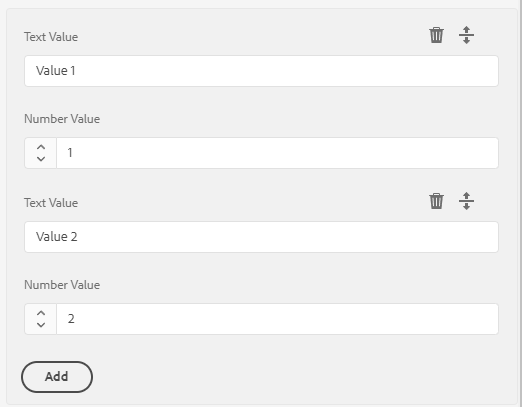
Multifield
A multifield lets an author add n copies of a field or a field group. There are two storage shapes, and they are not interchangeable.
Flat (no composite) stores one multi-value property. The name on the inner field is that property:
<keywords
    jcr:primaryType="nt:unstructured"
    sling:resourceType="granite/ui/components/coral/foundation/form/multifield"
    fieldLabel="Keywords">
    <field
        jcr:primaryType="nt:unstructured"
        sling:resourceType="granite/ui/components/coral/foundation/form/textfield"
        name="./keywords"/>
</keywords>
teaser
  keywords = ["spring", "lookbook"]    String[]
Read it with @ValueMapValue private String[] keywords.
Composite (composite="{Boolean}true") stores ordered child nodes. The JCR name is the name on the inner field container, not the multifield element's own node name. Inner fields use their own ./ names, relative to each item:
teaser
  links/                 # name="./links" on the field container
    item0/  text = "..."
    item1/  text = "..."
@ChildResource injects that list. The child model adapts from Resource, and the list follows JCR child order. Sort by that order. Sorting the node names as strings puts item10 before item2.
import java.util.Collections;
import java.util.List;

import org.apache.sling.api.SlingHttpServletRequest;
import org.apache.sling.api.resource.Resource;
import org.apache.sling.models.annotations.Model;
import org.apache.sling.models.annotations.injectorspecific.ChildResource;
import org.apache.sling.models.annotations.injectorspecific.ValueMapValue;

@Model(adaptables = SlingHttpServletRequest.class)
public class LinkList {

    @ChildResource
    private List<Link> links;

    public List<Link> getLinks() {
        return links != null ? links : Collections.emptyList();
    }

    @Model(adaptables = Resource.class)
    public static class Link {
        @ValueMapValue
        private String text;

        public String getText() {
            return text;
        }
    }
}
The full pattern, including a multifield of nested models, is on the @ChildResource page.
Multifield validation (min/max)
<links
    jcr:primaryType="nt:unstructured"
    sling:resourceType="granite/ui/components/coral/foundation/form/multifield"
    composite="{Boolean}true">
    <granite:data
        jcr:primaryType="nt:unstructured"
        min-items="1"
        max-items="5"/>
    <field
        jcr:primaryType="nt:unstructured"
        sling:resourceType="granite/ui/components/coral/foundation/container"
        name="./links">
        <items jcr:primaryType="nt:unstructured">
            <textvalue
                jcr:primaryType="nt:unstructured"
                sling:resourceType="granite/ui/components/coral/foundation/form/textfield"
                fieldLabel="Link Text"
                name="./text"/>
        </items>
    </field>
</links>
min-items and max-items are data attributes. Granite does not enforce them. They start working when a foundation.validation.validator reads data-min-items and data-max-items off the coral-multifield. That validator is on the Dialog Validation page. required="{Boolean}true" on the multifield draws the asterisk and still does not count items.
<myMultifield
    jcr:primaryType="nt:unstructured"
    sling:resourceType="granite/ui/components/coral/foundation/form/multifield"
    composite="{Boolean}true"
    required="{Boolean}true">
    <field
        jcr:primaryType="nt:unstructured"
        sling:resourceType="granite/ui/components/coral/foundation/container"
        name="./values">
        <items jcr:primaryType="nt:unstructured">
            <textvalue
                jcr:primaryType="nt:unstructured"
                sling:resourceType="granite/ui/components/coral/foundation/form/textfield"
                fieldLabel="Text Value"
                name="./textvalue"/>
            <numbervalue
                 jcr:primaryType="nt:unstructured"
                 sling:resourceType="granite/ui/components/coral/foundation/form/numberfield"
                 fieldLabel="Number Value"
                 name="./numbervalue"/>
        </items>
    </field>
</myMultifield>
FieldSet (grouped fields)
A fieldset groups related fields under a single legend, and -- usefully -- prefixes every nested
field's property name so the values land in a subnode of the component. This is the cleanest way
to persist "a logical sub-object" (e.g. social links, SEO metadata) without reaching for a
multifield.
<social
    jcr:primaryType="nt:unstructured"
    sling:resourceType="granite/ui/components/coral/foundation/form/fieldset"
    jcr:title="Social Links"
    name="./social">
    <items jcr:primaryType="nt:unstructured">
        <twitter
            jcr:primaryType="nt:unstructured"
            sling:resourceType="granite/ui/components/coral/foundation/form/textfield"
            fieldLabel="Twitter / X"
            name="./twitter"/>
        <linkedin
            jcr:primaryType="nt:unstructured"
            sling:resourceType="granite/ui/components/coral/foundation/form/textfield"
            fieldLabel="LinkedIn"
            name="./linkedin"/>
    </items>
</social>
The above persists to:
myComponent
  └─ social/
       ├─ twitter = "..."
       └─ linkedin = "..."
Read it in a Sling Model with @ChildResource:
@ChildResource
private Resource social;

public String getTwitter() {
    return social != null ? social.getValueMap().get("twitter", String.class) : null;
}
- Well - visual grouping only. No name prefix, no subnode.
- Fieldset - visual grouping and persistence into a subnode (
name="./social"). - Multifield - use only when authors can add n repeating items. A fieldset is almost always the right choice for a fixed group of fields.
Accordion
You can add a parentConfig block with active to set the accordion to be opened by default.
Any dialog field can be added to each accordion item items block.
<accordion
        jcr:primaryType="nt:unstructured"
        sling:resourceType="granite/ui/components/coral/foundation/accordion"
        variant="default">
    <items jcr:primaryType="nt:unstructured">
        <block1
                jcr:primaryType="nt:unstructured"
                jcr:title="Some Category"
                sling:resourceType="granite/ui/components/coral/foundation/container"
                maximized="{Boolean}true">
            <items jcr:primaryType="nt:unstructured">
                <textvalue1
                        jcr:primaryType="nt:unstructured"
                        sling:resourceType="granite/ui/components/coral/foundation/form/textfield"
                        fieldLabel="Text Value"
                        name="./textvalue"/>
                <textvalue2
                        jcr:primaryType="nt:unstructured"
                        sling:resourceType="granite/ui/components/coral/foundation/form/textfield"
                        fieldLabel="Text Value 2"
                        name="./textvalue2"/>
            </items>
            <parentConfig
               jcr:primaryType="nt:unstructured"
               active="{Boolean}true"/>
        </block1>
        <block2
                jcr:primaryType="nt:unstructured"
                jcr:title="Another Category"
                sling:resourceType="granite/ui/components/coral/foundation/container"
                maximized="{Boolean}true">
            <items jcr:primaryType="nt:unstructured">
                <numbervalue
                        jcr:primaryType="nt:unstructured"
                        sling:resourceType="granite/ui/components/coral/foundation/form/numberfield"
                        fieldLabel="Number Value"
                        name="./numbervalue"/>
                <numbervalue2
                        jcr:primaryType="nt:unstructured"
                        sling:resourceType="granite/ui/components/coral/foundation/form/numberfield"
                        fieldLabel="Number Value 2"
                        name="./numbervalue2"/>
            </items>
        </block2>
    </items>
</accordion>

Tags field
See also the Tags and Taxonomies deep dive.
<tags
    jcr:primaryType="nt:unstructured"
    sling:resourceType="cq/gui/components/coral/common/form/tagfield"
    fieldLabel="Tags"
    name="./cq:tags"
    multiple="{Boolean}true"
    rootPath="/content/cq:tags/myproject"/>
name="./cq:tags"is the conventional property name - Sling and AEM search already understand it, andcom.day.cq.tagging.TagManagerreads it by default.rootPathrestricts the picker to a specific taxonomy branch, which keeps authors from tagging with marketing tags intended for other projects. Omit it only when the component is truly cross-project.multiple="{Boolean}true"persists aString[]- even for a single tag, this is usually what you want, since it matches the AEM default.
Reading tags in a Sling Model - never concatenate paths, let TagManager resolve them so admin
UI paths are treated correctly:
import com.day.cq.tagging.Tag;
import com.day.cq.tagging.TagManager;
import org.apache.sling.api.SlingHttpServletRequest;
import org.apache.sling.models.annotations.injectorspecific.Self;
import org.apache.sling.models.annotations.injectorspecific.ValueMapValue;

import java.util.Arrays;
import java.util.Collections;
import java.util.List;
import java.util.Objects;
import java.util.stream.Collectors;

@ValueMapValue(name = "cq:tags")
private String[] tagIds;

@Self
private SlingHttpServletRequest request;

public List<Tag> getTags() {
    if (tagIds == null || tagIds.length == 0) {
        return Collections.emptyList();
    }
    TagManager tagManager = request.getResourceResolver().adaptTo(TagManager.class);
    if (tagManager == null) {
        return Collections.emptyList();
    }
    return Arrays.stream(tagIds)
            .map(tagManager::resolve)
            .filter(Objects::nonNull)
            .collect(Collectors.toList());
}
See Tags and Taxonomies for the full model, including reading localized tag titles and filtering by namespace.
Link tuple (label + URL + target)
A recurring pattern is a "link" made of three related fields. Group them inside a fieldset so
they persist to a single subnode, and handle the target="_blank" security additions in the
Sling Model - not in the dialog.
<link
    jcr:primaryType="nt:unstructured"
    sling:resourceType="granite/ui/components/coral/foundation/form/fieldset"
    jcr:title="Call-to-action link"
    name="./link">
    <items jcr:primaryType="nt:unstructured">
        <label
            jcr:primaryType="nt:unstructured"
            sling:resourceType="granite/ui/components/coral/foundation/form/textfield"
            fieldLabel="Label"
            name="./label"/>
        <url
            jcr:primaryType="nt:unstructured"
            sling:resourceType="granite/ui/components/coral/foundation/form/pathfield"
            fieldLabel="URL or path"
            fieldDescription="Internal paths or full URLs (https://...)"
            name="./url"/>
        <target
            jcr:primaryType="nt:unstructured"
            sling:resourceType="granite/ui/components/coral/foundation/form/select"
            fieldLabel="Open in"
            name="./target">
            <items jcr:primaryType="nt:unstructured">
                <self  jcr:primaryType="nt:unstructured" text="Same tab"  value="_self" selected="{Boolean}true"/>
                <blank jcr:primaryType="nt:unstructured" text="New tab"   value="_blank"/>
            </items>
        </target>
    </items>
</link>
Sling Model reading the subnode as a structured object - and adding rel for _blank links:
@Model(adaptables = Resource.class)
public class LinkModel {

    @ValueMapValue
    @Default(values = "")
    private String label;

    @ValueMapValue
    @Default(values = "")
    private String url;

    @ValueMapValue
    @Default(values = "_self")
    private String target;

    public String getRel() {
        // Only _blank needs noopener/noreferrer to prevent window.opener hijacking.
        return "_blank".equals(target) ? "noopener noreferrer" : null;
    }

    // label, url, target getters...
}
Adapt in the parent model with @ChildResource:
@ChildResource
private LinkModel link;
Content Fragment picker
dam/cfm/components/cfpicker is the Content Fragment picker (AEM 6.5 and Cloud Service). The attributes below are the ones on the Core Components Content Fragment dialog. A plain pathfield with filter="hierarchyNotFile" cannot select a fragment: that filter hides assets, and a content fragment is a dam:Asset.
<contentFragment
    jcr:primaryType="nt:unstructured"
    sling:resourceType="dam/cfm/components/cfpicker"
    fieldLabel="Content Fragment"
    fieldDescription="Path to the Content Fragment to display."
    emptyText="Enter or select Content Fragment"
    pickerTitle="Select Content Fragment"
    rootPath="/content/dam"
    name="./fragmentPath"/>
rootPath limits the browse root. The picker has no model filter of its own; restricting to one Content Fragment Model means a project-specific picker or a datasource. Read fragmentPath with @ValueMapValue and resolve the asset through the Content Fragment API.
Experience Fragment picker
cq/experience-fragments/editor/components/xffield is the variation picker. These attributes are the ones on the Core Components Experience Fragment dialog: variant="web" keeps web variations, filter="folderOrVariant" is the column-view mode, and propertyFilter="cq:xfShowInEditor" hides variations that are not meant for the editor. rootPath is the pathfield root, so authors start under Experience Fragments.
<experienceFragment
    jcr:primaryType="nt:unstructured"
    sling:resourceType="cq/experience-fragments/editor/components/xffield"
    fieldLabel="Experience Fragment"
    fieldDescription="Choose the experience fragment variation to display."
    name="./fragmentVariationPath"
    rootPath="/content/experience-fragments"
    filter="folderOrVariant"
    propertyFilter="cq:xfShowInEditor"
    variant="web"/>
A plain pathfield rooted at /content/experience-fragments also works when you only need a path and not the variation filter.
Validation
Most dialogs only need the declarative attributes; for anything else, see the dedicated Dialog Validation page for custom validators, async / server checks, multifield rules, styling, and debugging.
Quick reference - declarative attributes
<title
    jcr:primaryType="nt:unstructured"
    sling:resourceType="granite/ui/components/coral/foundation/form/textfield"
    fieldLabel="Title"
    name="./title"
    required="{Boolean}true"
    maxlength="{Long}80"/>

<price
    jcr:primaryType="nt:unstructured"
    sling:resourceType="granite/ui/components/coral/foundation/form/numberfield"
    fieldLabel="Price"
    name="./price"
    min="{Double}0.01"
    max="{Double}99999.99"
    step="{Double}0.01"/>

<nodeName
    jcr:primaryType="nt:unstructured"
    sling:resourceType="granite/ui/components/coral/foundation/form/textfield"
    fieldLabel="Node name"
    name="./name"
    validation="foundation.jcr.name"/>
| Attribute | Purpose |
|---|---|
required="{Boolean}true" | Field must not be empty |
maxlength="{Long}80" | Max string length (textfield, textarea) |
min / max / step | Numeric bounds (numberfield) |
validation="foundation.jcr.name" | Pre-registered Granite validator |
For the full list of pre-registered foundation.* validators, custom validator registration, the
Foundation Validation API lifecycle, server-side rules, and multifield patterns, continue to
Dialog Validation.
Dialog Inheritance
Extending a parent dialog with sling:resourceSuperType
When the component sets sling:resourceSuperType, the editor loads the dialog through Sling Resource Merger (/mnt/override). The child cq:dialog is merged onto the parent cq:dialog. Same node names merge, properties on the child win, and new nodes are added.
The node names along the path have to match the parent. A standard dialog keeps content/items/tabs/items. Rename tabs and the merger adds a second tab list instead of a tab.
The component property is what the merger follows. A sling:resourceSuperType on the dialog is the other case: point it at a dialog from a component this one does not extend, for example core/wcm/components/text/v2/text/cq:dialog.
sling:orderBefore names the sibling node that should come after yours. The value is the node name, not the jcr:title. Read it off the parent dialog in CRXDE.
<?xml version="1.0" encoding="UTF-8"?>
<jcr:root xmlns:sling="http://sling.apache.org/jcr/sling/1.0"
          xmlns:jcr="http://www.jcp.org/jcr/1.0"
          xmlns:nt="http://www.jcp.org/jcr/nt/1.0"
          jcr:primaryType="nt:unstructured"
          jcr:title="My Text"
          sling:resourceType="cq/gui/components/authoring/dialog">
    <content jcr:primaryType="nt:unstructured"
             sling:resourceType="granite/ui/components/coral/foundation/container">
        <items jcr:primaryType="nt:unstructured">
            <tabs jcr:primaryType="nt:unstructured"
                  sling:resourceType="granite/ui/components/coral/foundation/tabs"
                  maximized="{Boolean}true">
                <items jcr:primaryType="nt:unstructured">
                    <!-- New tab added to the inherited dialog -->
                    <analytics
                        jcr:primaryType="nt:unstructured"
                        jcr:title="Analytics"
                        sling:orderBefore="PARENT_TAB_NODE_NAME"
                        sling:resourceType="granite/ui/components/coral/foundation/container"
                        margin="{Boolean}true">
                        <items jcr:primaryType="nt:unstructured">
                            <trackingId
                                jcr:primaryType="nt:unstructured"
                                sling:resourceType="granite/ui/components/coral/foundation/form/textfield"
                                fieldLabel="Tracking ID"
                                name="./trackingId"/>
                        </items>
                    </analytics>
                </items>
            </tabs>
        </items>
    </content>
</jcr:root>
The component's .content.xml must reference the parent:
<jcr:root xmlns:jcr="http://www.jcp.org/jcr/1.0"
          xmlns:cq="http://www.day.com/jcr/cq/1.0"
          xmlns:sling="http://sling.apache.org/jcr/sling/1.0"
          jcr:primaryType="cq:Component"
          jcr:title="My Text"
          sling:resourceSuperType="core/wcm/components/text/v2/text"
          componentGroup="My Project"/>
Replace PARENT_TAB_NODE_NAME with a real sibling, or drop sling:orderBefore and the tab is appended.
Hiding inherited tabs or fields with sling:hideChildren
sling:hideChildren is a merger property. It has to sit on the node whose children you want to drop, at the same path the parent uses. On content/items/tabs/items it drops tabs. On a column's items it drops fields. The names are node names.
<!-- Hide specific tabs by name -->
<items jcr:primaryType="nt:unstructured"
       sling:hideChildren="[layoutTab,stylesTab]">
    <!-- your additional tabs here -->
</items>
[*] drops every inherited child of that node, then your own children are added back:
<items jcr:primaryType="nt:unstructured"
       sling:hideChildren="[*]">
    <!-- only your own tabs will show -->
</items>
On a dialog that has no super type, [*] does nothing. On a proxy it wipes the inherited dialog. Keep it out of the full example below.
Hiding a single field with granite:hide
Two properties hide one node. You only need the node name, at the same path as the parent field. Copying the rest of the field is unnecessary.
<unwantedField
    jcr:primaryType="nt:unstructured"
    granite:hide="{Boolean}true"/>
granite:hide leaves the node in the merged tree and tells Granite not to render it, so a further override can show it again. sling:hideResource="{Boolean}true" removes the node during the merge.
<unwantedField
    jcr:primaryType="nt:unstructured"
    sling:hideResource="{Boolean}true"/>
cq editConfig - inline editing, listeners, drop targets
_cq_editConfig.xml (file system form) or the cq:editConfig node sits next to _cq_dialog and
controls how the component behaves in edit mode before the dialog opens: which inline editors
are allowed, what gets dropped onto the component, and which client-side events should re-render
the component after a save.
components/mycomponent/
  _cq_dialog/.content.xml         # dialog that opens on "configure"
  _cq_editConfig.xml              # inline editing + drop targets
  mycomponent.html
Drop target for assets
Lets authors drag an image from the asset finder straight onto the component.
<?xml version="1.0" encoding="UTF-8"?>
<jcr:root xmlns:cq="http://www.day.com/jcr/cq/1.0"
          xmlns:jcr="http://www.jcp.org/jcr/1.0"
          xmlns:nt="http://www.jcp.org/jcr/nt/1.0"
          xmlns:sling="http://sling.apache.org/jcr/sling/1.0"
          jcr:primaryType="cq:EditConfig">
    <cq:dropTargets jcr:primaryType="nt:unstructured">
        <image
            jcr:primaryType="cq:DropTargetConfig"
            accept="[image/.*]"
            groups="[media]"
            propertyName="./fileReference">
            <parameters
                jcr:primaryType="nt:unstructured"
                sling:resourceType="myproject/components/mycomponent"/>
        </image>
    </cq:dropTargets>
</jcr:root>
The propertyName is where the path of the dragged asset is stored on the component's resource.
Mark the component HTML with cq-droptarget (or the clientlib-generated class) so the drop zone is
visible in edit mode.
Inline editor (edit text without opening the dialog)
<cq:editConfig jcr:primaryType="cq:EditConfig">
    <cq:inplaceEditing
        jcr:primaryType="cq:InplaceEditingConfig"
        active="{Boolean}true"
        configPath="/apps/myproject/components/mycomponent/cq:editConfig/inplaceEditing"
        editorType="text">
        <config
            jcr:primaryType="nt:unstructured"
            editElementQuery=".cmp-mycomponent__title"
            propertyName="./title"
            textPropertyName="./title"/>
    </cq:inplaceEditing>
</cq:editConfig>
editorType="text"- plain textfield inline editor.editorType="plaintext"- same, but strips HTML on save.editorType="title"- classic title editor (single line, pressing Enter saves).
For Rich Text inline editing, set editorType="text" and add the full rtePlugins config similar
to the dialog RTE widget - see Rich Text Editor (RTE) for the complete
plugin/toolbar structure.
Listeners (refresh behaviour after save)
By default, AEM refreshes only the edited component. If a component's HTML depends on siblings (e.g. a carousel that re-renders when a slide changes), broaden the refresh:
<cq:listeners
    jcr:primaryType="cq:EditListenersConfig"
    afteredit="REFRESH_PAGE"
    afterinsert="REFRESH_PAGE"
    afterdelete="REFRESH_PAGE"
    afterchildinsert="REFRESH_SELF"/>
| Value | Effect |
|---|---|
REFRESH_SELF (default) | Re-render only this component |
REFRESH_PARENT | Re-render the enclosing container |
REFRESH_PAGE | Reload the whole page |
| Custom JS function name | Called with the edit event - use for targeted DOM updates |
REFRESH_PAGE is a sledgehammerEvery change forces a full page reload, which is slow and loses any unsaved edits in other
components. Reach for REFRESH_SELF or REFRESH_PARENT first; only escalate to REFRESH_PAGE
when siblings genuinely depend on each other.
Disabling default actions
Remove the "Copy" or "Delete" buttons from the component toolbar:
<cq:editConfig
    jcr:primaryType="cq:EditConfig"
    cq:actions="[edit,insert]"/>
Omitting copymove and delete hides those toolbar buttons. cq:actions replaces the whole list, including editannotate on versions that show annotations. The common set is [edit,copymove,delete,insert]. Add back any action you still want.
Design Dialog (Template Policies)
A _cq_design_dialog defines fields that appear in the template editor (Edit Template > Policy).
Values are stored on the template policy, not on the component instance, and apply to all instances of the component
using that template.
components/
  mycomponent/
    _cq_dialog/.content.xml          <-- instance dialog (per component)
    _cq_design_dialog/.content.xml   <-- design dialog (per template policy)
    mycomponent.html
<?xml version="1.0" encoding="UTF-8"?>
<jcr:root xmlns:sling="http://sling.apache.org/jcr/sling/1.0"
          xmlns:jcr="http://www.jcp.org/jcr/1.0"
          xmlns:nt="http://www.jcp.org/jcr/nt/1.0"
          jcr:primaryType="nt:unstructured"
          jcr:title="My Component - Policy"
          sling:resourceType="cq/gui/components/authoring/dialog">
    <content jcr:primaryType="nt:unstructured"
             sling:resourceType="granite/ui/components/coral/foundation/container">
        <items jcr:primaryType="nt:unstructured">
            <tabs jcr:primaryType="nt:unstructured"
                  sling:resourceType="granite/ui/components/coral/foundation/tabs"
                  maximized="{Boolean}true">
                <items jcr:primaryType="nt:unstructured">
                    <properties
                        jcr:primaryType="nt:unstructured"
                        jcr:title="Settings"
                        sling:resourceType="granite/ui/components/coral/foundation/container"
                        margin="{Boolean}true">
                        <items jcr:primaryType="nt:unstructured">
                            <columns jcr:primaryType="nt:unstructured"
                                     sling:resourceType="granite/ui/components/coral/foundation/fixedcolumns"
                                     margin="{Boolean}true">
                                <items jcr:primaryType="nt:unstructured">
                                    <column jcr:primaryType="nt:unstructured"
                                            sling:resourceType="granite/ui/components/coral/foundation/container">
                                        <items jcr:primaryType="nt:unstructured">
                                            <headingLevel
                                                jcr:primaryType="nt:unstructured"
                                                sling:resourceType="granite/ui/components/coral/foundation/form/select"
                                                fieldLabel="Default Heading Level"
                                                name="./headingLevel">
                                                <items jcr:primaryType="nt:unstructured">
                                                    <h2 jcr:primaryType="nt:unstructured" text="H2" value="h2" selected="{Boolean}true"/>
                                                    <h3 jcr:primaryType="nt:unstructured" text="H3" value="h3"/>
                                                    <h4 jcr:primaryType="nt:unstructured" text="H4" value="h4"/>
                                                </items>
                                            </headingLevel>
                                            <maxItems
                                                jcr:primaryType="nt:unstructured"
                                                sling:resourceType="granite/ui/components/coral/foundation/form/numberfield"
                                                fieldLabel="Max visible items"
                                                fieldDescription="Limits the number of items an author can add"
                                                name="./maxItems"
                                                min="{Long}1"
                                                max="{Long}20"
                                                value="{Long}5"/>
                                            <maxItemsTypeHint
                                                jcr:primaryType="nt:unstructured"
                                                sling:resourceType="granite/ui/components/coral/foundation/form/hidden"
                                                name="./maxItems@TypeHint"
                                                value="Long"/>
                                        </items>
                                    </column>
                                </items>
                            </columns>
                        </items>
                    </properties>
                </items>
            </tabs>
        </items>
    </content>
</jcr:root>
Reading policy values in a Sling Model:
import com.day.cq.wcm.api.policies.ContentPolicy;
import com.day.cq.wcm.api.policies.ContentPolicyManager;

@Model(adaptables = SlingHttpServletRequest.class)
public class MyComponentModel {

    @SlingObject
    private Resource resource;

    public String getDefaultHeadingLevel() {
        ContentPolicyManager policyManager = resource.getResourceResolver()
            .adaptTo(ContentPolicyManager.class);
        if (policyManager != null) {
            ContentPolicy policy = policyManager.getPolicy(resource);
            if (policy != null) {
                return policy.getProperties().get("headingLevel", "h2");
            }
        }
        return "h2";
    }
}
For reusable helper methods to read policy values, see the Sling Models page.
Layout & Read Only
Alert
<alert
   granite:class="cmp-editor-alert"
   jcr:primaryType="nt:unstructured"
   sling:resourceType="granite/ui/components/coral/foundation/alert"
   size="S"
   jcr:title="Some-Title"
   text="Alert text"
   variant="warning"/>
- Variant options are:
error,warning,success,helpandinfowithinfobeing the default. - Size options are:
SandLwithSbeing the default.

You could now leverage the css class cmp-editor-alert to set the alert box div to e.g width: 100%.
Hyperlink
<hyperlink
   jcr:primaryType="nt:unstructured"
   sling:resourceType="granite/ui/components/coral/foundation/hyperlink"
   target="_blank"
   rel="noopener noreferrer"
   text="Granite Hyperlink Documentation"
   icon="link"
   href="https://developer.adobe.com/experience-manager/reference-materials/6-5/granite-ui/api/jcr_root/libs/granite/ui/components/coral/foundation/hyperlink/index.html"/>

Check the Coral UI Icon List for available icons.
When adding these kinds of read only components, you will most likely need to add custom css via granite:class="someclass" to fix/update the layout.
For example, set display:block, to move the next item to a new line.
Text
You can add simple, readonly text to the dialog. This lets you add "notes" or declarative text.
<text
   jcr:primaryType="nt:unstructured"
   sling:resourceType="granite/ui/components/coral/foundation/text"
   text="Some help text :)"/>

Heading
<heading
    jcr:primaryType="nt:unstructured"
    sling:resourceType="granite/ui/components/coral/foundation/heading"
    level="{Long}2"
    text="Some Heading"/>

Well
A Well groups items together visually, by adding a background color and a small margin.
<wellGroup jcr:primaryType="nt:unstructured"
               sling:resourceType="granite/ui/components/coral/foundation/well">
    <items jcr:primaryType="nt:unstructured">
        <textvalue1
                jcr:primaryType="nt:unstructured"
                sling:resourceType="granite/ui/components/coral/foundation/form/textfield"
                fieldLabel="Text Value"
                name="./textvalue"/>
        <somenumber
                jcr:primaryType="nt:unstructured"
                sling:resourceType="granite/ui/components/coral/foundation/form/numberfield"
                fieldLabel="Number Value"
                name="./numbervalue2"/>
    </items>
</wellGroup>

Granite data attributes for JS hooks
Use granite:data to expose custom attributes for dialog scripts.
<textvalue
    jcr:primaryType="nt:unstructured"
    sling:resourceType="granite/ui/components/coral/foundation/form/textfield"
    fieldLabel="Label"
    name="./label">
    <granite:data
        jcr:primaryType="nt:unstructured"
        role="dialog-toggle"
        target=".cmp-dialog-advanced"/>
</textvalue>
Collapsible container
<section
    jcr:primaryType="nt:unstructured"
    sling:resourceType="granite/ui/components/coral/foundation/accordion"
    variant="default">
    <items jcr:primaryType="nt:unstructured">
        <group
            jcr:primaryType="nt:unstructured"
            jcr:title="Advanced"
            sling:resourceType="granite/ui/components/coral/foundation/container"
            maximized="{Boolean}false">
            <items jcr:primaryType="nt:unstructured">
                <!-- fields -->
            </items>
        </group>
    </items>
</section>
Persisted values and defaults
- Use
./propertyNameto persist values on the component node. - When changing field names, add migration logic or fallback in your model.
- Prefer handling defaults in Sling Models rather than relying solely on dialog defaults.
@ValueMapValue
private String variant;

public String getVariant() {
    return StringUtils.defaultIfBlank(variant, "simple");
}
Field naming conventions
- Always include the
./prefix to store values on the current component node. - Use consistent prefixes for related fields (for example,
ctaText,ctaLink). - Avoid renaming existing fields unless you migrate content.
Rich Text Editor (RTE)
The Rich Text Editor (cq/gui/components/authoring/dialog/richtext) is the most configurable field in
the dialog framework. It is driven by plugins (each plugin contributes toolbar buttons and
behaviours) and a toolbar definition that decides which of those buttons are shown. The official
references are Adobe's
Configuring the Rich Text Editor
guide and the
Configure the RTE plug-ins (Experience League).
Minimal inline RTE
<text
    jcr:primaryType="nt:unstructured"
    sling:resourceType="cq/gui/components/authoring/dialog/richtext"
    name="./text"
    useFixedInlineToolbar="{Boolean}true">
    <uiSettings jcr:primaryType="nt:unstructured">
        <cui jcr:primaryType="nt:unstructured">
            <inline
                jcr:primaryType="nt:unstructured"
                toolbar="[format#bold,format#italic,links#modifylink,links#unlink,#paraformat]"/>
        </cui>
    </uiSettings>
</text>
Full RTE configuration
A complete RTE wires up rtePlugins (what is enabled and how it behaves) and uiSettings (which
buttons appear, and in what order, for the inline, dialogFullScreen, and tableEditOptions toolbars).
This example enables formatting, lists, links, paragraph formats, a Styles dropdown backed by
component CSS, paste-as-plaintext, special characters, find/replace, and source editing.
<text
    jcr:primaryType="nt:unstructured"
    sling:resourceType="cq/gui/components/authoring/dialog/richtext"
    fieldLabel="Body"
    name="./text"
    useFixedInlineToolbar="{Boolean}true">
    <rtePlugins jcr:primaryType="nt:unstructured">
        <format
            jcr:primaryType="nt:unstructured"
            features="[bold,italic,underline]"/>
        <subsuperscript
            jcr:primaryType="nt:unstructured"
            features="[subscript,superscript]"/>
        <lists
            jcr:primaryType="nt:unstructured"
            features="[ordered,unordered,indent,outdent]"/>
        <justify
            jcr:primaryType="nt:unstructured"
            features="*"/>
        <links
            jcr:primaryType="nt:unstructured"
            features="[modifylink,unlink]">
            <!-- Only allow internal and https links; protocols can be restricted -->
            <linkbrowserConfig
                jcr:primaryType="nt:unstructured"
                targetConfig="{Boolean}true">
                <targetConfig
                    jcr:primaryType="nt:unstructured"
                    mode="manual"/>
            </linkbrowserConfig>
        </links>
        <paraformat
            jcr:primaryType="nt:unstructured">
            <formats jcr:primaryType="cq:WidgetCollection">
                <p   jcr:primaryType="nt:unstructured" tag="p"  description="Paragraph"/>
                <h2  jcr:primaryType="nt:unstructured" tag="h2" description="Heading 2"/>
                <h3  jcr:primaryType="nt:unstructured" tag="h3" description="Heading 3"/>
                <blockquote jcr:primaryType="nt:unstructured" tag="blockquote" description="Quote"/>
            </formats>
        </paraformat>
        <styles
            jcr:primaryType="nt:unstructured"
            features="*">
            <styles jcr:primaryType="cq:WidgetCollection">
                <lead   jcr:primaryType="nt:unstructured" cssName="cmp-text__lead"      text="Lead paragraph"/>
                <accent jcr:primaryType="nt:unstructured" cssName="cmp-text__accent"    text="Accent"/>
            </styles>
        </styles>
        <misctools
            jcr:primaryType="nt:unstructured"
            features="[specialchars,sourceedit]"/>
        <findreplace
            jcr:primaryType="nt:unstructured"
            features="*"/>
        <undo
            jcr:primaryType="nt:unstructured"
            features="*"/>
        <!-- Strip formatting from pasted Word/Docs content -->
        <edit
            jcr:primaryType="nt:unstructured"
            defaultPasteMode="plaintext"
            features="*"/>
        <spellcheck
            jcr:primaryType="nt:unstructured"
            features="*"/>
    </rtePlugins>
    <uiSettings jcr:primaryType="nt:unstructured">
        <cui jcr:primaryType="nt:unstructured">
            <inline
                jcr:primaryType="nt:unstructured"
                toolbar="[format#bold,format#italic,format#underline,#styles,#justify,#lists,links#modifylink,links#unlink,#paraformat,misctools#specialchars,fullscreen#start]">
                <popovers jcr:primaryType="nt:unstructured">
                    <styles
                        jcr:primaryType="nt:unstructured"
                        items="styles:getStyles:styles-pulldown"
                        ref="styles"/>
                </popovers>
            </inline>
            <dialogFullScreen
                jcr:primaryType="nt:unstructured"
                toolbar="[format#bold,format#italic,format#underline,#styles,#justify,#lists,links#modifylink,links#unlink,#paraformat,misctools#specialchars,misctools#sourceedit,findreplace#find,findreplace#replace,undo#undo,undo#redo]">
                <popovers jcr:primaryType="nt:unstructured">
                    <styles
                        jcr:primaryType="nt:unstructured"
                        items="styles:getStyles:styles-pulldown"
                        ref="styles"/>
                </popovers>
            </dialogFullScreen>
            <tableEditOptions
                jcr:primaryType="nt:unstructured"
                toolbar="[table#insertcolumn-before,table#insertcolumn-after,table#removecolumn,table#insertrow-before,table#insertrow-after,table#removerow,table#mergecells,table#removetable]"/>
        </cui>
    </uiSettings>
</text>
Common RTE plugins
Plugin (rtePlugins/<name>) | Notable features | Purpose |
|---|---|---|
format | bold, italic, underline | Inline character formatting |
subsuperscript | subscript, superscript | Sub/superscript |
lists | ordered, unordered, indent, outdent | Lists and indentation |
justify | * | Text alignment |
links | modifylink, unlink | Anchor insertion; linkbrowserConfig controls the path picker and target |
paraformat | block formats | Wrap selection in p, h2, blockquote, etc. |
styles | CSS class dropdown | Apply semantic classes (preferred over inline styling) |
misctools | specialchars, sourceedit | Special characters and raw HTML editing |
findreplace / undo / spellcheck | * | Editor utilities |
edit | defaultPasteMode | Controls paste behaviour (plaintext, wordhtml, html) |
RTE tips
- Keep the toolbar minimal. Every button you add is a way for authors to produce off-brand markup. Start small and add on request.
- Prefer the Styles plugin over inline formatting. A
stylesdropdown that applies CSS classes keeps markup semantic and themeable;format#boldetc. bake presentation into the content. - Set
defaultPasteMode="plaintext"to stop Word/Google Docs styling from leaking into the JCR. - Limit
paraformatto the heading levels your design system actually uses, so authors cannot drop anh1into the middle of a page and break the document outline. - Render in the right HTL context. Output RTE values with
@ context='html'so AEM's XSS filter keeps the safe subset of markup - nevercontext='unsafe'. See HTL Templates. - For inline (in-context) RTE editing without opening the dialog, see
Inline editor below - it reuses the same
rtePluginsstructure.
MSM / Live Copy considerations
Multi-Site Management (MSM) inherits a blueprint page into one or more Live Copy pages. By
default any content authored in the blueprint flows down to every Live Copy and overrides whatever
was there. cq-msm-lockable gives the Live Copy author per-field control: the field can be
unlocked to break inheritance on just that property, edited locally, and re-locked to resume
taking updates from the blueprint.
<ctaText
    jcr:primaryType="nt:unstructured"
    sling:resourceType="granite/ui/components/coral/foundation/form/textfield"
    fieldLabel="CTA Text"
    name="./ctaText"
    cq-msm-lockable="ctaText"/>
How the attribute works:
Adobe's MSM lock rules apply to the first child level of the resource being edited:
- A relative value,
ctaTextor./ctaText, adds that property name to the multi-valuecq:propertyInheritanceCancelledon the component node. Both spellings address the same property. Core Components tend to write the./form. - An absolute value,
/links, cancels the child nodelinks: MSM adds thecq:LiveSyncCancelledmixin on that child and setscq:isCancelledForChildrentotrue. - The chain icon is the Touch UI control. Re-enabling inheritance does not copy the blueprint value back. An author has to roll the page out again.
Common pitfalls:
- The value has to name the same property as
name. A padlock with a different name still renders, and rollout keeps overwriting the field the author thinks is locked. cq-msm-lockabledoes not work for anything deeper than the first child../social/twitter(a fieldset subnode) andlinks/item0/label(a multifield item) show the chain and are still overwritten. Lock the child node with an absolute value (/links,/social) if the whole group should break together.- A per-market value that every Live Copy must change is a policy or a separate component, not a lock every local author has to open.
<links
    jcr:primaryType="nt:unstructured"
    sling:resourceType="granite/ui/components/coral/foundation/form/multifield"
    composite="{Boolean}true"
    fieldLabel="Links"
    cq-msm-lockable="/links">
    <field
        jcr:primaryType="nt:unstructured"
        sling:resourceType="granite/ui/components/coral/foundation/container"
        name="./links">
        <items jcr:primaryType="nt:unstructured">
            <label
                jcr:primaryType="nt:unstructured"
                sling:resourceType="granite/ui/components/coral/foundation/form/textfield"
                fieldLabel="Label"
                name="./label"/>
            <url
                jcr:primaryType="nt:unstructured"
                sling:resourceType="granite/ui/components/coral/foundation/form/textfield"
                fieldLabel="URL"
                name="./url"/>
        </items>
    </field>
</links>
Some examples from Aanchal Sikka
Dialog cookbook
Complete, copy-paste dialogs for the patterns teams build most often. Each is a full
_cq_dialog/.content.xml body - drop it into your component and adjust the field names.
Teaser dialog
Eyebrow + title + rich-text description + a CTA (label/URL/target) + a style select. Organised into Content and Link tabs.
<?xml version="1.0" encoding="UTF-8"?>
<jcr:root xmlns:sling="http://sling.apache.org/jcr/sling/1.0"
          xmlns:granite="http://www.adobe.com/jcr/granite/1.0"
          xmlns:cq="http://www.day.com/jcr/cq/1.0"
          xmlns:jcr="http://www.jcp.org/jcr/1.0"
          xmlns:nt="http://www.jcp.org/jcr/nt/1.0"
          jcr:primaryType="nt:unstructured"
          jcr:title="Teaser"
          sling:resourceType="cq/gui/components/authoring/dialog">
    <content jcr:primaryType="nt:unstructured"
             sling:resourceType="granite/ui/components/coral/foundation/container">
        <items jcr:primaryType="nt:unstructured">
            <tabs jcr:primaryType="nt:unstructured"
                  sling:resourceType="granite/ui/components/coral/foundation/tabs"
                  maximized="{Boolean}true">
                <items jcr:primaryType="nt:unstructured">
                    <contentTab jcr:primaryType="nt:unstructured"
                                jcr:title="Content"
                                sling:resourceType="granite/ui/components/coral/foundation/container"
                                margin="{Boolean}true">
                        <items jcr:primaryType="nt:unstructured">
                            <columns jcr:primaryType="nt:unstructured"
                                     sling:resourceType="granite/ui/components/coral/foundation/fixedcolumns">
                                <items jcr:primaryType="nt:unstructured">
                                    <column jcr:primaryType="nt:unstructured"
                                            sling:resourceType="granite/ui/components/coral/foundation/container">
                                        <items jcr:primaryType="nt:unstructured">
                                            <image jcr:primaryType="nt:unstructured"
                                                   sling:resourceType="granite/ui/components/coral/foundation/form/pathfield"
                                                   fieldLabel="Image"
                                                   name="./fileReference"
                                                   rootPath="/content/dam"/>
                                            <eyebrow jcr:primaryType="nt:unstructured"
                                                     sling:resourceType="granite/ui/components/coral/foundation/form/textfield"
                                                     fieldLabel="Eyebrow"
                                                     name="./eyebrow"/>
                                            <title jcr:primaryType="nt:unstructured"
                                                   sling:resourceType="granite/ui/components/coral/foundation/form/textfield"
                                                   fieldLabel="Title"
                                                   name="./title"
                                                   required="{Boolean}true"
                                                   maxlength="{Long}120"/>
                                            <description jcr:primaryType="nt:unstructured"
                                                         sling:resourceType="cq/gui/components/authoring/dialog/richtext"
                                                         fieldLabel="Description"
                                                         name="./description"
                                                         useFixedInlineToolbar="{Boolean}true">
                                                <rtePlugins jcr:primaryType="nt:unstructured">
                                                    <format jcr:primaryType="nt:unstructured" features="[bold,italic]"/>
                                                    <links jcr:primaryType="nt:unstructured" features="[modifylink,unlink]"/>
                                                </rtePlugins>
                                            </description>
                                            <style jcr:primaryType="nt:unstructured"
                                                   sling:resourceType="granite/ui/components/coral/foundation/form/select"
                                                   fieldLabel="Style"
                                                   name="./style">
                                                <items jcr:primaryType="nt:unstructured">
                                                    <default jcr:primaryType="nt:unstructured" text="Default" value="default" selected="{Boolean}true"/>
                                                    <inverted jcr:primaryType="nt:unstructured" text="Inverted" value="inverted"/>
                                                </items>
                                            </style>
                                        </items>
                                    </column>
                                </items>
                            </columns>
                        </items>
                    </contentTab>
                    <linkTab jcr:primaryType="nt:unstructured"
                             jcr:title="Link"
                             sling:resourceType="granite/ui/components/coral/foundation/container"
                             margin="{Boolean}true">
                        <items jcr:primaryType="nt:unstructured">
                            <columns jcr:primaryType="nt:unstructured"
                                     sling:resourceType="granite/ui/components/coral/foundation/fixedcolumns">
                                <items jcr:primaryType="nt:unstructured">
                                    <column jcr:primaryType="nt:unstructured"
                                            sling:resourceType="granite/ui/components/coral/foundation/container">
                                        <items jcr:primaryType="nt:unstructured">
                                            <ctaText jcr:primaryType="nt:unstructured"
                                                     sling:resourceType="granite/ui/components/coral/foundation/form/textfield"
                                                     fieldLabel="CTA Label"
                                                     name="./ctaText"/>
                                            <ctaUrl jcr:primaryType="nt:unstructured"
                                                    sling:resourceType="granite/ui/components/coral/foundation/form/pathfield"
                                                    fieldLabel="CTA Link"
                                                    name="./ctaUrl"
                                                    rootPath="/content"/>
                                            <ctaTarget jcr:primaryType="nt:unstructured"
                                                       sling:resourceType="granite/ui/components/coral/foundation/form/checkbox"
                                                       text="Open in new tab"
                                                       name="./ctaNewTab"
                                                       value="{Boolean}true"
                                                       uncheckedValue="{Boolean}false"/>
                                        </items>
                                    </column>
                                </items>
                            </columns>
                        </items>
                    </linkTab>
                </items>
            </tabs>
        </items>
    </content>
</jcr:root>
Card list (composite multifield)
A repeatable list of cards, each with an image, title, and link. Stored as ordered child nodes under
./cards.
<cards jcr:primaryType="nt:unstructured"
       sling:resourceType="granite/ui/components/coral/foundation/form/multifield"
       fieldLabel="Cards"
       composite="{Boolean}true">
    <granite:data jcr:primaryType="nt:unstructured" max-items="6"/>
    <field jcr:primaryType="nt:unstructured"
           sling:resourceType="granite/ui/components/coral/foundation/container"
           name="./cards">
        <items jcr:primaryType="nt:unstructured">
            <image jcr:primaryType="nt:unstructured"
                   sling:resourceType="granite/ui/components/coral/foundation/form/pathfield"
                   fieldLabel="Image"
                   name="./image"
                   rootPath="/content/dam"/>
            <title jcr:primaryType="nt:unstructured"
                   sling:resourceType="granite/ui/components/coral/foundation/form/textfield"
                   fieldLabel="Title"
                   name="./title"
                   required="{Boolean}true"/>
            <link jcr:primaryType="nt:unstructured"
                  sling:resourceType="granite/ui/components/coral/foundation/form/pathfield"
                  fieldLabel="Link"
                  name="./link"
                  rootPath="/content"/>
        </items>
    </field>
</cards>
Read it in a Sling Model with @ChildResource + a Card interface/model (see
Multifield above and the Sling Models page). The
max-items data attribute is enforced by the multifield validator.
Link with type switch
A compact link group where a dropdown reveals the right field (internal path vs external URL vs email) using the native show/hide script:
<linkType jcr:primaryType="nt:unstructured"
          sling:resourceType="granite/ui/components/coral/foundation/form/select"
          fieldLabel="Link Type"
          name="./linkType"
          granite:class="cq-dialog-dropdown-showhide">
    <granite:data jcr:primaryType="nt:unstructured"
                  cq-dialog-dropdown-showhide-target=".cta-link-target"/>
    <items jcr:primaryType="nt:unstructured">
        <internal jcr:primaryType="nt:unstructured" text="Internal" value="internal"/>
        <external jcr:primaryType="nt:unstructured" text="External" value="external"/>
        <email jcr:primaryType="nt:unstructured" text="Email" value="email"/>
    </items>
</linkType>
<internalPath jcr:primaryType="nt:unstructured"
              sling:resourceType="granite/ui/components/coral/foundation/form/pathfield"
              fieldLabel="Page"
              name="./internalPath"
              rootPath="/content"
              granite:class="cta-link-target hide">
    <granite:data jcr:primaryType="nt:unstructured" showhidetargetvalue="internal"/>
</internalPath>
<externalUrl jcr:primaryType="nt:unstructured"
             sling:resourceType="granite/ui/components/coral/foundation/form/textfield"
             fieldLabel="URL"
             name="./externalUrl"
             validation="url"
             granite:class="cta-link-target hide">
    <granite:data jcr:primaryType="nt:unstructured" showhidetargetvalue="external"/>
</externalUrl>
<email jcr:primaryType="nt:unstructured"
       sling:resourceType="granite/ui/components/coral/foundation/form/textfield"
       fieldLabel="Email"
       name="./email"
       validation="email"
       granite:class="cta-link-target hide">
    <granite:data jcr:primaryType="nt:unstructured" showhidetargetvalue="email"/>
</email>
validation="url" and validation="email" are not built in. They do nothing until the matching validators from Dialog Validation are registered. Hidden targets should not be required; see the show/hide warning.
Full XML Example
The following .content.xml is a standalone dialog (no sling:resourceSuperType) that shows the widgets from this page in one place. It does not set sling:hideChildren. Paste it onto a Core Component proxy and that property would wipe the inherited tabs -- the merge rules are in Dialog Inheritance.
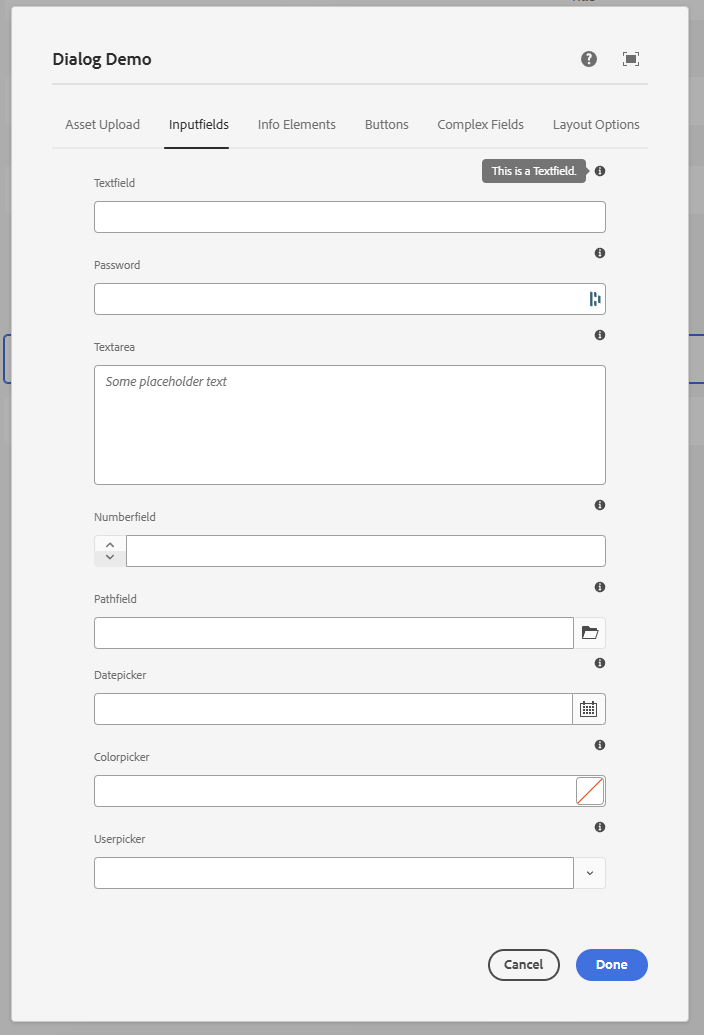
<?xml version="1.0" encoding="UTF-8"?>
<jcr:root xmlns:sling="http://sling.apache.org/jcr/sling/1.0" xmlns:granite="http://www.adobe.com/jcr/granite/1.0"
xmlns:jcr="http://www.jcp.org/jcr/1.0" xmlns:nt="http://www.jcp.org/jcr/nt/1.0"
xmlns:cq="http://www.day.com/jcr/cq/1.0"
jcr:primaryType="nt:unstructured"
jcr:title="Dialog Demo"
helpPath="/mnt/overlay/wcm/core/content/sites/components/details.html/apps/some-app/components/demo/v1/demo"
sling:resourceType="cq/gui/components/authoring/dialog">
<content
jcr:primaryType="nt:unstructured"
sling:resourceType="granite/ui/components/coral/foundation/container"
granite:class="cmp-container__editor">
<items jcr:primaryType="nt:unstructured">
<tabs
jcr:primaryType="nt:unstructured"
sling:resourceType="granite/ui/components/coral/foundation/tabs"
maximized="{Boolean}true">
<items jcr:primaryType="nt:unstructured">
<assetUpload
jcr:primaryType="nt:unstructured"
jcr:title="Asset Upload"
sling:resourceType="granite/ui/components/coral/foundation/container"
margin="{Boolean}true">
<items jcr:primaryType="nt:unstructured">
<columns
jcr:primaryType="nt:unstructured"
sling:resourceType="granite/ui/components/coral/foundation/fixedcolumns"
margin="{Boolean}true">
<items jcr:primaryType="nt:unstructured">
<column
jcr:primaryType="nt:unstructured"
sling:resourceType="granite/ui/components/coral/foundation/container">
<items jcr:primaryType="nt:unstructured">
<assetUpload
jcr:primaryType="nt:unstructured"
sling:resourceType="cq/gui/components/authoring/dialog/fileupload"
allowUpload="{Boolean}false"
autoStart="{Boolean}false"
class="cq-droptarget"
fileNameParameter="./fileName"
fileReferenceParameter="./fileReference"
mimeTypes="[image/gif,image/jpeg,image/png,image/webp,image/svg+xml]"
multiple="{Boolean}false"
name="./file"
title="Upload Asset"
uploadUrl="${suffix.path}"
useHTML5="{Boolean}true"/>
</items>
</column>
</items>
</columns>
</items>
</assetUpload>
<inputfields
jcr:primaryType="nt:unstructured"
jcr:title="Inputfields"
sling:resourceType="granite/ui/components/coral/foundation/container"
margin="{Boolean}true">
<items jcr:primaryType="nt:unstructured">
<columns
jcr:primaryType="nt:unstructured"
sling:resourceType="granite/ui/components/coral/foundation/fixedcolumns"
margin="{Boolean}true">
<items jcr:primaryType="nt:unstructured">
<column
jcr:primaryType="nt:unstructured"
sling:resourceType="granite/ui/components/coral/foundation/container">
<items jcr:primaryType="nt:unstructured">
<textfield
jcr:primaryType="nt:unstructured"
sling:resourceType="granite/ui/components/coral/foundation/form/textfield"
fieldLabel="Textfield"
fieldDescription="This is a Textfield."
name="./textfield"/>
<password
jcr:primaryType="nt:unstructured"
sling:resourceType="granite/ui/components/coral/foundation/form/password"
fieldLabel="Password"
fieldDescription="This is a Password."
name="./password"/>
<textarea
jcr:primaryType="nt:unstructured"
sling:resourceType="granite/ui/components/coral/foundation/form/textarea"
fieldLabel="Textarea"
emptyText="Some placeholder text"
fieldDescription="This is a Textarea."
name="./textarea"/>
<numberfield
jcr:primaryType="nt:unstructured"
sling:resourceType="granite/ui/components/coral/foundation/form/numberfield"
fieldLabel="Numberfield"
fieldDescription="This is a Numberfield."
name="./numberfield"
min="{Long}1"
max="{Long}10"
step="{Double}1"/>
<pathfield
jcr:primaryType="nt:unstructured"
sling:resourceType="granite/ui/components/coral/foundation/form/pathfield"
fieldLabel="Pathfield"
fieldDescription="This is a Pathfield."
rootPath="/content"
name="./pathfield"/>
<datepicker
jcr:primaryType="nt:unstructured"
sling:resourceType="granite/ui/components/coral/foundation/form/datepicker"
displayedFormat="MM-DD-YYYY HH:mm"
fieldLabel="Datepicker"
fieldDescription="This is a Datepicker."
name="./datepicker"
type="datetime"
typeHint="Date"/>
<colorpicker
jcr:primaryType="nt:unstructured"
sling:resourceType="granite/ui/components/coral/foundation/form/colorfield"
fieldLabel="Colorpicker"
fieldDescription="This is a Colorpicker."
name="./colorpicker"/>
<userpicker
jcr:primaryType="nt:unstructured"
sling:resourceType="granite/ui/components/coral/foundation/form/userpicker"
fieldLabel="Userpicker"
fieldDescription="This is a Userpicker."
hideServiceUsers="{Boolean}true"
impersonatesOnly="{Boolean}false"
name="./userpicker"/>
</items>
</column>
</items>
</columns>
</items>
</inputfields>
<staticinfo
jcr:primaryType="nt:unstructured"
jcr:title="Info Elements"
sling:resourceType="granite/ui/components/coral/foundation/container"
margin="{Boolean}true">
<items jcr:primaryType="nt:unstructured">
<columns
jcr:primaryType="nt:unstructured"
sling:resourceType="granite/ui/components/coral/foundation/fixedcolumns"
margin="{Boolean}true">
<items jcr:primaryType="nt:unstructured">
<column
jcr:primaryType="nt:unstructured"
sling:resourceType="granite/ui/components/coral/foundation/container">
<items jcr:primaryType="nt:unstructured">
<heading1 jcr:primaryType="nt:unstructured"
sling:resourceType="granite/ui/components/coral/foundation/heading"
level="{Long}1"
text="Heading Level 1"/>
<heading2 jcr:primaryType="nt:unstructured"
sling:resourceType="granite/ui/components/coral/foundation/heading"
level="{Long}2"
text="Heading Level 2"/>
<heading3 jcr:primaryType="nt:unstructured"
sling:resourceType="granite/ui/components/coral/foundation/heading"
level="{Long}3"
text="Heading Level 3"/>
<heading4 jcr:primaryType="nt:unstructured"
sling:resourceType="granite/ui/components/coral/foundation/heading"
level="{Long}4"
text="Heading Level 4"/>
<heading5 jcr:primaryType="nt:unstructured"
sling:resourceType="granite/ui/components/coral/foundation/heading"
level="{Long}5"
text="Heading Level 5"/>
<heading6 jcr:primaryType="nt:unstructured"
sling:resourceType="granite/ui/components/coral/foundation/heading"
level="{Long}6"
text="Heading Level 6"/>
<text jcr:primaryType="nt:unstructured"
sling:resourceType="granite/ui/components/coral/foundation/text"
text="Lorem ipsum odor amet, consectetuer adipiscing elit. Blandit natoque porta sapien et dictumst tortor."/>
<alertInfo
granite:class="cmp-form-textfield-readonlyselected-alert"
jcr:primaryType="nt:unstructured"
sling:resourceType="granite/ui/components/coral/foundation/alert"
size="S"
jcr:title="Info"
text="Lorem ipsum odor amet, consectetuer adipiscing elit. Blandit natoque porta sapien et dictumst tortor. "
variant="info"/>
<alertError
granite:class="cmp-form-textfield-readonlyselected-alert"
jcr:primaryType="nt:unstructured"
sling:resourceType="granite/ui/components/coral/foundation/alert"
size="S"
jcr:title="Error"
text="Lorem ipsum odor amet, consectetuer adipiscing elit. Blandit natoque porta sapien et dictumst tortor. "
variant="error"/>
<alertWarning
granite:class="cmp-form-textfield-readonlyselected-alert"
jcr:primaryType="nt:unstructured"
sling:resourceType="granite/ui/components/coral/foundation/alert"
size="S"
jcr:title="Warning"
text="Lorem ipsum odor amet, consectetuer adipiscing elit. Blandit natoque porta sapien et dictumst tortor. "
variant="warning"/>
<alertSuccess
granite:class="cmp-form-textfield-readonlyselected-alert"
jcr:primaryType="nt:unstructured"
sling:resourceType="granite/ui/components/coral/foundation/alert"
size="S"
jcr:title="Success"
text="Lorem ipsum odor amet, consectetuer adipiscing elit. Blandit natoque porta sapien et dictumst tortor. "
variant="success"/>
<hyperlink
jcr:primaryType="nt:unstructured"
sling:resourceType="granite/ui/components/coral/foundation/hyperlink"
target="_blank"
rel="noopener noreferrer"
text="Granite Hyperlink Documentation"
icon="link"
href="https://developer.adobe.com/experience-manager/reference-materials/6-5/granite-ui/api/jcr_root/libs/granite/ui/components/coral/foundation/hyperlink/index.html"/>
</items>
</column>
</items>
</columns>
</items>
</staticinfo>
<buttons
jcr:primaryType="nt:unstructured"
jcr:title="Buttons"
sling:resourceType="granite/ui/components/coral/foundation/container"
margin="{Boolean}true">
<items jcr:primaryType="nt:unstructured">
<columns
jcr:primaryType="nt:unstructured"
sling:resourceType="granite/ui/components/coral/foundation/fixedcolumns"
margin="{Boolean}true">
<items jcr:primaryType="nt:unstructured">
<column
jcr:primaryType="nt:unstructured"
sling:resourceType="granite/ui/components/coral/foundation/container">
<items jcr:primaryType="nt:unstructured">
<anchorButton
jcr:primaryType="nt:unstructured"
sling:resourceType="granite/ui/components/coral/foundation/anchorbutton"
href="https://developer.adobe.com/experience-manager/reference-materials/6-5/coral-ui/coralui3/Coral.Icon.html#availableIcons"
text="Available Icons"
icon="adobe"
target="_blank"/>
<button
jcr:primaryType="nt:unstructured"
sling:resourceType="granite/ui/components/coral/foundation/button"
text="Button"
icon="Search"/>
<cyclebutton
jcr:primaryType="nt:unstructured"
sling:resourceType="granite/ui/components/coral/foundation/cyclebutton"
displayMode="text">
<items
jcr:primaryType="nt:unstructured">
<button1 jcr:primaryType="nt:unstructured" icon="search"
text="Button 1"/>
<button2 jcr:primaryType="nt:unstructured" icon="search"
text="Button 2"/>
<button3 jcr:primaryType="nt:unstructured" icon="search"
text="Button 3"/>
</items>
</cyclebutton>
<switch
jcr:primaryType="nt:unstructured"
sling:resourceType="granite/ui/components/coral/foundation/form/switch"
checked="{Boolean}true"
name="./switchValue"
uncheckedValue="{Boolean}false"
value="{Boolean}true"/>
<buttonGroup jcr:primaryType="nt:unstructured"
sling:resourceType="granite/ui/components/coral/foundation/form/buttongroup"
fieldLabel="Button Group"
selectionMode="single"
name="./buttonGroup"
cq-msm-lockable="./buttonGroup">
<items jcr:primaryType="nt:unstructured">
<left jcr:primaryType="nt:unstructured"
text="Left"
value="left"/>
<center jcr:primaryType="nt:unstructured"
text="Center"
value="center"
checked="{Boolean}true"/>
<right jcr:primaryType="nt:unstructured"
text="Right"
value="right"/>
</items>
</buttonGroup>
</items>
</column>
</items>
</columns>
</items>
</buttons>
<complexFormFields
jcr:primaryType="nt:unstructured"
jcr:title="Complex Fields"
sling:resourceType="granite/ui/components/coral/foundation/container"
margin="{Boolean}true">
<items jcr:primaryType="nt:unstructured">
<columns
jcr:primaryType="nt:unstructured"
sling:resourceType="granite/ui/components/coral/foundation/fixedcolumns"
margin="{Boolean}true">
<items jcr:primaryType="nt:unstructured">
<column
jcr:primaryType="nt:unstructured"
sling:resourceType="granite/ui/components/coral/foundation/container">
<items jcr:primaryType="nt:unstructured">
<select
jcr:primaryType="nt:unstructured"
sling:resourceType="granite/ui/components/coral/foundation/form/select"
fieldLabel="Select Dropdown"
fieldDescription="This is a Select Dropdown."
name="./select">
<items jcr:primaryType="nt:unstructured">
<item1
jcr:primaryType="nt:unstructured"
text="Item 1"
value="item1"/>
<item2
jcr:primaryType="nt:unstructured"
text="Item 2"
value="item2"/>
<item3
jcr:primaryType="nt:unstructured"
text="Item 3"
value="item3"/>
</items>
</select>
<radio
jcr:primaryType="nt:unstructured"
sling:resourceType="granite/ui/components/coral/foundation/form/radiogroup"
name="./radioselection"
vertical="{Boolean}true"
fieldLabel="Radio Select"
fieldDescription="This is a Radio Select.">
<items jcr:primaryType="nt:unstructured">
<vara
jcr:primaryType="nt:unstructured"
text="Variation A"
value="var-a"/>
<varb
jcr:primaryType="nt:unstructured"
text="Variation B"
value="var-b"/>
</items>
</radio>
<myMultifield
jcr:primaryType="nt:unstructured"
sling:resourceType="granite/ui/components/coral/foundation/form/multifield"
fieldLabel="Multifield"
fieldDescription="This is a Multifield."
composite="{Boolean}true">
<field
jcr:primaryType="nt:unstructured"
sling:resourceType="granite/ui/components/coral/foundation/container"
name="./values">
<items jcr:primaryType="nt:unstructured">
<textvalue
jcr:primaryType="nt:unstructured"
sling:resourceType="granite/ui/components/coral/foundation/form/textfield"
fieldLabel="Text Value"
fieldDescription="This is a Textfield."
name="./textvalue"/>
<numbervalue
jcr:primaryType="nt:unstructured"
sling:resourceType="granite/ui/components/coral/foundation/form/numberfield"
fieldLabel="Number Value"
fieldDescription="This is a Numberfield."
name="./numbervalue"/>
</items>
</field>
</myMultifield>
</items>
</column>
</items>
</columns>
</items>
</complexFormFields>
<layout
jcr:primaryType="nt:unstructured"
jcr:title="Layout Options"
sling:resourceType="granite/ui/components/coral/foundation/container"
margin="{Boolean}true">
<items jcr:primaryType="nt:unstructured">
<columns
jcr:primaryType="nt:unstructured"
sling:resourceType="granite/ui/components/coral/foundation/fixedcolumns"
margin="{Boolean}true">
<items jcr:primaryType="nt:unstructured">
<column
jcr:primaryType="nt:unstructured"
sling:resourceType="granite/ui/components/coral/foundation/container">
<items jcr:primaryType="nt:unstructured">
<wellText jcr:primaryType="nt:unstructured"
sling:resourceType="granite/ui/components/coral/foundation/text"
text="Well Group"/>
<wellGroup jcr:primaryType="nt:unstructured"
sling:resourceType="granite/ui/components/coral/foundation/well">
<items jcr:primaryType="nt:unstructured">
<textvalue1
jcr:primaryType="nt:unstructured"
sling:resourceType="granite/ui/components/coral/foundation/form/textfield"
fieldLabel="Text Value"
fieldDescription="This is a Textfield."
name="./textvalueWell"/>
<somenumber
jcr:primaryType="nt:unstructured"
sling:resourceType="granite/ui/components/coral/foundation/form/numberfield"
fieldLabel="Number Value"
fieldDescription="This is a Numberfield."
name="./numbervalue2Well"/>
</items>
</wellGroup>
<accordionText jcr:primaryType="nt:unstructured"
sling:resourceType="granite/ui/components/coral/foundation/text"
text="Accordion"/>
<accordion
jcr:primaryType="nt:unstructured"
sling:resourceType="granite/ui/components/coral/foundation/accordion"
fieldLabel="Accordion"
variant="default">
<items jcr:primaryType="nt:unstructured">
<block1
jcr:primaryType="nt:unstructured"
jcr:title="Some Category"
sling:resourceType="granite/ui/components/coral/foundation/container"
maximized="{Boolean}true">
<items jcr:primaryType="nt:unstructured">
<textvalue1
jcr:primaryType="nt:unstructured"
sling:resourceType="granite/ui/components/coral/foundation/form/textfield"
fieldLabel="Text Value"
fieldDescription="This is a Textfield."
name="./textvalueAccordion"/>
<textvalue2
jcr:primaryType="nt:unstructured"
sling:resourceType="granite/ui/components/coral/foundation/form/textfield"
fieldLabel="Text Value 2"
fieldDescription="This is a Textfield."
name="./textvalue2Accordion"/>
</items>
<parentConfig
jcr:primaryType="nt:unstructured"
active="{Boolean}true"/>
</block1>
<block2
jcr:primaryType="nt:unstructured"
jcr:title="Another Category"
sling:resourceType="granite/ui/components/coral/foundation/container"
maximized="{Boolean}true">
<items jcr:primaryType="nt:unstructured">
<numbervalue
jcr:primaryType="nt:unstructured"
sling:resourceType="granite/ui/components/coral/foundation/form/numberfield"
fieldLabel="Number Value"
fieldDescription="This is a Numberfield."
name="./numbervalue"/>
<numbervalue2
jcr:primaryType="nt:unstructured"
sling:resourceType="granite/ui/components/coral/foundation/form/numberfield"
fieldLabel="Number Value 2"
fieldDescription="This is a Numberfield."
name="./numbervalue2"/>
</items>
</block2>
</items>
</accordion>
</items>
</column>
</items>
</columns>
</items>
</layout>
</items>
</tabs>
</items>
</content>
</jcr:root>
Authoring UX tips
- Keep required fields early in the first tab.
- Use
fieldDescriptionfor guidance and examples. - Prefer smaller, focused tabs over a single long list.
- Keep names stable; renaming properties impacts existing content.
- Use
granite:classsparingly to improve spacing or emphasis.
Accessibility
The Touch UI dialog (Coral) is keyboard- and screen-reader-accessible out of the box, but only if you use the framework correctly. A few rules keep dialogs usable for everyone on the authoring team:
- Always set
fieldLabel. ThefieldGranite UI component wires the label to the input viaaria-labelledbyusing a generatedlabelId(Granite UIfieldcontract). A field with nofieldLabelis unlabelled for screen readers. - Use
fieldDescriptionfor instructions, not a separatetextwidget. The description is associated with the field (aria-describedby), so assistive tech reads it together with the label. - Don't rely on colour alone. The invalid state adds the
is-invalidclass and an error tooltip with text - keep that text meaningful (see Dialog Validation). - Prefer Coral/Granite widgets over raw HTML in the dialog. Hand-rolled markup in a
textwidget bypasses Coral's focus management and ARIA handling. - Keep a logical tab order. Author tab order follows DOM order, so order your
itemsthe way you want the author to traverse them; avoid using CSS to visually reorder fields. - Label icon-only controls. If you add custom buttons via clientlibs, give them an accessible
name (
aria-labelor visible text).
See Adobe's Coral UI notes and the Granite UI server-side API for the underlying accessibility contracts.
AEM Component Help Pages
helpPath on the dialog root is where the Help (?) icon goes. An https:// URL is enough. To show the component's own README.md inside the product, point helpPath at the components console detail view:
- Open CRXDE Lite and the component, for example
/apps/<projectname>/components/some/text. - Add a
README.mdunder that component and write the author notes in it. - Open the components console and select that component. It is listed only when it has a component group.
- Copy the address bar. It looks like
/mnt/overlay/wcm/core/content/sites/components/details.html/apps/<projectname>/components/some/text. - Set that path as
helpPathoncq:dialog. - Drop the component on a page, open the dialog, and use the Help (?) icon.
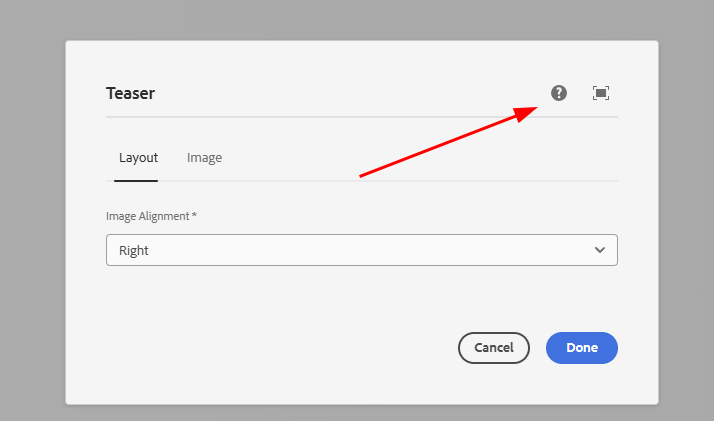
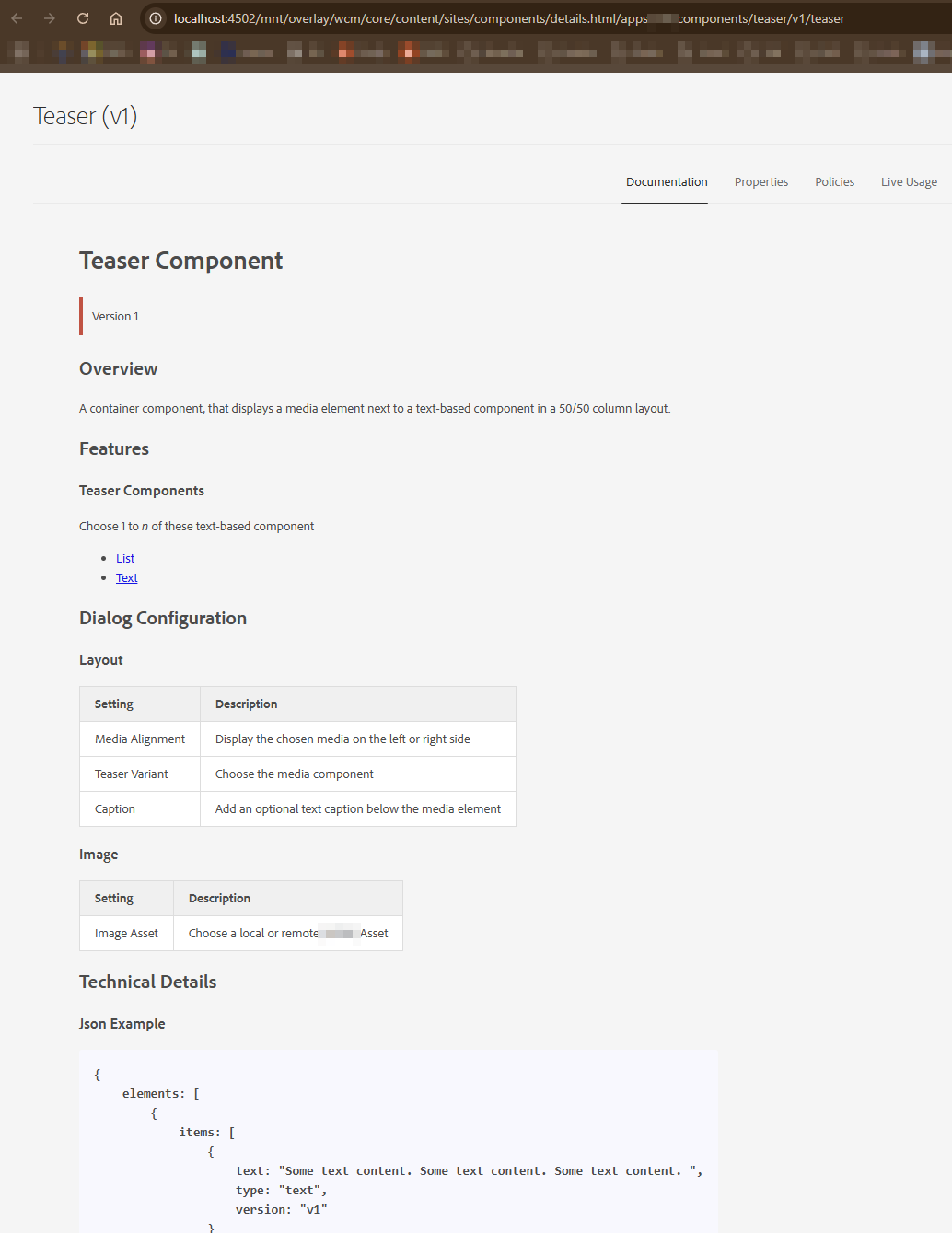
Set Documentation as Default Active Tab
The help view opens on the component properties. To make the documentation tab active, overlay the console node and order it first.
/libs on AEM as a Cloud ServicehelpPath works on 6.5 and on Cloud Service. The overlay copies a /libs node into /apps, which Cloud Service does not allow. Use it on 6.5 on-prem only. See AEMaaCS vs AEM 6.5.
- In CRXDE Lite, open
/libs/wcm/core/content/sites/components/details/jcr:content/content/single/content/items/content/items/tabs/items/documentation. - Overlay that node to
/appswith Match node types checked. - On the overlay, set
sling:orderBefore(String) tofixedColumnContainer.
ui.apps/src/main/content/jcr_root/apps/wcm/core/content/sites/components/details/.content.xml
<?xml version="1.0" encoding="UTF-8"?>
<jcr:root xmlns:jcr="http://www.jcp.org/jcr/1.0" xmlns:nt="http://www.jcp.org/jcr/nt/1.0"
          xmlns:cq="http://www.day.com/jcr/cq/1.0"
          xmlns:sling="http://sling.apache.org/jcr/sling/1.0"
          jcr:primaryType="cq:Page">
    <jcr:content
        jcr:primaryType="nt:unstructured">
        <content
            jcr:primaryType="nt:unstructured">
            <single jcr:primaryType="nt:unstructured">
                <content
                    jcr:primaryType="nt:unstructured">
                    <items jcr:primaryType="nt:unstructured">
                        <content
                            jcr:primaryType="nt:unstructured">
                            <items jcr:primaryType="nt:unstructured">
                                <tabs
                                    jcr:primaryType="nt:unstructured">
                                    <items jcr:primaryType="nt:unstructured">
                                        <documentation
                                            jcr:primaryType="nt:unstructured"
                                            sling:orderBefore="fixedColumnContainer"/>
                                    </items>
                                </tabs>
                            </items>
                        </content>
                    </items>
                </content>
            </single>
        </content>
    </jcr:content>
</jcr:root>
See also
- Custom Component Guide
- Dialog validation
- Components
- Core Components
- HTL Templates
- Touch UI
- Coral UI
- Overlays
- Sling Models - reading policy values
- Custom dialog widgets (dynamic rootpath, asset finder)
- Templates and Policies - design dialogs, component policies
- Tags and Taxonomies - tag field deep dive
- Granite UI Server-side API
- Coral UI Icon List
- Creating a New Granite UI Field Component (Experience League)
- Adding Fields to an AEM Dialog - WKND tutorial
- Configuring the Rich Text Editor (Experience League)