Servlets
Sling Servlets are Java classes that handle HTTP requests in AEM. They are the standard way to build custom endpoints - REST APIs, form handlers, AJAX callbacks, data sources for dialog dropdowns, and more. Sling's servlet resolution mechanism routes requests to servlets based on resource type or path, making them a natural extension of the content-driven architecture.
How Sling Servlet Resolution Works
When a request arrives, Sling determines which servlet to invoke based on the request's resource type, selectors, extension, and method:
Request URL:
/content/myproject/en/contact/jcr:content/root/container/form.submit.json

Decomposed:
  Resource path:  /content/myproject/en/contact/jcr:content/root/container/form
  Resource type:  myproject/components/contactform (from the node's sling:resourceType)
  Selector:       submit
  Extension:      json
  Method:         POST
Sling matches this against registered servlets using:
sling.servlet.resourceTypes+sling.servlet.selectors+sling.servlet.extensions+sling.servlet.methods- Or
sling.servlet.pathsfor path-based servlets
Registration: Resource Type vs Path
There are two ways to register a servlet. Resource-type registration is always preferred.
| Approach | Pros | Cons |
|---|---|---|
| Resource type | Respects Sling security, ACLs apply, follows AEM patterns | Requires a resource with the matching type to exist |
| Path | Works without a resource, simple URL | Bypasses Sling ACLs, must be explicitly allowed in the Sling Servlet Resolver config |
Path-based servlets bypass JCR access controls. On AEMaaCS, only specific path prefixes are
allowed (/bin/). Always prefer resource-type registration unless you have a specific reason
to use paths.
Servlet Registration Annotations
Modern approach (recommended)
Use @SlingServletResourceTypes or @SlingServletPaths from the org.apache.sling.servlets.annotations
package. These are type-safe and self-documenting:
@Component(service = Servlet.class)
@SlingServletResourceTypes(
    resourceTypes = "myproject/components/contactform",
    methods = HttpConstants.METHOD_POST,
    selectors = "submit",
    extensions = "json"
)
public class ContactFormServlet extends SlingAllMethodsServlet { ... }
@Component(service = Servlet.class)
@SlingServletPaths("/bin/myproject/api/search")
public class SearchApiServlet extends SlingSafeMethodsServlet { ... }
Legacy approach (avoid)
The older @SlingServlet annotation is deprecated. The even older @Component + @Property
pattern should never be used:
// ❌ Old @SlingServlet annotation (Felix maven-scr-plugin, legacy)
@SlingServlet(resourceTypes = "...", methods = "GET")
public class OldServlet extends SlingSafeMethodsServlet { ... }

// ❌ Even older @Property pattern (Felix SCR annotations, legacy)
@Component
@Service(value = Servlet.class)
@Properties({
    @Property(name = "sling.servlet.resourceTypes", value = "..."),
    @Property(name = "sling.servlet.methods", value = "GET")
})
public class VeryOldServlet extends SlingSafeMethodsServlet { ... }
Registration properties reference
| Property | Purpose | Example |
|---|---|---|
resourceTypes | Sling resource type(s) the servlet handles | "myproject/components/form" |
methods | HTTP methods (GET, POST, PUT, DELETE) | HttpConstants.METHOD_POST |
selectors | URL selector(s) that must be present | "submit", "action" |
extensions | URL extension(s) | "json", "html" |
resourceSuperType | Parent resource type for inheritance | "sling/servlet/default" |
Base Classes
Sling provides two servlet base classes:
| Class | Methods | Use when |
|---|---|---|
SlingSafeMethodsServlet | doGet(), doHead(), doOptions() | Read-only operations (GET endpoints, data sources) |
SlingAllMethodsServlet | All of the above + doPost(), doPut(), doDelete() | Write operations (form submissions, API mutations) |
Always extend SlingSafeMethodsServlet if your servlet only handles GET requests. This makes the
read-only intent explicit and prevents accidental POST handling.
Practical Examples
GET Servlet: JSON API endpoint
A servlet that returns JSON data for a search API:
package com.myproject.core.servlets;

import com.google.gson.Gson;
import com.google.gson.JsonArray;
import com.google.gson.JsonObject;
import org.apache.sling.api.SlingHttpServletRequest;
import org.apache.sling.api.SlingHttpServletResponse;
import org.apache.sling.api.resource.Resource;
import org.apache.sling.api.servlets.HttpConstants;
import org.apache.sling.api.servlets.SlingSafeMethodsServlet;
import org.apache.sling.servlets.annotations.SlingServletResourceTypes;
import org.osgi.service.component.annotations.Component;

import javax.servlet.Servlet;
import javax.servlet.ServletException;
import java.io.IOException;
import java.util.Iterator;

@Component(service = Servlet.class)
@SlingServletResourceTypes(
    resourceTypes = "myproject/components/page",
    methods = HttpConstants.METHOD_GET,
    selectors = "search",
    extensions = "json"
)
public class SearchServlet extends SlingSafeMethodsServlet {

    private static final Gson GSON = new Gson();

    @Override
    protected void doGet(SlingHttpServletRequest request,
                         SlingHttpServletResponse response)
            throws ServletException, IOException {

        response.setContentType("application/json");
        response.setCharacterEncoding("UTF-8");

        String query = request.getParameter("q");
        int limit = getIntParam(request, "limit", 10);

        JsonObject result = new JsonObject();
        JsonArray items = new JsonArray();

        if (query != null && !query.trim().isEmpty()) {
            // Use QueryBuilder or JCR-SQL2 to search content
            Resource root = request.getResource();
            Iterator<Resource> children = root.listChildren();

            int count = 0;
            while (children.hasNext() && count < limit) {
                Resource child = children.next();
                String title = child.getValueMap().get("jcr:title", "");
                if (title.toLowerCase().contains(query.toLowerCase())) {
                    JsonObject item = new JsonObject();
                    item.addProperty("path", child.getPath());
                    item.addProperty("title", title);
                    items.add(item);
                    count++;
                }
            }
        }

        result.add("results", items);
        result.addProperty("total", items.size());

        response.getWriter().write(GSON.toJson(result));
    }

    private int getIntParam(SlingHttpServletRequest request, String name, int defaultValue) {
        String value = request.getParameter(name);
        if (value != null) {
            try {
                return Integer.parseInt(value);
            } catch (NumberFormatException e) {
                // fall through to default
            }
        }
        return defaultValue;
    }
}
Request:
GET /content/myproject/en.search.json?q=news&limit=5
Response:
{
    "results": [
        { "path": "/content/myproject/en/news", "title": "Latest News" },
        { "path": "/content/myproject/en/newsletter", "title": "Newsletter Signup" }
    ],
    "total": 2
}
POST Servlet: Form submission
A servlet that handles contact form submissions. See CSRF Protection below for the token handling AEM adds on top:
package com.myproject.core.servlets;

import com.google.gson.Gson;
import com.google.gson.JsonObject;
import com.myproject.core.services.EmailService;
import org.apache.commons.lang3.StringUtils;
import org.apache.sling.api.SlingHttpServletRequest;
import org.apache.sling.api.SlingHttpServletResponse;
import org.apache.sling.api.servlets.SlingAllMethodsServlet;
import org.apache.sling.servlets.annotations.SlingServletResourceTypes;
import org.osgi.service.component.annotations.Component;
import org.osgi.service.component.annotations.Reference;
import org.slf4j.Logger;
import org.slf4j.LoggerFactory;

import javax.servlet.Servlet;
import javax.servlet.ServletException;
import java.io.IOException;

import static org.apache.sling.api.servlets.HttpConstants.METHOD_POST;

@Component(service = Servlet.class)
@SlingServletResourceTypes(
    resourceTypes = "myproject/components/contactform",
    methods = METHOD_POST,
    selectors = "submit",
    extensions = "json"
)
public class ContactFormServlet extends SlingAllMethodsServlet {

    private static final Logger LOG = LoggerFactory.getLogger(ContactFormServlet.class);
    private static final Gson GSON = new Gson();

    @Reference
    private EmailService emailService;

    @Override
    protected void doPost(SlingHttpServletRequest request,
                          SlingHttpServletResponse response)
            throws ServletException, IOException {

        response.setContentType("application/json");
        response.setCharacterEncoding("UTF-8");

        JsonObject result = new JsonObject();

        try {
            // Read form parameters
            String name = request.getParameter("name");
            String email = request.getParameter("email");
            String message = request.getParameter("message");

            // Validate input
            if (StringUtils.isAnyBlank(name, email, message)) {
                response.setStatus(SlingHttpServletResponse.SC_BAD_REQUEST);
                result.addProperty("success", false);
                result.addProperty("error", "All fields are required.");
                response.getWriter().write(GSON.toJson(result));
                return;
            }

            // Process the form (e.g. send email)
            emailService.sendContactEmail(name, email, message);

            response.setStatus(SlingHttpServletResponse.SC_OK);
            result.addProperty("success", true);
            result.addProperty("message", "Thank you for your message.");

        } catch (Exception e) {
            LOG.error("Error processing contact form", e);
            response.setStatus(SlingHttpServletResponse.SC_INTERNAL_SERVER_ERROR);
            result.addProperty("success", false);
            result.addProperty("error", "An internal error occurred.");
        }

        response.getWriter().write(GSON.toJson(result));
    }
}
Request URL:
POST /content/myproject/en/contact/jcr:content/root/container/form.submit.json
The URL is derived from the page path + the component's position in the parsys + the selector and extension.
DataSource Servlet: Dynamic dialog dropdowns
DataSource servlets populate dialog dropdowns, selects, and autocomplete fields dynamically from backend data. The result is set as a request attribute (not written to the response).
Dialog field:
<category
    jcr:primaryType="nt:unstructured"
    sling:resourceType="granite/ui/components/coral/foundation/form/select"
    fieldLabel="Category"
    name="./category">
    <datasource
        jcr:primaryType="nt:unstructured"
        sling:resourceType="/apps/myproject/datasource/categories"/>
</category>
Servlet:
package com.myproject.core.servlets;

import com.adobe.granite.ui.components.ds.DataSource;
import com.adobe.granite.ui.components.ds.SimpleDataSource;
import com.adobe.granite.ui.components.ds.ValueMapResource;
import com.day.cq.commons.jcr.JcrConstants;
import org.apache.commons.collections4.iterators.TransformIterator;
import org.apache.sling.api.SlingHttpServletRequest;
import org.apache.sling.api.SlingHttpServletResponse;
import org.apache.sling.api.resource.ResourceMetadata;
import org.apache.sling.api.resource.ResourceResolver;
import org.apache.sling.api.resource.ValueMap;
import org.apache.sling.api.servlets.HttpConstants;
import org.apache.sling.api.servlets.SlingSafeMethodsServlet;
import org.apache.sling.api.wrappers.ValueMapDecorator;
import org.apache.sling.servlets.annotations.SlingServletResourceTypes;
import org.osgi.service.component.annotations.Component;

import javax.servlet.Servlet;
import java.util.*;

@Component(service = Servlet.class)
@SlingServletResourceTypes(
    methods = HttpConstants.METHOD_GET,
    resourceTypes = "/apps/myproject/datasource/categories"
)
public class CategoryDataSourceServlet extends SlingSafeMethodsServlet {

    @Override
    protected void doGet(SlingHttpServletRequest request,
                         SlingHttpServletResponse response) {

        ResourceResolver resolver = request.getResourceResolver();

        // Build the list of options (could come from JCR, an API, OSGi config, etc.)
        List<Map.Entry<String, String>> options = new ArrayList<>();
        options.add(Map.entry("news", "News"));
        options.add(Map.entry("blog", "Blog"));
        options.add(Map.entry("product", "Product"));
        options.add(Map.entry("event", "Event"));

        // Convert to a DataSource
        DataSource dataSource = new SimpleDataSource(
            new TransformIterator<>(options.iterator(), entry -> {
                ValueMap vm = new ValueMapDecorator(new HashMap<>());
                vm.put("value", entry.getKey());
                vm.put("text", entry.getValue());
                return new ValueMapResource(
                    resolver,
                    new ResourceMetadata(),
                    JcrConstants.NT_UNSTRUCTURED,
                    vm
                );
            })
        );

        // Set on the request - NOT the response
        request.setAttribute(DataSource.class.getName(), dataSource);
    }
}
The DataSource is set as a request attribute, not written to the response body. The Granite UI framework reads the attribute and renders the dropdown options automatically.
DataSource with JCR-based values
A more realistic example that reads tag nodes from the JCR to populate a dropdown:
@Override
protected void doGet(SlingHttpServletRequest request,
                     SlingHttpServletResponse response) {

    ResourceResolver resolver = request.getResourceResolver();
    List<Map.Entry<String, String>> options = new ArrayList<>();

    // Read tags from the JCR
    Resource tagRoot = resolver.getResource("/content/cq:tags/myproject/categories");
    if (tagRoot != null) {
        for (Resource child : tagRoot.getChildren()) {
            String value = child.getName();
            String text = child.getValueMap().get("jcr:title", child.getName());
            options.add(Map.entry(value, text));
        }
    }

    // ... convert to DataSource as above ...
}
Testing POST Servlets
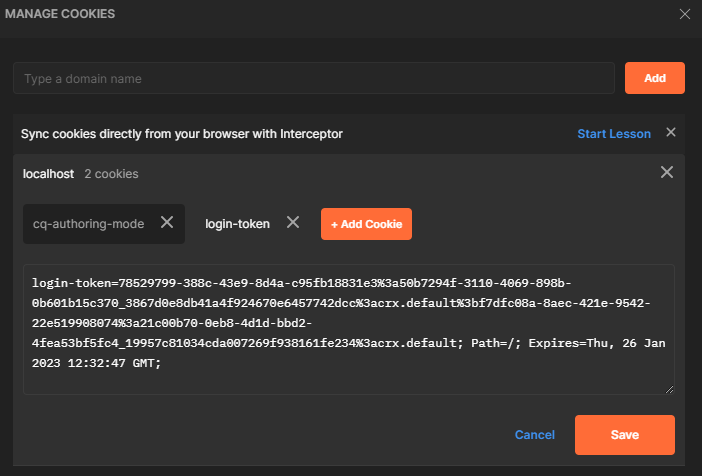
POST requests to AEM require authentication. When testing with tools like curl or Postman, you need to provide AEM's login cookie.
Using curl
# Local SDK / dev only - never ship admin:admin credentials against a real environment.

# 1. Authenticate and capture the cookie
curl -u admin:admin -c cookies.txt http://localhost:4502/libs/granite/core/content/login.html

# 2. Use the cookie for the POST request
curl -b cookies.txt \
  -X POST \
  -d "name=John&email=john@example.com&message=Hello" \
  http://localhost:4502/content/myproject/en/contact/jcr:content/root/container/form.submit.json
Using Postman
- Open your browser's DevTools and find the
login-tokencookie forlocalhost:4502 - In Postman, add the cookie manually via Cookies (below the Send button)
- Set the cookie domain to
localhostand copy thelogin-tokenkey/value - Set the
Expirestimestamp to several hours in the future - Send the POST request



CSRF Protection
AEM protects POST endpoints with CSRF tokens. If your POST request returns a 403 Forbidden,
you need to include the CSRF token:
# 1. Fetch the CSRF token
TOKEN=$(curl -s -b cookies.txt \
  http://localhost:4502/libs/granite/csrf/token.json | jq -r '.token')

# 2. Include it in your POST request
curl -b cookies.txt \
  -X POST \
  -H "CSRF-Token: $TOKEN" \
  -d "name=John&email=john@example.com" \
  http://localhost:4502/content/myproject/en/contact/jcr:content/root/container/form.submit.json
In frontend JavaScript, fetch the token before submitting:
async function submitForm(formData) {
    // Fetch CSRF token
    const tokenResponse = await fetch('/libs/granite/csrf/token.json');
    const { token } = await tokenResponse.json();

    // Submit with token
    const response = await fetch(formEndpoint, {
        method: 'POST',
        headers: { 'CSRF-Token': token },
        body: formData,
    });

    return response.json();
}
Servlet Response Helpers
JSON responses
A reusable pattern for consistent JSON responses:
private void writeJsonResponse(SlingHttpServletResponse response,
        int status, boolean success, String message) throws IOException {
    response.setStatus(status);
    response.setContentType("application/json");
    response.setCharacterEncoding("UTF-8");

    JsonObject json = new JsonObject();
    json.addProperty("success", success);
    json.addProperty("message", message);
    response.getWriter().write(new Gson().toJson(json));
}
Streaming binary content
Serve files or generated PDFs:
@Override
protected void doGet(SlingHttpServletRequest request,
                     SlingHttpServletResponse response) throws IOException {

    response.setContentType("application/pdf");
    response.setHeader("Content-Disposition", "attachment; filename=\"report.pdf\"");

    try (InputStream inputStream = generatePdf();
         OutputStream outputStream = response.getOutputStream()) {
        IOUtils.copy(inputStream, outputStream);
    }
}
Redirects
@Override
protected void doGet(SlingHttpServletRequest request,
                     SlingHttpServletResponse response) throws IOException {

    String targetPath = request.getParameter("target");
    String normalizedPath = targetPath != null ? ResourceUtil.normalize(targetPath) : null;
    if (StringUtils.isBlank(normalizedPath)
            || !normalizedPath.startsWith("/content/myproject/")) {
        response.sendError(SlingHttpServletResponse.SC_BAD_REQUEST, "Invalid target parameter");
        return;
    }

    // Use ResourceResolver.map() for proper URL mapping after allowlisting the target.
    String mappedUrl = request.getResourceResolver().map(request, normalizedPath);
    response.sendRedirect(mappedUrl);
}
Dispatcher and Servlet Caching
Dispatcher can cache GET responses when cache rules allow the URL. For servlets that return dynamic data, configure Dispatcher/CDN cache rules explicitly and send browser cache headers that match the intended behaviour.
Preventing caching on dynamic endpoints
@Override
protected void doGet(SlingHttpServletRequest request,
                     SlingHttpServletResponse response) throws IOException {

    // Prevent Dispatcher and browser caching
    response.setHeader("Cache-Control", "no-cache, no-store, must-revalidate");
    response.setHeader("Pragma", "no-cache");
    response.setDateHeader("Expires", 0);

    // ... write response ...
}
The Cache-Control response header does not by itself override every Dispatcher configuration. Make
sure the Dispatcher /cache/rules and /cache/headers settings for the endpoint match your intent.
Allowing Dispatcher caching for stable data
For servlets that return relatively stable data (e.g. site navigation, tag lists), allow Dispatcher caching with a TTL:
response.setHeader("Cache-Control", "public, max-age=300"); // 5 minutes
Configure a matching Dispatcher rule:
/0100 { /glob "*.json" /type "allow" }
Servlet vs Sling Model vs Filter
| Feature | Servlet | Sling Model | Filter |
|---|---|---|---|
| Purpose | Handle HTTP requests directly | Provide data to HTL templates | Intercept/modify request/response pipeline |
| Triggered by | HTTP request to matching URL | data-sly-use in HTL | Every request matching filter scope |
| Returns | Full HTTP response (JSON, HTML, binary) | Java object consumed by HTL | Passes through (modifies request/response) |
| Use case | API endpoints, form handlers, data sources | Component rendering logic | Security headers, logging, response wrapping |
When to use a servlet
- You need a custom HTTP endpoint (API, webhook, data feed)
- You return non-HTML content (JSON, XML, PDF, CSV)
- You handle POST/PUT/DELETE operations
- You provide DataSource values for dialog dropdowns
- You need full control over the HTTP response
When NOT to use a servlet
- You just need data for a component -> use a Sling Model
- You need to add headers or log requests -> use a Filter
- You need to transform responses -> use a Filter or Transformer
Best Practices and Common Pitfalls
Always set content type and encoding
response.setContentType("application/json");
response.setCharacterEncoding("UTF-8");
Omitting these causes encoding issues and incorrect MIME types in browser developer tools.
Validate and sanitize all input
Servlet parameters come directly from the HTTP request. Never trust them:
String path = request.getParameter("path");
path = path != null ? ResourceUtil.normalize(path) : null;

// Validate after normalization: must remain under /content/
if (path == null || !path.startsWith("/content/")) {
    response.sendError(SC_BAD_REQUEST, "Invalid path");
    return;
}
Don't close the request's ResourceResolver
The request's ResourceResolver is managed by the Sling engine. Closing it in a servlet will
break the rest of the request processing chain.
Use SlingSafeMethodsServlet for GET-only servlets
It prevents accidental POST handling and signals intent. Only extend SlingAllMethodsServlet when
you actually need to handle POST/PUT/DELETE.
Handle errors gracefully
Never let exceptions bubble up unhandled. Always catch, log, and return a meaningful HTTP status:
try {
    // ... business logic ...
} catch (Exception e) {
    LOG.error("Error in servlet", e);
    response.setStatus(SC_INTERNAL_SERVER_ERROR);
    // Write a JSON error body (don't expose internal details)
    writeJsonResponse(response, SC_INTERNAL_SERVER_ERROR, false, "An error occurred.");
}
Limit path-based servlets
On AEMaaCS, path-based servlets are restricted to specific prefixes (/bin/). Even on AEM 6.5,
prefer resource-type registration. A path-bound servlet only runs if its path is covered by the resolver's Execution Paths (servletresolver.paths); extend that list with a prefix ending in / instead of replacing it, and leave servletresolver.servletRoot at its default.
See also
- Architecture - Sling request processing pipeline
- Filters
- Event Listener
- Sling Models
- OSGi Configuration
- Java Best Practices
- Security - CSRF, referrer filter, ACLs
- Dispatcher Configuration
- Component Dialogs - DataSource usage in dialogs
- Apache Sling Servlets - official servlet registration reference
- Sling Servlet Annotations -
@SlingServletResourceTypes/@SlingServletPaths - AEM Servlets (Experience League) - tutorial walkthrough