Servlets
Sling Servlets are Java classes that handle HTTP requests in AEM. They are the standard way to build custom endpoints -- REST APIs, form handlers, AJAX callbacks, data sources for dialog dropdowns, and more. Sling's servlet resolution mechanism routes requests to servlets based on resource type or path, making them a natural extension of the content-driven architecture.
How Sling Servlet Resolution Works
When a request arrives, Sling determines which servlet to invoke based on the request's resource type, selectors, extension, and method:
Request URL:
/content/myproject/en/contact/jcr:content/root/container/form.submit.json

Decomposed:
  Resource path:  /content/myproject/en/contact/jcr:content/root/container/form
  Resource type:  myproject/components/contactform (from the node's sling:resourceType)
  Selector:       submit
  Extension:      json
  Method:         POST
Sling matches this against registered servlets using:
sling.servlet.resourceTypes+sling.servlet.selectors+sling.servlet.extensions+sling.servlet.methods- Or
sling.servlet.pathsfor path-based servlets
Registration: Resource Type vs Path
There are two ways to register a servlet. Resource-type registration is always preferred.
| Approach | Pros | Cons |
|---|---|---|
| Resource type | Respects Sling security, ACLs apply, follows AEM patterns | Requires a resource with the matching type to exist |
| Path | Works without a resource, simple URL | Bypasses Sling ACLs, must be explicitly allowed in the Sling Servlet Resolver config |
Path-based servlets bypass JCR access controls. On AEMaaCS, only specific path prefixes are
allowed (/bin/). Always prefer resource-type registration unless you have a specific reason
to use paths.
Servlet Registration Annotations
Modern approach (recommended)
Use @SlingServletResourceTypes or @SlingServletPaths from the org.apache.sling.servlets.annotations
package. These are type-safe and self-documenting:
@Component(service = Servlet.class)
@SlingServletResourceTypes(
    resourceTypes = "myproject/components/contactform",
    methods = HttpConstants.METHOD_POST,
    selectors = "submit",
    extensions = "json"
)
public class ContactFormServlet extends SlingAllMethodsServlet { ... }
@Component(service = Servlet.class)
@SlingServletPaths("/bin/myproject/api/search")
public class SearchApiServlet extends SlingSafeMethodsServlet { ... }
Legacy approach (avoid)
The older @SlingServlet annotation is deprecated. The even older @Component + @Property
pattern should never be used:
// ❌ Old @SlingServlet annotation (deprecated since Sling 2.5)
@SlingServlet(resourceTypes = "...", methods = "GET")
public class OldServlet extends SlingSafeMethodsServlet { ... }

// ❌ Even older @Property pattern (Sling SCR annotations, fully deprecated)
@Component
@Service(value = Servlet.class)
@Properties({
    @Property(name = "sling.servlet.resourceTypes", value = "..."),
    @Property(name = "sling.servlet.methods", value = "GET")
})
public class VeryOldServlet extends SlingSafeMethodsServlet { ... }
Registration properties reference
| Property | Purpose | Example |
|---|---|---|
resourceTypes | Sling resource type(s) the servlet handles | "myproject/components/form" |
methods | HTTP methods (GET, POST, PUT, DELETE) | HttpConstants.METHOD_POST |
selectors | URL selector(s) that must be present | "submit", "action" |
extensions | URL extension(s) | "json", "html" |
resourceSuperType | Parent resource type for inheritance | "sling/servlet/default" |
Base Classes
Sling provides two servlet base classes:
| Class | Methods | Use when |
|---|---|---|
SlingSafeMethodsServlet | doGet(), doHead(), doOptions() | Read-only operations (GET endpoints, data sources) |
SlingAllMethodsServlet | All of the above + doPost(), doPut(), doDelete() | Write operations (form submissions, API mutations) |
Always extend SlingSafeMethodsServlet if your servlet only handles GET requests. This makes the
read-only intent explicit and prevents accidental POST handling.
Practical Examples
GET Servlet: JSON API endpoint
A servlet that returns JSON data for a search API:
package com.myproject.core.servlets;

import com.google.gson.Gson;
import com.google.gson.JsonArray;
import com.google.gson.JsonObject;
import org.apache.sling.api.SlingHttpServletRequest;
import org.apache.sling.api.SlingHttpServletResponse;
import org.apache.sling.api.resource.Resource;
import org.apache.sling.api.servlets.HttpConstants;
import org.apache.sling.api.servlets.SlingSafeMethodsServlet;
import org.apache.sling.servlets.annotations.SlingServletResourceTypes;
import org.osgi.service.component.annotations.Component;

import javax.servlet.Servlet;
import javax.servlet.ServletException;
import java.io.IOException;
import java.util.Iterator;

@Component(service = Servlet.class)
@SlingServletResourceTypes(
    resourceTypes = "myproject/components/page",
    methods = HttpConstants.METHOD_GET,
    selectors = "search",
    extensions = "json"
)
public class SearchServlet extends SlingSafeMethodsServlet {

    private static final Gson GSON = new Gson();

    @Override
    protected void doGet(SlingHttpServletRequest request,
                         SlingHttpServletResponse response)
            throws ServletException, IOException {

        response.setContentType("application/json");
        response.setCharacterEncoding("UTF-8");

        String query = request.getParameter("q");
        int limit = getIntParam(request, "limit", 10);

        JsonObject result = new JsonObject();
        JsonArray items = new JsonArray();

        if (query != null && !query.trim().isEmpty()) {
            // Use QueryBuilder or JCR-SQL2 to search content
            Resource root = request.getResource();
            Iterator<Resource> children = root.listChildren();

            int count = 0;
            while (children.hasNext() && count < limit) {
                Resource child = children.next();
                String title = child.getValueMap().get("jcr:title", "");
                if (title.toLowerCase().contains(query.toLowerCase())) {
                    JsonObject item = new JsonObject();
                    item.addProperty("path", child.getPath());
                    item.addProperty("title", title);
                    items.add(item);
                    count++;
                }
            }
        }

        result.add("results", items);
        result.addProperty("total", items.size());

        response.getWriter().write(GSON.toJson(result));
    }

    private int getIntParam(SlingHttpServletRequest request, String name, int defaultValue) {
        String value = request.getParameter(name);
        if (value != null) {
            try {
                return Integer.parseInt(value);
            } catch (NumberFormatException e) {
                // fall through to default
            }
        }
        return defaultValue;
    }
}
Request:
GET /content/myproject/en.search.json?q=news&limit=5
Response:
{
    "results": [
        { "path": "/content/myproject/en/news", "title": "Latest News" },
        { "path": "/content/myproject/en/newsletter", "title": "Newsletter Signup" }
    ],
    "total": 2
}
POST Servlet: Form submission
A servlet that handles contact form submissions with CSRF protection:
package com.myproject.core.servlets;

import com.google.gson.Gson;
import com.google.gson.JsonObject;
import com.myproject.core.services.EmailService;
import org.apache.commons.lang3.StringUtils;
import org.apache.sling.api.SlingHttpServletRequest;
import org.apache.sling.api.SlingHttpServletResponse;
import org.apache.sling.api.servlets.SlingAllMethodsServlet;
import org.apache.sling.servlets.annotations.SlingServletResourceTypes;
import org.osgi.service.component.annotations.Component;
import org.osgi.service.component.annotations.Reference;
import org.slf4j.Logger;
import org.slf4j.LoggerFactory;

import javax.servlet.Servlet;
import javax.servlet.ServletException;
import java.io.IOException;

import static org.apache.sling.api.servlets.HttpConstants.METHOD_POST;

@Component(service = Servlet.class)
@SlingServletResourceTypes(
    resourceTypes = "myproject/components/contactform",
    methods = METHOD_POST,
    selectors = "submit",
    extensions = "json"
)
public class ContactFormServlet extends SlingAllMethodsServlet {

    private static final Logger LOG = LoggerFactory.getLogger(ContactFormServlet.class);
    private static final Gson GSON = new Gson();

    @Reference
    private EmailService emailService;

    @Override
    protected void doPost(SlingHttpServletRequest request,
                          SlingHttpServletResponse response)
            throws ServletException, IOException {

        response.setContentType("application/json");
        response.setCharacterEncoding("UTF-8");

        JsonObject result = new JsonObject();

        try {
            // Read form parameters
            String name = request.getParameter("name");
            String email = request.getParameter("email");
            String message = request.getParameter("message");

            // Validate input
            if (StringUtils.isAnyBlank(name, email, message)) {
                response.setStatus(SlingHttpServletResponse.SC_BAD_REQUEST);
                result.addProperty("success", false);
                result.addProperty("error", "All fields are required.");
                response.getWriter().write(GSON.toJson(result));
                return;
            }

            // Process the form (e.g. send email)
            emailService.sendContactEmail(name, email, message);

            response.setStatus(SlingHttpServletResponse.SC_OK);
            result.addProperty("success", true);
            result.addProperty("message", "Thank you for your message.");

        } catch (Exception e) {
            LOG.error("Error processing contact form", e);
            response.setStatus(SlingHttpServletResponse.SC_INTERNAL_SERVER_ERROR);
            result.addProperty("success", false);
            result.addProperty("error", "An internal error occurred.");
        }

        response.getWriter().write(GSON.toJson(result));
    }
}
Request URL:
POST /content/myproject/en/contact/jcr:content/root/container/form.submit.json
The URL is derived from the page path + the component's position in the parsys + the selector and extension.
DataSource Servlet: Dynamic dialog dropdowns
DataSource servlets populate dialog dropdowns, selects, and autocomplete fields dynamically from backend data. The result is set as a request attribute (not written to the response).
Dialog field:
<category
    jcr:primaryType="nt:unstructured"
    sling:resourceType="granite/ui/components/coral/foundation/form/select"
    fieldLabel="Category"
    name="./category">
    <datasource
        jcr:primaryType="nt:unstructured"
        sling:resourceType="/apps/myproject/datasource/categories"/>
</category>
Servlet:
package com.myproject.core.servlets;

import com.adobe.granite.ui.components.ds.DataSource;
import com.adobe.granite.ui.components.ds.SimpleDataSource;
import com.adobe.granite.ui.components.ds.ValueMapResource;
import com.day.cq.commons.jcr.JcrConstants;
import org.apache.commons.collections4.iterators.TransformIterator;
import org.apache.sling.api.SlingHttpServletRequest;
import org.apache.sling.api.SlingHttpServletResponse;
import org.apache.sling.api.resource.ResourceMetadata;
import org.apache.sling.api.resource.ResourceResolver;
import org.apache.sling.api.resource.ValueMap;
import org.apache.sling.api.servlets.HttpConstants;
import org.apache.sling.api.servlets.SlingSafeMethodsServlet;
import org.apache.sling.api.wrappers.ValueMapDecorator;
import org.apache.sling.servlets.annotations.SlingServletResourceTypes;
import org.osgi.service.component.annotations.Component;

import javax.servlet.Servlet;
import java.util.*;

@Component(service = Servlet.class)
@SlingServletResourceTypes(
    methods = HttpConstants.METHOD_GET,
    resourceTypes = "/apps/myproject/datasource/categories"
)
public class CategoryDataSourceServlet extends SlingSafeMethodsServlet {

    @Override
    protected void doGet(SlingHttpServletRequest request,
                         SlingHttpServletResponse response) {

        ResourceResolver resolver = request.getResourceResolver();

        // Build the list of options (could come from JCR, an API, OSGi config, etc.)
        List<Map.Entry<String, String>> options = new ArrayList<>();
        options.add(Map.entry("news", "News"));
        options.add(Map.entry("blog", "Blog"));
        options.add(Map.entry("product", "Product"));
        options.add(Map.entry("event", "Event"));

        // Convert to a DataSource
        DataSource dataSource = new SimpleDataSource(
            new TransformIterator<>(options.iterator(), entry -> {
                ValueMap vm = new ValueMapDecorator(new HashMap<>());
                vm.put("value", entry.getKey());
                vm.put("text", entry.getValue());
                return new ValueMapResource(
                    resolver,
                    new ResourceMetadata(),
                    JcrConstants.NT_UNSTRUCTURED,
                    vm
                );
            })
        );

        // Set on the request -- NOT the response
        request.setAttribute(DataSource.class.getName(), dataSource);
    }
}
The DataSource is set as a request attribute, not written to the response body. The Granite UI framework reads the attribute and renders the dropdown options automatically.
DataSource with JCR-based values
A more realistic example that reads tag nodes from the JCR to populate a dropdown:
@Override
protected void doGet(SlingHttpServletRequest request,
                     SlingHttpServletResponse response) {

    ResourceResolver resolver = request.getResourceResolver();
    List<Map.Entry<String, String>> options = new ArrayList<>();

    // Read tags from the JCR
    Resource tagRoot = resolver.getResource("/content/cq:tags/myproject/categories");
    if (tagRoot != null) {
        for (Resource child : tagRoot.getChildren()) {
            String value = child.getName();
            String text = child.getValueMap().get("jcr:title", child.getName());
            options.add(Map.entry(value, text));
        }
    }

    // ... convert to DataSource as above ...
}
Testing POST Servlets
POST requests to AEM require authentication. When testing with tools like curl or Postman, you need to provide AEM's login cookie.
Using curl
# 1. Authenticate and capture the cookie
curl -u admin:admin -c cookies.txt http://localhost:4502/libs/granite/core/content/login.html

# 2. Use the cookie for the POST request
curl -b cookies.txt \
  -X POST \
  -d "name=John&email=john@example.com&message=Hello" \
  http://localhost:4502/content/myproject/en/contact/jcr:content/root/container/form.submit.json
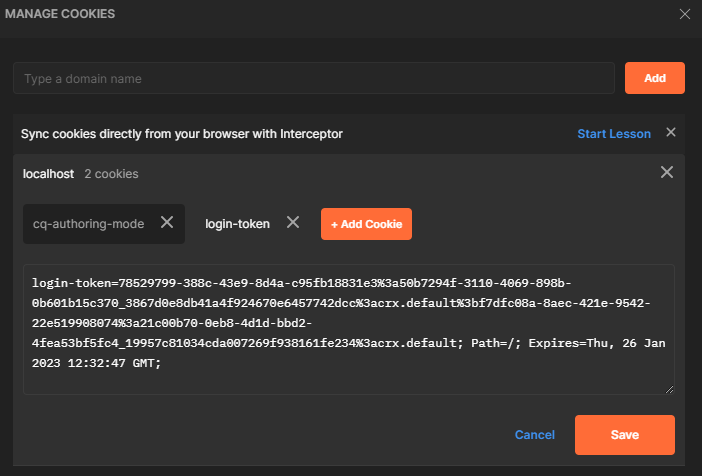
Using Postman
- Open your browser's DevTools and find the
login-tokencookie forlocalhost:4502 - In Postman, add the cookie manually via Cookies (below the Send button)
- Set the cookie domain to
localhostand copy thelogin-tokenkey/value - Set the
Expirestimestamp to several hours in the future - Send the POST request



CSRF Protection
AEM protects POST endpoints with CSRF tokens. If your POST request returns a 403 Forbidden,
you need to include the CSRF token:
# 1. Fetch the CSRF token
TOKEN=$(curl -s -b cookies.txt \
  http://localhost:4502/libs/granite/csrf/token.json | jq -r '.token')

# 2. Include it in your POST request
curl -b cookies.txt \
  -X POST \
  -H "CSRF-Token: $TOKEN" \
  -d "name=John&email=john@example.com" \
  http://localhost:4502/content/myproject/en/contact/jcr:content/root/container/form.submit.json
In frontend JavaScript, fetch the token before submitting:
async function submitForm(formData) {
    // Fetch CSRF token
    const tokenResponse = await fetch('/libs/granite/csrf/token.json');
    const { token } = await tokenResponse.json();

    // Submit with token
    const response = await fetch(formEndpoint, {
        method: 'POST',
        headers: { 'CSRF-Token': token },
        body: formData,
    });

    return response.json();
}
Servlet Response Helpers
JSON responses
A reusable pattern for consistent JSON responses:
private void writeJsonResponse(SlingHttpServletResponse response,
        int status, boolean success, String message) throws IOException {
    response.setStatus(status);
    response.setContentType("application/json");
    response.setCharacterEncoding("UTF-8");

    JsonObject json = new JsonObject();
    json.addProperty("success", success);
    json.addProperty("message", message);
    response.getWriter().write(new Gson().toJson(json));
}
Streaming binary content
Serve files or generated PDFs:
@Override
protected void doGet(SlingHttpServletRequest request,
                     SlingHttpServletResponse response) throws IOException {

    response.setContentType("application/pdf");
    response.setHeader("Content-Disposition", "attachment; filename=\"report.pdf\"");

    try (InputStream inputStream = generatePdf();
         OutputStream outputStream = response.getOutputStream()) {
        IOUtils.copy(inputStream, outputStream);
    }
}
Redirects
@Override
protected void doGet(SlingHttpServletRequest request,
                     SlingHttpServletResponse response) throws IOException {

    String targetPath = request.getParameter("target");
    if (StringUtils.isNotBlank(targetPath)) {
        // Use ResourceResolver.map() for proper URL mapping
        String mappedUrl = request.getResourceResolver().map(request, targetPath);
        response.sendRedirect(mappedUrl);
    } else {
        response.sendError(SlingHttpServletResponse.SC_BAD_REQUEST, "Missing target parameter");
    }
}
Dispatcher and Servlet Caching
By default, Dispatcher caches GET responses. For servlets that return dynamic data, you need to either disable caching or configure appropriate cache rules.
Preventing caching on dynamic endpoints
@Override
protected void doGet(SlingHttpServletRequest request,
                     SlingHttpServletResponse response) throws IOException {

    // Prevent Dispatcher and browser caching
    response.setHeader("Cache-Control", "no-cache, no-store, must-revalidate");
    response.setHeader("Pragma", "no-cache");
    response.setDateHeader("Expires", 0);
    response.setHeader("Dispatcher", "no-cache");

    // ... write response ...
}
Allowing Dispatcher caching for stable data
For servlets that return relatively stable data (e.g. site navigation, tag lists), allow Dispatcher caching with a TTL:
response.setHeader("Cache-Control", "public, max-age=300"); // 5 minutes
Configure a matching Dispatcher rule:
/0100 { /glob "*.json" /type "allow" }
Servlet vs Sling Model vs Filter
| Feature | Servlet | Sling Model | Filter |
|---|---|---|---|
| Purpose | Handle HTTP requests directly | Provide data to HTL templates | Intercept/modify request/response pipeline |
| Triggered by | HTTP request to matching URL | data-sly-use in HTL | Every request matching filter scope |
| Returns | Full HTTP response (JSON, HTML, binary) | Java object consumed by HTL | Passes through (modifies request/response) |
| Use case | API endpoints, form handlers, data sources | Component rendering logic | Security headers, logging, response wrapping |
When to use a servlet
- You need a custom HTTP endpoint (API, webhook, data feed)
- You return non-HTML content (JSON, XML, PDF, CSV)
- You handle POST/PUT/DELETE operations
- You provide DataSource values for dialog dropdowns
- You need full control over the HTTP response
When NOT to use a servlet
- You just need data for a component -> use a Sling Model
- You need to add headers or log requests -> use a Filter
- You need to transform responses -> use a Filter or Transformer
Best Practices and Common Pitfalls
Always set content type and encoding
response.setContentType("application/json");
response.setCharacterEncoding("UTF-8");
Omitting these causes encoding issues and incorrect MIME types in browser developer tools.
Validate and sanitize all input
Servlet parameters come directly from the HTTP request. Never trust them:
String path = request.getParameter("path");

// Validate: must start with /content/
if (path == null || !path.startsWith("/content/")) {
    response.sendError(SC_BAD_REQUEST, "Invalid path");
    return;
}

// Sanitize: prevent path traversal
path = ResourceUtil.normalize(path);
if (path == null) {
    response.sendError(SC_BAD_REQUEST, "Invalid path");
    return;
}
Don't close the request's ResourceResolver
The request's ResourceResolver is managed by the Sling engine. Closing it in a servlet will
break the rest of the request processing chain.
Use SlingSafeMethodsServlet for GET-only servlets
It prevents accidental POST handling and signals intent. Only extend SlingAllMethodsServlet when
you actually need to handle POST/PUT/DELETE.
Handle errors gracefully
Never let exceptions bubble up unhandled. Always catch, log, and return a meaningful HTTP status:
try {
    // ... business logic ...
} catch (Exception e) {
    LOG.error("Error in servlet", e);
    response.setStatus(SC_INTERNAL_SERVER_ERROR);
    // Write a JSON error body (don't expose internal details)
    writeJsonResponse(response, SC_INTERNAL_SERVER_ERROR, false, "An error occurred.");
}
Limit path-based servlets
On AEMaaCS, path-based servlets are restricted to specific prefixes (/bin/). Even on AEM 6.5,
prefer resource-type registration. If you must use a path, configure the Sling Servlet Resolver
to allow it:
{
    "servletresolver.servletRoot": "/bin",
    "servletresolver.paths": ["/bin/myproject"]
}
See also
- Architecture -- Sling request processing pipeline
- Filters
- Event Listener
- Sling Models
- OSGi Configuration
- Java Best Practices
- Security -- CSRF, referrer filter, ACLs
- Dispatcher Configuration
- Component Dialogs -- DataSource usage in dialogs